FileWave MDM and UEM in the UAE and GCC: distributor, demos, pricing model and support

Licences, demonstrations, deployment, administrator training and local support from PRO TECHnology in Dubai, FileWave’s distributor and partner for the Middle East. One FileWave console lets your IT team:

✔️ Manage Macs, Windows PCs, iPhones, iPads, Apple TV, Android phones and tablets, and Chromebooks in a single console

✔️ Report on devices, operating-system and application versions, licences and update status, and see when each device last reported

✔️ Restore changed or deleted files in managed Filesets automatically with Self Healing

✔️ Let staff install IT-approved apps from the self-service Kiosk, without local administrator rights on Mac and Windows

Who should evaluate it: IT teams in schools and universities running iPads, Macs and Chromebooks; companies with Mac and Windows laptops; and organisations replacing another MDM or needing to run their own server.

What PRO TECHnology provides: licences and renewals, setup in FileWave’s cloud or on your own server, enrolment, a pilot, administrator training, and support from our Dubai team, escalated to FileWave when needed.

FileWave logo circled by Apple, Chrome, iOS, Windows and Android icons

What is FileWave?

FileWave is unified endpoint management (UEM) software: one console from which an IT team enrols, configures, updates, inventories and secures Macs, Windows PCs, iPhones, iPads, Apple TVs, Android devices and Chromebooks. It combines mobile device management (MDM), which uses the management controls built into each operating system, with a client for Mac and Windows computers that installs packaged software, patches third-party applications and puts back files it deployed if they are changed or deleted. It is made by FileWave AG of Wil, Switzerland, and runs in FileWave’s cloud or on your own server.

Company

FileWave AG, Wil, Switzerland, founded in 1992, with a US office in Indianapolis. FileWave is ISO/IEC 27001 certified for information security management (certified by DEKRA).

Current release

FileWave 16.4.2 is the current release, with 16.3.5 for customers on the 16.3 line. FileWave publishes releases roughly quarterly and supports the current and previous release families (N and N-1).

Two consoles in every licence

FileWave Central, the native administrator app for macOS and Windows, and FileWave Anywhere, the web console. Both are included in every FileWave licence.

Platforms managed

Windows, macOS, iOS and iPadOS, tvOS, visionOS (from FileWave 16.4), Android and ChromeOS. Chromebooks stay enrolled in Google Admin, with FileWave adding inventory and reporting.

Trial and free edition

A 30-day trial with no device limit, and a free Community Edition for up to 15 computers, 15 tablets and 15 Chrome devices with community support. Paid licences are priced per device; there is no public price list.

Hosting

FileWave’s cloud or your own server, on macOS or Debian, with the same features either way. Optional Boosters cache content for branch offices and campuses.

Facts checked against FileWave’s website and knowledge base (FileWave, checked 6 November 2026). Page last reviewed 6 November 2026.

FileWave in the UAE, Saudi Arabia and the GCC

PRO TECHnology in Dubai sells, deploys and supports FileWave, the Swiss unified endpoint management platform, for schools, universities, companies and government entities in Dubai, Abu Dhabi and across the Gulf. PRO TECHnology is FileWave’s distributor and partner for the Middle East and has been an authorised FileWave reseller in the GCC since 2009. FileWave’s own announcement of 1 July 2026 says the expanded partnership “extends sales, deployment, and local support across the Middle East, including Saudi Arabia and the wider Gulf region”; our partnership announcement explains what it covers.

Countries

UAE, Saudi Arabia, Qatar, Kuwait, Oman and Bahrain. Saudi enquiries come to our account team, who visit the Kingdom often, with local work delegated to PRONEXT, the group’s Saudi operation in Riyadh; Enterprise IT in Saudi Arabia sets NCA and SAMA device controls beside what FileWave can enforce and what stays the organisation’s responsibility.

Devices

macOS, iOS and iPadOS, tvOS, Windows, Android and ChromeOS in one console. For Apple devices, enrolment runs through Apple Business (formerly Apple Business Manager) or Apple School Manager; Chromebooks enrol through Google Admin.

What we do

Licences and renewals, setup in FileWave’s cloud or on your own server, enrolling devices, turning your first applications into Filesets, a pilot group, administrator training, and support after go-live from our Dubai team, escalated to FileWave when needed.

How to buy

There is no public price list; licences are quoted by device count, hosting and term. Book a demonstration or request pricing for your devices; demonstrations run at Showroom 3, Aswar Building, Sheikh Zayed Road, Business Bay, Dubai, or at your offices, or call +971 4 343 5501.

From demo to rollout

A FileWave project with PRO TECHnology follows three steps. First, a demonstration on your own devices, whether Macs, Windows PCs, iPads, Android devices or Chromebooks, at the showroom or at your offices. Next, a pilot: we set up the FileWave server or cloud instance, enrol a small group of devices and package the first applications, so your team can check the results before anything reaches everyone. Then the rollout, with hands-on training for your FileWave administrators and a support contact in Dubai afterwards, with FileWave behind us when an issue needs the manufacturer.

For a quotation, send the number of devices on each operating system, how your Apple devices and Chromebooks are enrolled today, whether FileWave should host the server or you will run it yourselves, and the licence term you want. No prices are published, because every quotation is built around your devices, hosting and term, and covers deployment and training as well as licences. Renewals and additional licences go through the same team.

For a full explanation of how centralised device management works, including what MDM and UEM mean, which operating systems FileWave covers and how schools and companies in the region use it, read our guide to FileWave unified endpoint management in the UAE and Middle East.

Talk to us about FileWave

Choose what you need and tell us a little about your devices. Our Enterprise IT team in Dubai replies by email. Only the first six fields are required; the optional details help us prepare a demonstration or a quotation.

What would you like to do?
Add details (optional)
Operating systems to manage optional

Your details go only to PRO TECHnology’s sales team; see our privacy policy.

Meet FileWave

FileWave is developed by FileWave AG in Switzerland, where the company was founded in 1992. From one console, an IT team can enrol devices, apply settings, deploy and update software, and keep an inventory of hardware and installed applications, across macOS, iOS and iPadOS, tvOS, Windows, Android and ChromeOS. Our guide to tracking company devices and installed software explains what that inventory can and cannot show.

FileWave’s one-minute animated feature overview (FileWave, 2023), hosted by PRO TECHnology. It starts muted; use the controls to play it with sound.

Customer references

FileWave publishes testimonials from its customers worldwide on filewave.com, among them Billings Public Schools in the United States. References from organisations in the region are shared only where the customer has agreed; ask about your sector when you book a demonstration.

FileWave cross-platform management of macOS, iOS, Windows, ChromeOS and Android endpoints

Cross-platform device management

One FileWave console covers macOS, iOS and iPadOS, tvOS, Windows, Android and ChromeOS.

It suits organisations with mixed estates, such as a company with Mac and Windows laptops or a school with iPads and Chromebooks. Apple devices enrol through Apple Business or Apple School Manager, and Chromebooks through the Google Admin console.

Remote content and software distribution

Deploy software, settings and fixes to enrolled computers and mobile devices without visiting them, wherever they are, as long as they can reach your FileWave server. Mac and Windows computers receive software through the FileWave Client; iPhones, iPads and other mobile devices through MDM. Our guide to remote software deployment across company computers covers pilots, staged rollouts and devices that are offline.

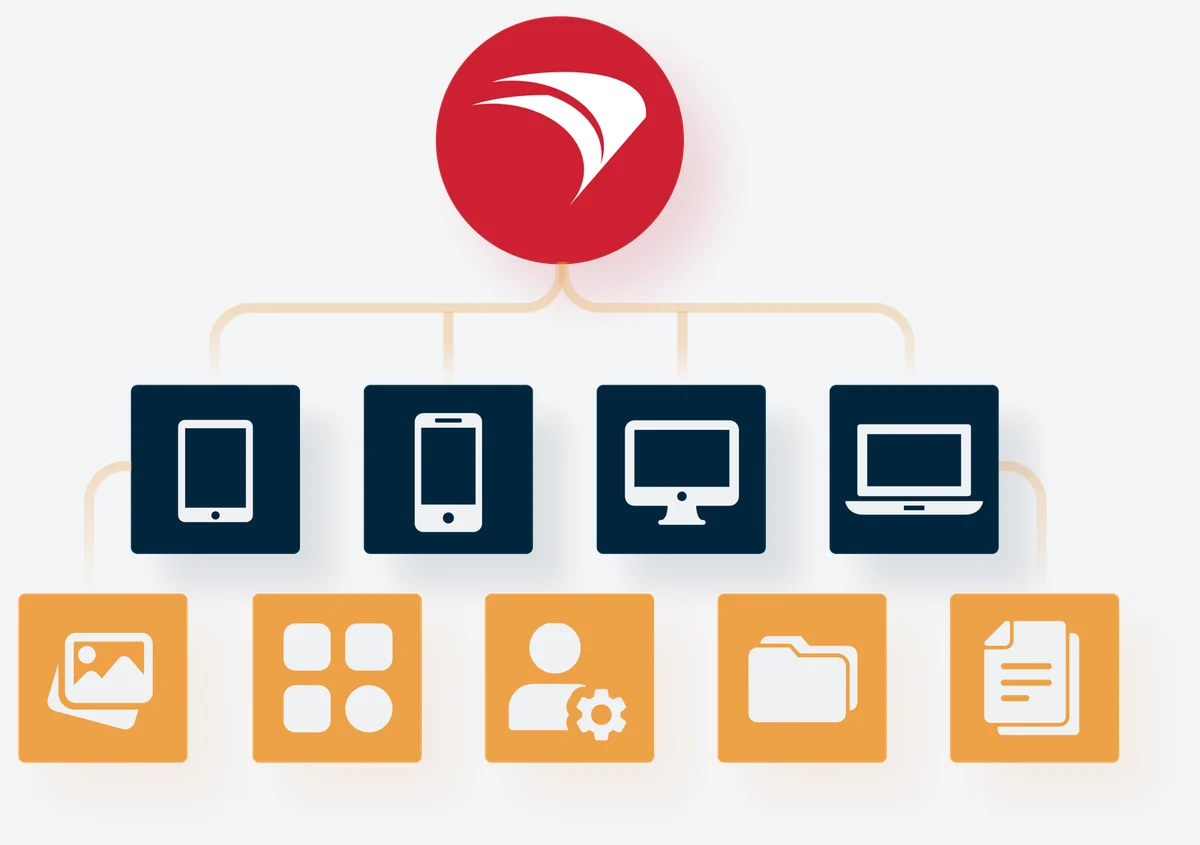
FileWave illustration of applications, files and settings delivered from one server to tablets, phones, desktops and laptops
FileWave Enable Self Healing setting shown over a warning dialog

Self-healing technology

FileWave checks the files it has deployed. With the Self Healing setting, a managed file that is changed or deleted on the device is put back; Download if Missing replaces only deleted files, and Ignore At Verify leaves a file alone, for files that staff are expected to change. Self Healing restores what FileWave delivered; it does not repair every application fault.

For branch offices, optional Boosters cache Filesets closer to Mac and Windows computers; they do not serve mobile devices. Test them from your own locations during the pilot.

FileWave Central and FileWave Anywhere: the two consoles

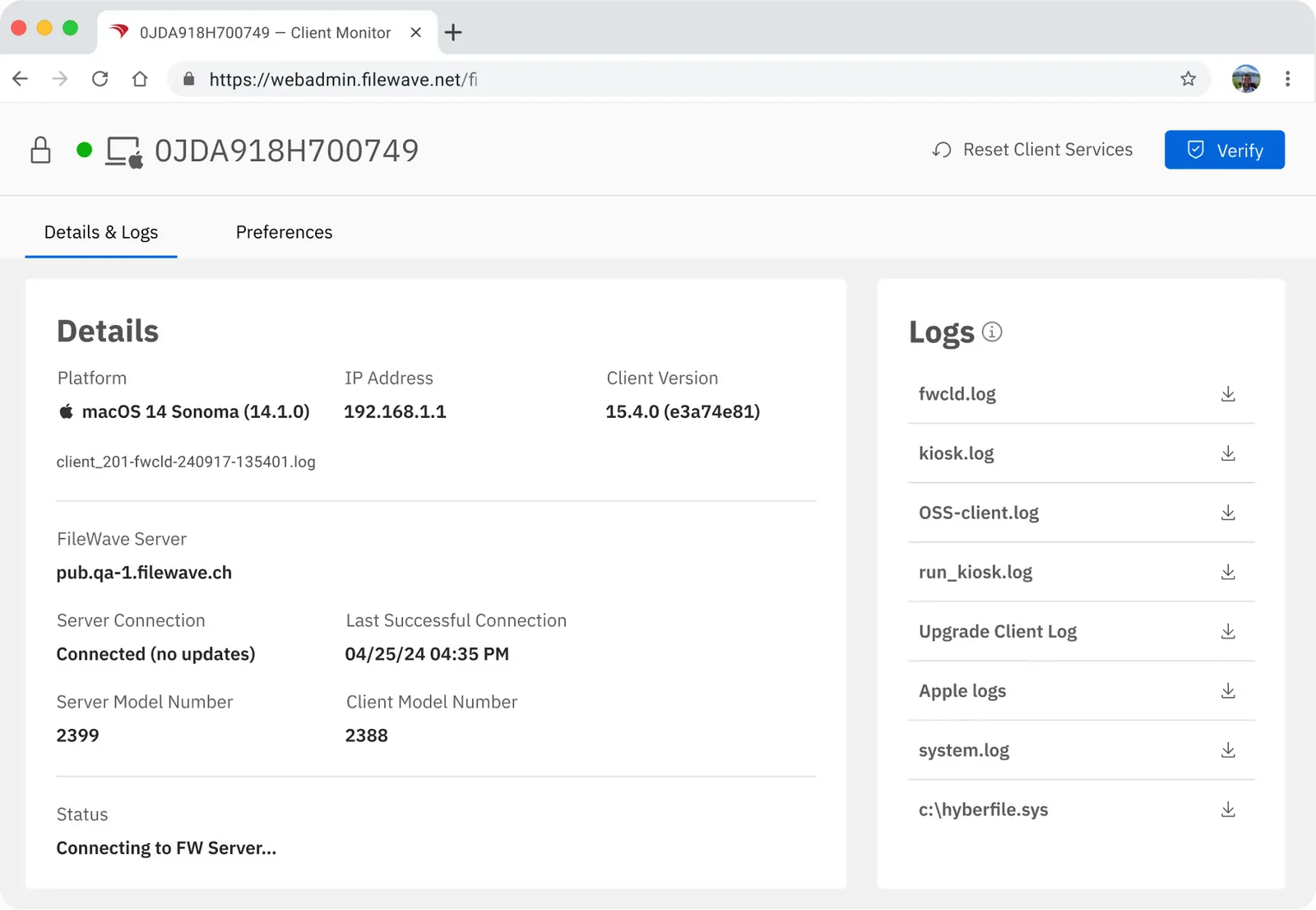
Every FileWave licence includes both consoles. FileWave Central is the native administrator application for macOS and Windows, used for imaging, building Filesets, scheduling patches and associating content with devices and groups. FileWave Anywhere is the web console, reached over HTTPS from any browser, for day-to-day work such as checking a device, its installed software and its logs.
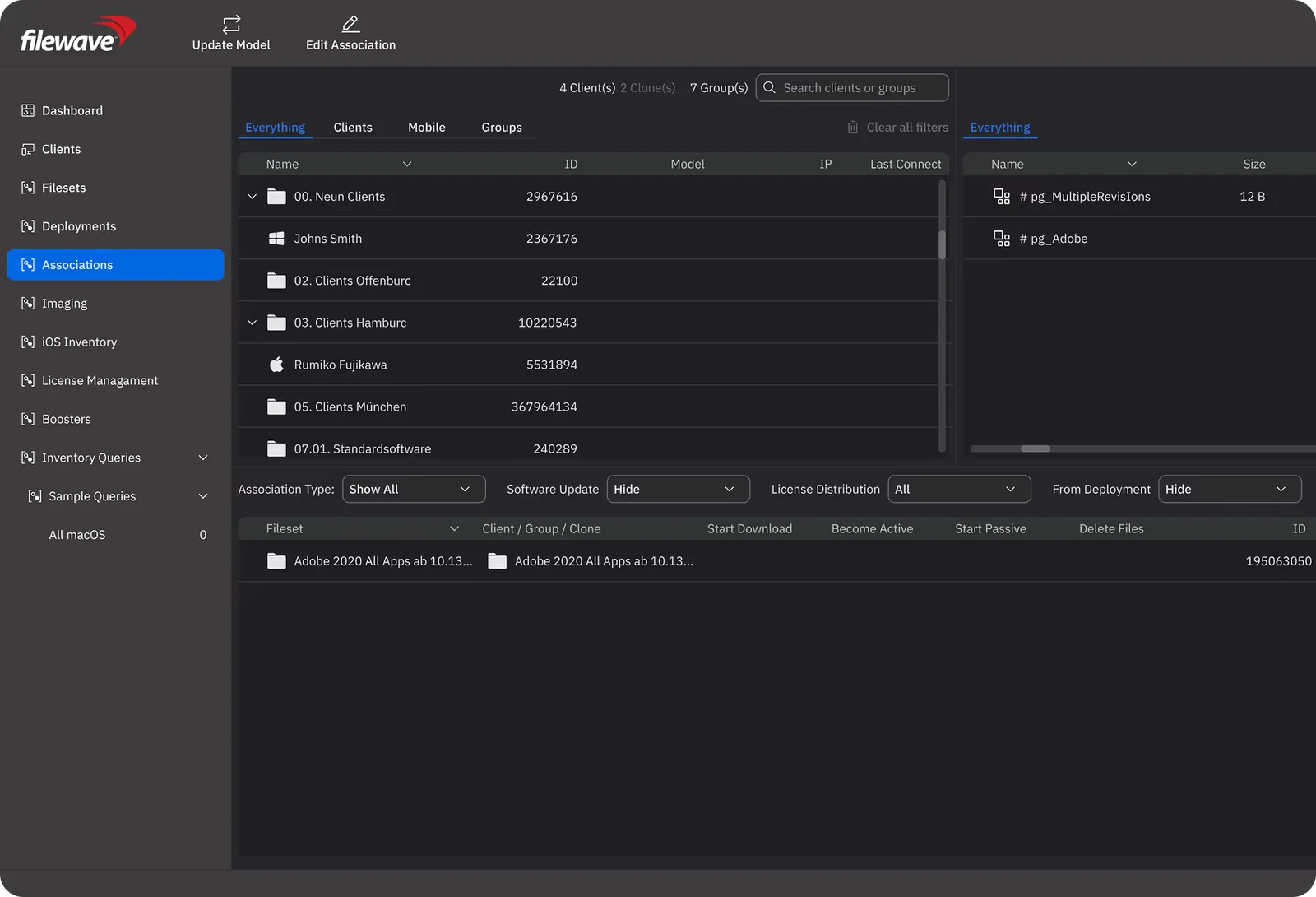
FileWave Central, the native administrator console, in dark mode: the Associations view lists client groups and devices on the left, Filesets on the right and an Adobe Fileset associated with a client group below
FileWave Central (native app, dark mode) on the Associations view, where Filesets are assigned to devices and groups. Image: FileWave.
FileWave Anywhere web console in a browser: the Client Monitor page for a Mac shows Details and Logs, with platform macOS 14, IP address, client version, FileWave server, last successful connection and downloadable log files
FileWave Anywhere (web console) showing the Client Monitor for a Mac: platform, client version, server connection and logs. Image: FileWave.

Device management problems FileWave solves: one guide each

Each guide goes deeper on one part of a FileWave project.

What is MDM, and when do you need UEM?
What MDM and UEM mean, which operating systems FileWave covers, zero-touch Apple enrolment, inventory and school deployments.
Manage company Android phones, tablets and kiosks
Fully managed phones and tablets, dedicated kiosks, zero-touch and QR enrolment, Lost Mode and wipe.
Install software on every computer remotely
Pilot groups, staged rollouts, checking results, offline devices and Boosters for branch offices.
Keep every device patched
A monthly update routine for Windows, Mac, iPhone and iPad, third-party apps and the reports auditors ask for.
Know which devices and software you own
What an inventory should answer, how fresh its data is, and reconciling it before licence renewals.
A company device is lost or stolen
The first hour, lock or erase by platform, Activation Lock, recovery keys and UAE and Saudi breach reporting.
Manage Mac and Windows laptops in one console
Onboarding, software, updates, inventory and an evaluation plan for UAE companies.
Let staff use their own phones (BYOD)
Apple User Enrollment and the Android work profile: what IT can see, enforce and remove.
Switch MDM without wiping devices
Which Apple, Windows and Android devices can move without a wipe, and what to rebuild first.
Set up Apple Business (formerly Apple Business Manager)
Moving from Apple Business Manager, what each GCC country gets, Apple’s built-in service and linking FileWave.
Run school iPads, Macs and Chromebooks
iPads, Macs and Chromebooks through the school year: ownership, Shared iPad, apps and term preparation.
Meet ADEK’s School Digital Policy
What Abu Dhabi’s policy asks of a school’s devices, backups and vendors.
FileWave school case studies
8,000+ iPads in five days, 5,000+ laptops at once and a 1,200-device BYOD school, with lessons for UAE schools.
Keep MDM on your own server
What stays in-house, what still connects out to Apple, Google, Microsoft and FileWave, and what your team owns.
Write an MDM tender or RFP
Requirements, pass/fail and scored lines, a scoring model, a proof of concept and how FileWave answers each line.
The FileWave and PRO TECHnology partnership (1 July 2026)
FileWave’s announcement, the relationship since 2009, and what local deployment and support include.

Buying FileWave in the UAE and GCC: common questions

What is FileWave used for?

FileWave is used to manage an organisation’s computers and mobile devices from one console: enrolling new Macs, Windows PCs, iPhones, iPads, Android devices and Chromebooks; installing and updating software remotely; applying security settings; keeping an inventory of hardware, operating-system versions and installed applications; and locking or erasing a company device that is lost. Schools use it for iPads and lab computers, companies for mixed Mac and Windows fleets, and government entities for devices that must be managed from a server on their own premises.

Is FileWave an MDM or a UEM?

Both, in practice. FileWave is a unified endpoint management (UEM) platform, and MDM is part of it. The MDM side uses the management controls built into iOS, iPadOS, macOS, tvOS, visionOS, Windows and Android to enrol devices and apply settings and apps. The UEM side adds a FileWave client for Mac and Windows computers, which installs packaged software, patches third-party applications, repairs what it deployed and reports inventory, and it adds Chromebook inventory alongside Google Admin. If you need only settings and App Store apps on phones and tablets, you are using FileWave as an MDM; if you also manage laptops and desktops, you are using it as a UEM.

How much does FileWave cost in the UAE?

There is no public price list. FileWave licences are counted per managed device, so the price depends on how many devices you manage on each operating system, whether FileWave hosts the server or you run it on your own, and the licence term. One quotation covers licences, deployment and administrator training, so you see the cost of a working system rather than of licences alone.

Can organisations in Qatar, Kuwait, Oman and Bahrain buy FileWave through PRO TECHnology?

Yes. PRO TECHnology has been an authorised FileWave reseller in the GCC since 2009, and FileWave’s 1 July 2026 announcement covers the Middle East, including Saudi Arabia and the wider Gulf region. Send us your device count per operating system and the country, and we will quote licences, deployment and training. In Saudi Arabia, enquiries come to our account team, who visit the Kingdom often, with local work delegated to PRONEXT, the group’s Saudi operation in Riyadh.

What do we need in place before a FileWave rollout?

For Apple devices, an Apple Business or Apple School Manager account linked to FileWave: Macs, iPads and iPhones added to it at purchase by Apple, an authorised reseller or carrier, or later with Apple Configurator, and assigned to your FileWave server, enrol during setup. For Windows PCs, MDM enrolment through Microsoft Entra ID needs Entra ID P1 or P2 or a bundle that includes it, and the FileWave Client handles software, inventory and other client-based management. For Chromebooks, enrolment stays in the Google Admin console, which continues to decide whether a Chromebook is managed; FileWave does not replace it. We agree these enrolment paths with you before quoting, because they determine how each device joins FileWave.

Can we evaluate FileWave before buying?

Yes. Ask us to discuss a FileWave evaluation: we agree which devices to include, what the pilot must prove and whether it runs in FileWave’s cloud or on your own server, before any purchase decision.

Can you help us move from our current MDM?

Yes. iPhones, iPads and Macs on version 26 or later, enrolled through Apple Business or Apple School Manager, can usually move to FileWave without being erased; Shared iPads, most Windows PCs and company-owned Android devices need re-enrolment. Our MDM migration guide sets out the conditions, and we plan the cut-over with you.