
On-premises device management: what stays on your server, and what still connects out
Published · PRO TECHnology Enterprise IT
An on-premises mobile device management (MDM) server keeps device records, inventory, policies and software packages on infrastructure you control, but for Apple, Android Enterprise and Entra-based Windows management it is not self-contained. Depending on the devices you manage, Apple’s push service, Google’s Android Enterprise services and Microsoft Entra ID (for FileWave’s Windows MDM) must stay reachable, a self-managed FileWave server must also reach FileWave’s licence server, and FileWave documents no air-gapped mode. This guide lists those connections, the records Apple and Google keep, your team’s duties and the questions to put in a tender.
- Stays in-house
- Server database, policies, Filesets (Google also keeps Android Enterprise policies and reports)
- Still connects out
- Apple push, Google, Microsoft Entra ID, FileWave licence server
- Air-gapped mode
- None documented by FileWave (checked October 2026)
- Your team owns
- Daily backups, patching, certificates, yearly APNs renewal
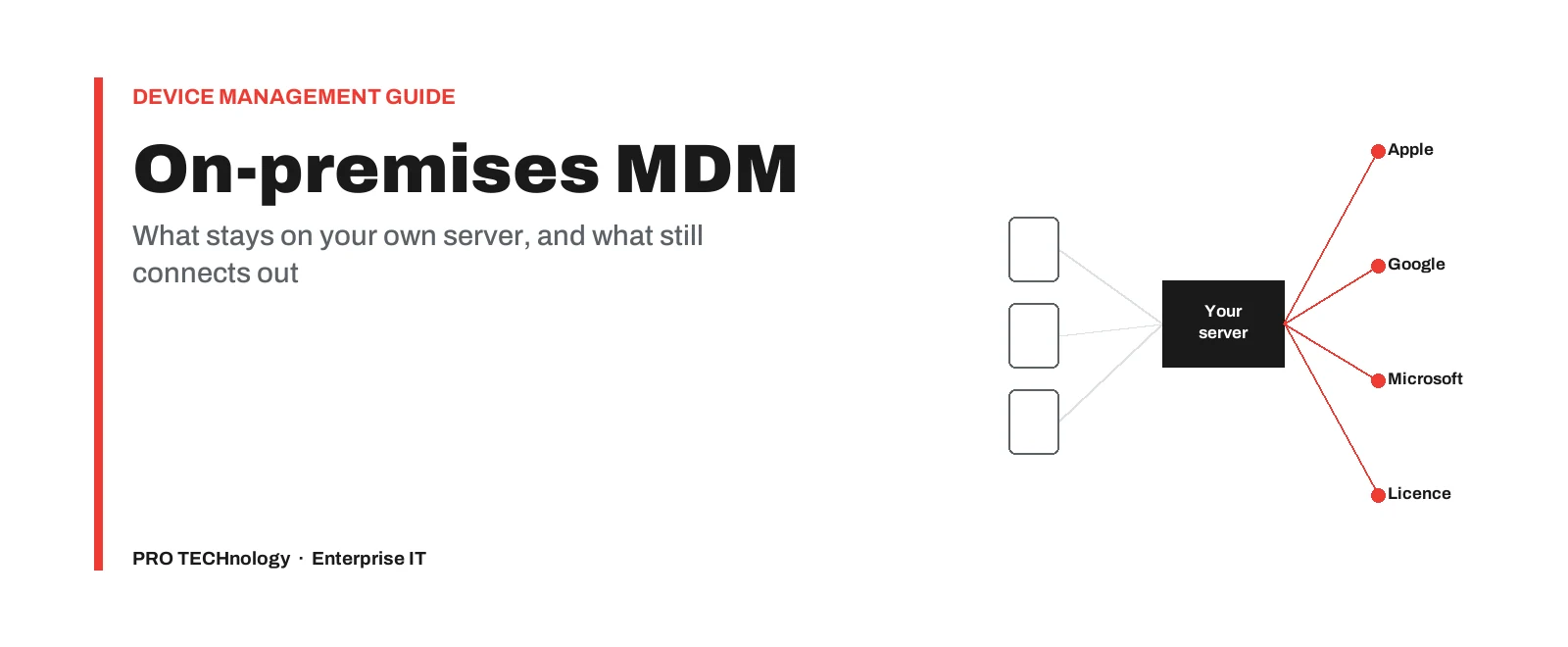
Key takeaways
- A self-managed device-management server keeps device records, inventory, policies and software packages on hardware you control, but Google also holds the policies and status reports of Android Enterprise devices, and self-hosting does not make device management independent of outside services.
- Apple devices are still woken through Apple’s push service (APNs), although FileWave notes that the management commands themselves travel directly between the device and your server.
- Android Enterprise devices and the server must reach Google, and FileWave’s Windows MDM enrols devices through Microsoft Entra ID, wherever the server runs.
- A self-managed FileWave server must reach FileWave’s licence server (fwks.filewave.com and logstash.filewave.com on port 443), and FileWave documents no air-gapped or offline mode, so do not promise isolation in a tender without written confirmation from FileWave.
- Under FileWave’s on-premise service level agreement the customer alone is responsible for daily backups, and FileWave says the APNs certificate must be renewed every year with the same Apple Account.
- In a tender, ask two separate questions: where the server and its backups sit, and who operates the server and can access it, including the vendor’s support staff.
What a self-managed device-management server keeps in-house
This guide is for teams that must self-host device management, or check a vendor’s hosting claim for a tender or security review. For the basics, see what MDM and UEM are.
FileWave’s server setup guide (updated 15 September 2026) describes two self-managed routes: a dedicated Mac, or FileWave’s Debian Server appliance on a virtualisation platform such as VMware or Microsoft Hyper-V. A server hosted by FileWave is not self-managed; this page mentions it only where the duties differ.
On a self-managed server, these stay on hardware and premises you choose:
- Device and user records. The inventory each device reports, the users and groups linked to it, and any custom fields your team adds. See what device inventory records contain.
- Policies and assignments. Configuration profiles, restrictions and the rules that decide which device gets which setting.
- Filesets and update content. The software packages and files you deploy, and any operating-system update content the server holds.
- Certificates and administrator access. The server’s TLS certificate, the Apple push certificate and the local administrator accounts. Sign-in through a cloud identity provider leaves the building too.
Some records never live only on your server, whoever hosts it. Apple Business (formerly Apple Business Manager) and Apple School Manager hold the devices your organisation has added to them and the management server each is assigned to. For Android Enterprise, Google’s Android Management API holds the enterprise binding, each device’s policy and the status reports devices send: hardware details and, where the policy enables them, software, network and app reports (Google’s API reference). Chromebook policies are set in Google Admin, and Windows enrolment through Microsoft Entra ID sits in your Microsoft tenant. MDM data residency therefore covers the server, its database and its backups, not the copies these platform services keep.
Hosting conditions UAE buyers attach to a device-management server
An on-premises requirement often comes not from a statute but from a tender clause, a sector hosting standard or an internal security policy requiring the server and its data to sit on infrastructure the organisation controls. None of the laws and standards below is written specifically for device-management systems, so ask your data protection officer how they apply to your MDM records. This is not legal advice.
| Rule | What it says (as read in September and October 2026) | What to ask internally |
|---|---|---|
| Federal Law No. 2 of 2019 (health ICT), Article 13 | Health information and data about health services provided in the UAE may be stored, processed, generated or transferred outside the country only in cases set by a decision of the health authority in coordination with the Ministry. Published legal summaries report that Ministerial Resolution No. 51 of 2021, from the Ministry of Health and Prevention, sets out such cases. | Could our device records hold health information, for example in custom fields, and does an exception apply? See the law’s text. |
| ADHICS v2, Abu Dhabi Department of Health | The 2024 standard requires a cloud environment holding health information to sit physically inside the UAE, including backup and disaster recovery (CS 1.2). CO 9.2 also says health information in any form, or a copy of it, must not be stored, processed or transferred outside the UAE, and that third parties involved in service delivery provide assistance from within the UAE, unless the Department of Health has issued an exemption. See the standard and our summary of the ADHICS hosting rules. | Is the device-management server in scope of our ADHICS controls, where do its backups go, and may the vendor give remote support from outside the UAE or take a database or log copy abroad without a DoH exemption? |
| Personal Data Protection Law, Federal Decree-Law No. 45 of 2021 | Articles 22 and 23 allow transfers abroad to countries whose data-protection law the UAE Data Office approves as adequate or, failing that, on listed grounds such as a binding contract or the data subject’s explicit consent. Article 2 excludes government data and entities, health and banking data with their own legislation, and companies in free zones that have their own data-protection legislation. | Which regime applies to us, and is local hosting a legal requirement or a policy choice? The decree-law alone does not require an on-premises MDM. |
| Tender terms and internal policy | Often decisive: the server, its data and its backups stay on the buyer’s premises or in a named facility, with controlled vendor access. | Does the clause cover only location, or also who operates the server and who may access it remotely? |
For device-control duties, see the UAE IA Standard rules for mobile devices. Organisations in Saudi Arabia face a different framework, covered under Saudi data localisation and NDMO.
What still connects out to Apple, Google and Microsoft
The Apple and Android Enterprise rows apply to any product that manages devices through Apple MDM or Android Enterprise, wherever its server runs, with hosts as Apple and Google publish them. The Chromebook and Windows rows come from FileWave’s documentation.
| Service | Why it is needed | Hosts and ports |
|---|---|---|
| Apple Push Notification service (APNs) | Wakes iPhones, iPads, Macs and Apple TVs so they check in. FileWave’s APNs article says APNs “only delivers the wake-up notification”; the commands then travel directly between the device and your server. | *.push.apple.com on TCP 443, 80, 5223 and 2197. For IPv4, Apple says you can allow outbound connections to 17.0.0.0/8. FileWave’s port list shows the server reaching Apple on 443 and 5223. |
| Apple activation and enrolment | Device activation, Automated Device Enrollment and the enrolment profiles devices download. | albert.apple.com, deviceenrollment.apple.com, mdmenrollment.apple.com and iprofiles.apple.com, all on TCP 443, plus the other device-management hosts on Apple’s list, such as vpp.itunes.apple.com for Apps and Books. |
| Apple software updates | Update catalogues and downloads for Apple operating systems. | gdmf.apple.com, mesu.apple.com and updates.cdn-apple.com, among others on Apple’s list. |
| Android Enterprise | Policies and commands go through Google’s Android Management API, apps come from Google Play, and Firebase Cloud Messaging carries the push. | androidmanagement.googleapis.com on 443; play.google.com on 443 and 5228 to 5230; mtalk.google.com on 443 and 5228 to 5230, per Google’s network requirements. |
| Chromebooks | Chromebooks enrol through Google Admin; the FileWave server and the Chromebooks both use Google’s Chrome API. | www.googleapis.com, per FileWave’s port list. |
| Windows MDM | Enrolment and MDM discovery run through Microsoft Entra ID; FileWave lists an Entra ID tenant with automatic MDM enrolment as a prerequisite. | *.azure.com from both the server and the devices, plus microsoft.com for Windows updates, per FileWave’s port list. |
Apple’s page is dated 7 August 2026 and Google’s 16 June 2026. Apple says its services fail any connection that uses HTTPS interception, and Google says intercepted traffic to its services is often blocked, so exclude these hosts from SSL inspection.
Three more details matter in a security review. Devices talk to these services directly: FileWave notes that Apple devices need Apple’s 17.0.0.0/8 range and Android devices need Google’s servers. Google warns that behind a proxy “certain functions will fail”, so test any proxy-only Android design first. And not all traffic is outbound: FileWave’s Apple MDM port table lists Apps and Books (VPP, Apple’s volume app licensing) v2 notifications reaching the server from Apple on port 443; ask FileWave what stops working without them before blocking inbound traffic from Apple.
What a self-managed FileWave server connects to at FileWave and its service providers
FileWave’s Default TCP and UDP Port Usage page (revision 70, updated 4 September 2026, tagged for FileWave 15.5.x to 16.3.x) lists the outbound connections a self-managed server and the FileWave Central administration app make to FileWave and its service providers. FileWave’s setup guide already uses release 16.4.1, which the port page is not tagged for, so confirm the list with FileWave for your server version. The first row is the one any isolation plan has to account for.
| Endpoint (port 443) | What FileWave says it is for | Your decision |
|---|---|---|
| fwks.filewave.com and logstash.filewave.com | Labelled “FileWave License Server”. FileWave’s notice about moving its licence server, FWKS (23 May 2024) says the server checks with it that you have the right licences and expiry date, and that it is “very important” the server can reach it. | Allow. Ask FileWave what happens if it cannot be reached for a period, and what data the two endpoints receive. |
| installer-info.filewave.com and notifications.filewave.com | Checks for the latest client version, and news notifications shown in FileWave Central and the FileWave Anywhere web console. | Review with FileWave. |
| rcs.filewave.com and fwpn.filewave.com | The FileWave and TeamViewer remote-session and push servers. | Ask FileWave whether you need them without remote sessions. |
| *.filewave.cloud | Devices download the Kiosk, FileWave’s self-service app, from here. | Needed if you use the Kiosk. |
| AutoPkg integration endpoint on Amazon Web Services (us-east-1) | FileWave’s AutoPkg integration for packaging third-party Mac software. | Only if you use the integration. |
| app.wonderchat.ai and *.filewavex.org | The AI chatbot, and the roadmap and feedback portals, reached from the administration tools. | Decide by policy; ask FileWave what is affected if blocked. |
Treat the allow-list as a controlled document and review it at every FileWave upgrade; the port page has reached revision 70 since June 2023. It gives the default MDM port as 20445 (20443 on older versions), while some of its tables still show 20443 for Apple device, inventory and profile traffic, so confirm the port in FileWave Central under Preferences > Mobile > MDM Server before changing rules. FileWave also documents a server command, check_connections, that tests the Apple, Microsoft and FileWave services, and a port-testing utility for device networks; run both after every firewall change.
Can on-premises device management be air-gapped?
Not in any mode FileWave documents, and not for Apple MDM or Android Enterprise devices. A search of FileWave’s knowledge base on 8 October 2026 found no air-gapped, offline or isolated-network deployment article, and its port list does not describe one. The limits are specific:
- Apple MDM and Android Enterprise devices need a path to Apple and Google, as the platform table above shows, and so does the server, which also calls Google’s Android Management API.
- The FileWave server must reach FileWave’s licence server. FileWave’s FWKS notice, written for a planned migration, says only that a licence key could not be applied or updated during the outage; it does not say how long a server keeps working without it.
What can stay internal is the routine traffic of the FileWave Client on Mac and Windows, which connects to your server’s name on FileWave’s own ports; Boosters at branch offices can cache Filesets for those clients locally. Clients that fetch operating-system updates still reach Apple or Microsoft.
The practical answer for a high-security site is a segmented network with a short, written outbound allow-list rather than a claimed air gap: allow only the hosts your platforms and features need, log every connection, and get written confirmation from FileWave before any isolation wording goes into a tender. Getting files into a physically isolated network is a separate problem; see moving files into an air-gapped network.
Managing devices off the corporate network: the internet-facing server
FileWave’s guidance on securing the server (updated 18 September 2026) says you might need to expose your FileWave server on the internet to manage devices wherever they are, including remote wipes. A server that answers only inside the office cannot manage a laptop that never returns or connects back, for example through a VPN.
Get the naming right first. FileWave’s setup guide asks for one fully qualified domain name, listed in a trusted certificate’s Subject Alternative Name, that resolves from every device network, typically to a private address inside and a public one outside, with the firewall forwarding only device traffic. FileWave also says server components should use IPv4 with IPv6 disabled.
FileWave’s hardening list for an internet-facing server, in short:
- Never publish SSH or the Webmin console (port 10000) to the internet; keep administration on trusted networks.
- Open only the FileWave ports your components and platforms need, not every port on the list.
- Patch the operating system on a schedule (apt update and upgrade on the Debian appliance) and reboot after kernel updates.
- Route administrator sign-in to FileWave Central and FileWave Anywhere through your identity provider with MFA; FileWave adds no second factor of its own. Keep one local administrator account with a long, unique password for recovery if the identity provider is down.
- Run a firewall and intrusion detection, and send server logs to a monitoring tool.
- Apply FileWave upgrades as they are released, since they often carry security fixes for third-party components such as Apache and OpenSSL. From FileWave 16.3.0, also review its brute-force protection for sign-in.
What your team owns on a self-managed server
Hosting the server yourself moves the operating work to your team; FileWave’s setup guide asks you to agree, before installing, who maintains backups, security updates, power protection and recovery.
- Daily backups. FileWave’s on-premise service level agreement (revision 2, August 2024) says “The Customer is solely responsible for performing regular backups of all Customer Data stored on the FileWave server”, to be conducted daily and kept as long as your retention and recovery requirements say.
- Disaster recovery for the server itself. A tested, documented restore to a second host or a clean virtual machine, with the certificate and DNS steps written down.
- Operating-system patching and FileWave upgrades, on a schedule, with the port list checked at each upgrade.
- The server’s TLS certificate, with a renewal date in someone’s calendar.
- The yearly APNs renewal. FileWave says Apple requires the push certificate to be renewed every year, that an expired certificate stops MDM commands to Apple devices, and that you must renew with the same Apple Account: a new certificate under another account changes the management identity and can break communication with enrolled devices. Use an organisation-controlled Apple Account and follow FileWave’s renewal steps. This duty stays with you even on a FileWave-hosted server.
- Platform account ownership. Record which organisation accounts own your Android Enterprise enrolment, Entra tenant and Apple Business or Apple School Manager link.
- Vendor support access. The same agreement says that, for Level 1 to 3 errors, the customer “agrees to provide FileWave with system-level control of FileWave servers and appliances”, or stays available to grant access during the work, and that FileWave may capture a copy of the database and logs. For incidents at any level, FileWave may also need remote access, for example through screen sharing. Customers who buy through PRO TECHnology get support after go-live from our Dubai team, escalated to FileWave when needed. If your rules limit who may reach the server or copy its data, agree in writing who may access it at each stage before you sign.
- Sizing. FileWave’s server requirements (updated 23 September 2026) give at least 8 GB of RAM, 16 GB recommended, and 1 TB of storage as a recommended minimum.
If these duties, rather than the data’s location, are the obstacle, consider a FileWave-hosted server: FileWave’s setup guide says hosting covers the standard hosted server name and certificate, backups and server upgrades. Our FileWave partnership FAQ answers whether to run FileWave in its cloud or on your own server.
Writing the device-management hosting requirement into a tender
A tick box marked “on-premises” tells an evaluator little. These questions produce answers a security reviewer can check; have your legal team or DPO review the final wording.
- Location. Where do the server and each copy of its backups sit: your premises, a named facility, which country? For a vendor-hosted option, ask the same of hosted servers.
- Operation and access. Who operates the server, and who can access it? Include the vendor’s support access, remote sessions, and any copy of the database or logs taken for diagnosis.
- External endpoints. A declared list of every host the server and the devices must reach, with the data each one receives, including licence and logging endpoints, and any inbound connection from Apple, Google or Microsoft.
- Licence-server outage. What happens if the licence server cannot be reached: is there a grace period, and for how long?
- Backup and recovery. Who runs daily backups, where they go, and evidence of a tested restore.
- Administrator sign-in. Identity-provider MFA for every administrator, plus a controlled recovery account.
- Account ownership. The Apple Account behind the APNs certificate, the Android Enterprise owner and the Entra tenant, all held by the organisation.
- Certification scope. Ask for the certificate and its scope statement, and check that the scope covers the services you will use. FileWave announced ISO 27001 certification in July 2024, covering its development activities at Wil, Switzerland, and Indianapolis, United States.
- Versions and upgrades. The supported server versions, the upgrade cadence, and the port-list revision the bid assumes.
- Exit. How device records and configuration are exported at contract end, and how devices move to another MDM.
Hypothetical example. A hospital group’s tender says the device-management server and its backups must stay in the hospital’s own data centre. A useful bid answers line by line: the server runs as FileWave’s Debian appliance on the hospital’s Hyper-V hosts; backups run daily to the hospital’s backup system; the server reaches Apple, Google’s Android Management API, Microsoft Entra ID, Apple and Microsoft update hosts, and FileWave’s licence endpoints (fwks and logstash); other FileWave endpoints are blocked, with FileWave’s written confirmation; vendor support happens only in supervised sessions, and any database or log copy for FileWave needs the hospital’s approval.
Each statement can be tested. A bid that only says “fully on-premises” cannot, because it does not say what still connects out.
Where to go next, and systems with the same hosting question
PRO TECHnology is FileWave’s distributor and partner for the Middle East, and an authorised FileWave reseller in the GCC since 2009; the FileWave partnership announcement sets out its scope, and FileWave licences, demos and deployment explains how to buy. Enquiries from Saudi Arabia are handled by PRONEXT in Riyadh.
Other systems on our site raise the same hosting question:
- KRMC On-Premise for encrypted USB drives.
- An on-site archive with spun-down disks.
- For contrast, a cloud service: where Dropbox stores files.
Sources
Platform requirements were read on Apple and Google pages, and FileWave behaviour on FileWave’s knowledge base and website, on 8 October 2026; revision numbers and update dates are given where the page shows them, and FileWave’s port list changes between releases. The UAE legal texts were read on the Emirates Health Services copy of Federal Law No. 2 of 2019, the Department of Health’s ADHICS v2 standard (May 2024) and an archived copy (13 January 2026) of the UAE Legislation page for Federal Decree-Law No. 45 of 2021, while Ministerial Resolution No. 51 of 2021 is referenced from published legal summaries; this is not legal advice.
- Apple: Use Apple products on enterprise networks (published 7 August 2026)
- Google: Android Enterprise network requirements (last updated 16 June 2026)
- Google for Developers: Android Management API, enterprises.devices resource (last updated 21 May 2026)
- FileWave knowledge base: Default TCP and UDP Port Usage (revision 70, 4 September 2026)
- FileWave: FWKS Server Migration (licence server notice, 23 May 2024)
- FileWave knowledge base: Apple Push Notification Service
- FileWave knowledge base: APNs Certificate Creation & Renewal on macOS with Keychain
- FileWave knowledge base: Pre-requisites of Windows MDM setup
- FileWave knowledge base: FileWave Server Setup
- FileWave knowledge base: FileWave Server System Requirements
- FileWave knowledge base: Securing FileWave Server on the internet
- FileWave knowledge base: On-Premise Service Level Agreement (revision 2, August 2024)
- FileWave: ISO 27001 certification announcement (July 2024)
- Federal Law No. 2 of 2019 on the use of ICT in health fields, Articles 11 to 15 (Emirates Health Services)
- UAE Legislation: Federal Decree-Law No. 45 of 2021 on the Protection of Personal Data (archived copy, 13 January 2026)
Frequently asked questions
Does an on-premises MDM still need an internet connection?
Yes. Hosting the server yourself keeps the server’s database in-house, although Google still holds the policies and status reports of Android Enterprise devices, and the device platforms depend on outside services. Apple devices are woken through Apple’s push service, Android Enterprise devices and the server must reach Google, and FileWave’s Windows MDM enrols devices through Microsoft Entra ID. A self-managed FileWave server must also reach FileWave’s licence server on port 443. FileWave documents no air-gapped or offline mode (knowledge base checked 8 October 2026), so get written confirmation from FileWave before promising isolation in a tender.
Do MDM commands pass through Apple’s servers when we host our own device-management server?
No. FileWave’s documentation says the Apple Push Notification service only delivers a wake-up notification; the device then contacts your FileWave server, and the management commands travel directly between the device and the server. Apple still has to be reachable for that wake-up, which is why Apple says firewalls can allow outbound connections to 17.0.0.0/8 and lists *.push.apple.com on ports 443, 80, 5223 and 2197.
Which firewall ports and addresses does Apple device management need?
Apple’s enterprise network page, published 7 August 2026, lists *.push.apple.com on TCP 443, 80, 5223 and 2197 for push notifications, and albert.apple.com, deviceenrollment.apple.com, mdmenrollment.apple.com and iprofiles.apple.com on TCP 443 for activation and enrolment, among other device-management hosts on the same page, such as vpp.itunes.apple.com for Apps and Books licences. For IPv4, Apple says you can allow outbound connections to 17.0.0.0/8. Apple also says its services fail through HTTPS interception, so exclude these hosts from SSL inspection. Your MDM vendor’s own ports come on top of this list.
Can Android Enterprise devices be managed on a network without internet access?
Not through Android Enterprise. Google’s network requirements say Android Enterprise devices must reach Google hosts, including androidmanagement.googleapis.com, play.google.com and mtalk.google.com, which carries Firebase Cloud Messaging on ports 5228 to 5230. Google adds that behind a proxy certain functions will fail, and that traffic to these hosts should bypass SSL inspection. A self-managed FileWave server also calls Google’s Android Management API, so the server and the devices both need a path to Google.
Does running our own server remove the Microsoft Entra ID dependency for Windows MDM?
No. FileWave’s Windows MDM enrols devices through Microsoft Entra ID wherever the FileWave server runs. FileWave lists an Entra ID tenant and automatic MDM enrolment, typically through Entra ID P1 or P2 or a bundle that includes it, as prerequisites, and its port list shows both the server and the devices reaching *.azure.com. Where the server runs affects the hostname, not the dependency: FileWave says a FileWave-hosted server needs a customer-owned custom hostname verified in your Entra tenant, because a FileWave-owned filewave.net name cannot be verified by your organisation.
What hardware or virtual machine does a self-managed FileWave server need?
FileWave’s server requirements page, updated 23 September 2026, gives at least 8 GB of RAM with 16 GB recommended, at least two virtual processors on a virtual machine, a 1 Gbit/s network connection and 1 TB of storage as a recommended minimum, more with large Filesets, OS updates or Windows imaging. The server runs on a dedicated Mac or as FileWave’s Debian Server appliance on VMware or another platform that imports OVA virtual-machine files, or on Microsoft Hyper-V as a Generation 2 virtual machine. Check the release’s own Server compatibility table before choosing the host.
Does our FileWave server have to be reachable from the internet?
Mainly if you manage devices that work outside your own network and cannot reach it another way, such as over a VPN. FileWave’s guidance says you might need to expose the server to manage devices wherever they are, including remote wipes. Its port list also shows Apple sending Apps and Books (VPP) v2 notifications to the server on port 443, so ask FileWave whether that inbound path is needed. If you do expose the server, FileWave says to open only the ports you need, never publish SSH or Webmin on port 10000, patch the operating system, use identity-provider MFA for administrators and apply FileWave upgrades.
What happens if our APNs certificate expires or is recreated under a different Apple Account?
FileWave says an expired APNs certificate stops it sending MDM commands to Apple devices until the certificate is renewed. Apple requires renewal every year. FileWave says to renew with the Apple Account that created the certificate. Signing in with a different account means creating a new certificate, and FileWave says that changes the management identity and can break communication with devices already enrolled. Use an organisation-controlled Apple Account, record who owns it, and set both a FileWave alert and a calendar reminder.
Does the UAE PDPL require device-management data to stay in the UAE?
Not on its own, on our reading of the decree-law’s text in October 2026 (this is not legal advice). Federal Decree-Law No. 45 of 2021 allows personal data to leave the country under Articles 22 and 23, for example to countries with adequate data-protection law approved by the UAE Data Office, or under a binding contract or the data subject’s explicit consent. Article 2 excludes government data and entities, health and banking data that have their own laws, and companies in free zones that have their own data-protection legislation. Sector rules, tender terms or internal policy may still require local hosting, so ask your DPO.
Do UAE health-data rules apply to device-management records?
It depends on what the records hold, so ask your DPO and your health regulator. Article 13 of Federal Law No. 2 of 2019 allows health information and data about health services provided in the UAE to be stored or processed abroad only in cases set by a decision of the health authority with the Ministry, and published legal summaries report that Ministerial Resolution No. 51 of 2021 lists such cases. An MDM server normally holds device, user and app details rather than clinical records, but custom fields and shared ward tablets can blur that line.
إدارة الأجهزة على خوادمك الخاصة: ما الذي يبقى لديك وما الذي يتصل بالخارج
يحتفظ خادم إدارة الأجهزة المستضاف داخل المؤسسة بسجلات الأجهزة والمستخدمين وبيانات الجرد والسياسات وحزم البرامج على بنية تحتية تتحكم بها المؤسسة، لكنه لا يعمل بمعزل عن الخدمات الخارجية عند إدارة أجهزة Apple وAndroid Enterprise وأجهزة Windows المسجّلة عبر Microsoft Entra ID، كما تحتفظ Google بسياسات أجهزة Android Enterprise وتقارير حالتها. فأجهزة Apple تُنبَّه عبر خدمة الإشعارات الفورية من Apple (APNs)، مع أن الأوامر نفسها تنتقل مباشرة بين الجهاز وخادمك وفق توثيق FileWave، ويجب أن تصل أجهزة Android Enterprise والخادم كلاهما إلى خوادم Google، ويمر تسجيل أجهزة Windows في خدمة Windows MDM من FileWave عبر Microsoft Entra ID. كما يجب أن يصل خادم FileWave المُدار ذاتيًا إلى خادم التراخيص لدى FileWave على المنفذ 443، ولا توثّق FileWave أي وضع للتشغيل المعزول تمامًا عن الإنترنت، لذلك لا ينبغي التعهد بالعزل في مناقصة دون تأكيد مكتوب من FileWave.
وعند استضافة الخادم بنفسك يتحمل فريقك النسخ الاحتياطي اليومي وفق اتفاقية مستوى الخدمة لدى FileWave، وتحديث نظام التشغيل وترقيات FileWave، وشهادة الخادم، وتجديد شهادة APNs سنويًا بحساب Apple نفسه التابع للمؤسسة (وهو واجب يبقى عليك حتى مع الاستضافة لدى FileWave)، وتأمين الخادم إذا كان مكشوفًا على الإنترنت لإدارة الأجهزة خارج الشبكة. وفي المناقصات يُستحسن الفصل بين سؤالين: أين يوجد الخادم ونسخه الاحتياطية، ومن يشغّله ومن يستطيع الوصول إليه بما في ذلك فريق دعم المورّد، مع طلب قائمة بكل الجهات الخارجية التي يتصل بها النظام والبيانات التي تصل إلى كل منها. ولا يفرض المرسوم بقانون اتحادي رقم 45 لسنة 2021 بشأن حماية البيانات الشخصية وحده استضافة محلية، وفق قراءتنا لنصه في أكتوبر 2026، لكن القواعد القطاعية وشروط المناقصات والسياسات الداخلية قد تفرضها، فاستشر مسؤول حماية البيانات لديك. وهذه ليست استشارة قانونية.
بروتكنولوجي (PRO TECHnology) هي الموزّع والشريك لـ FileWave في الشرق الأوسط، وتتعامل PRONEXT في الرياض مع الاستفسارات الواردة من المملكة العربية السعودية.
Check your hosting clause against the dependency list
Tell us your device mix, where the server has to sit and any hosting condition in your tender or policy. We will set out the connections that setup needs and the duties your team will own, and quote the licences, deployment on your own server and training as one proposal.