
Hard Drive and SSD Duplicators in the UAE and GCC: Choosing a Cloning and Secure Wiping Machine
Published · PRO TECHnology Enterprise IT
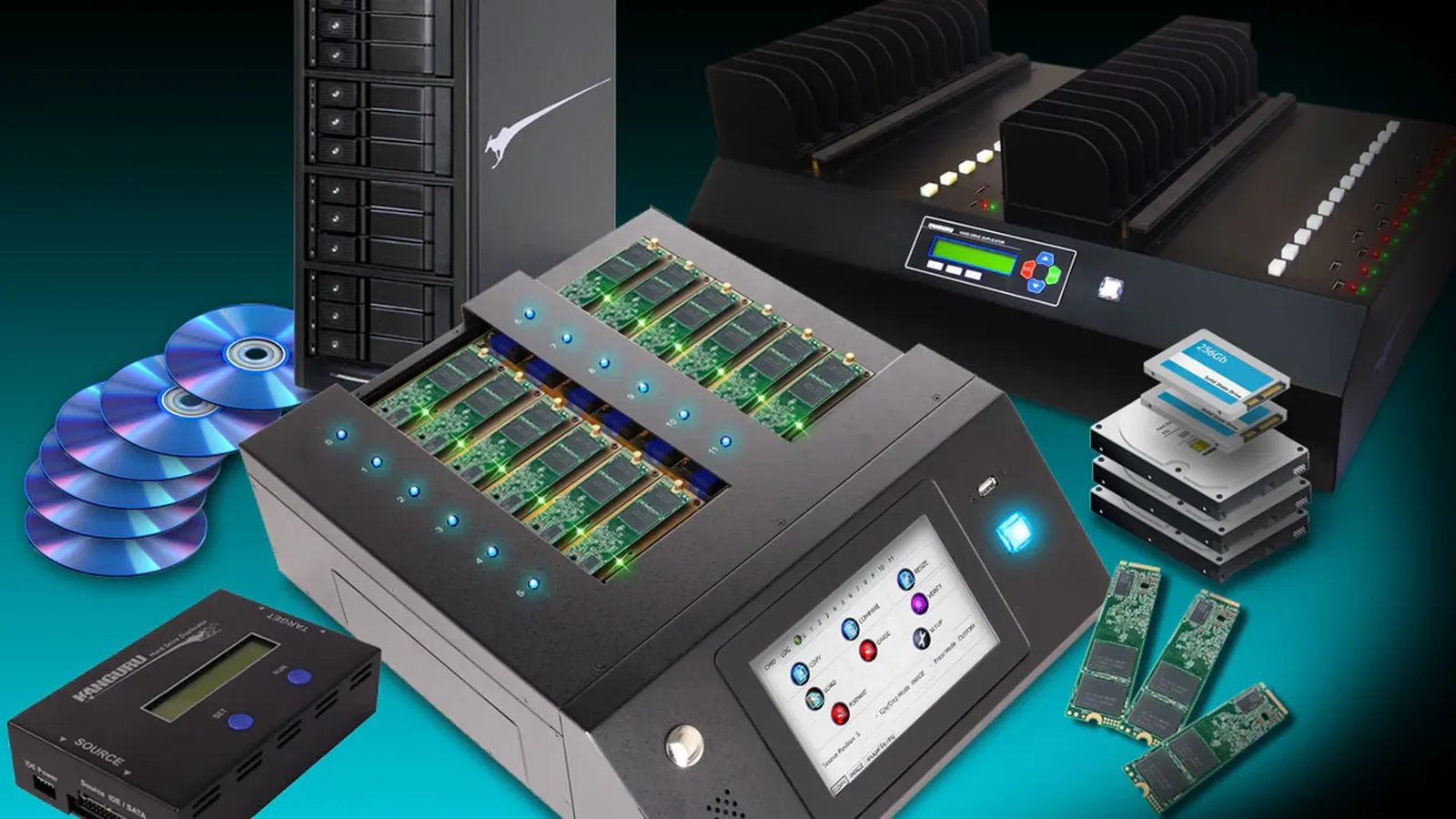
A hard drive duplicator, also called a hard drive cloning machine, copies one master drive to many blank drives at once, without a computer. The same machine also wipes drives at the end of their use. The KanguruClone range covers SATA hard drives and SSDs (from one-to-one up to 23 targets), M.2 NVMe SSDs (4 or 11 targets) and USB flash drives. PRO TECHnology, Kanguru’s exclusive distributor and partner for the Middle East, supplies and supports them from Dubai for the UAE, Saudi Arabia and the GCC.
- Drives per run
- One-to-one up to 23 targets on SATA; 4 or 11 on M.2 NVMe
- Drive types
- SATA hard drives and SSDs, M.2 NVMe and M.2 SATA SSDs, USB flash drives
- Computer needed
- No. Each unit runs on its own screen and controls
- Drive wiping
- Built in, with methods that differ by model and drive type
Key takeaways
- Match the machine to the drive first. M.2 NVMe SSDs go on the KanguruClone 11 or 4, SATA hard drives and 2.5-inch SSDs on the KanguruClone SATA duplicators, USB sticks on a USB duplicator. The dual-channel KanguruClone 11 is Kanguru’s newest duplicator.
- Choose the number of targets from your real batch size: one-to-one for a technician, 4 for small NVMe batches, 7 to 11 for regular PC refreshes, 15 to 23 for staging benches and refurbishers.
- Kanguru rates its hard drive and SSD duplicators at up to 6, 12 or 25GB per minute depending on the model (25GB on KanguruClone 11 units sold since October 2023). Real batch time depends on the data, the copy mode, compare passes and the slowest drive.
- The same units wipe drives. On the SATA Pro units and the KanguruClone 11, SATA drives can use ATA Secure Erase where the drive supports it; M.2 NVMe drives on the KanguruClone 11 can only be overwritten, which NIST treats as Clear, not Purge.
- A duplicator copies. It does not encrypt, back up or make forensic copies. Plan Sysprep before cloning Windows, BitLocker after deployment, and a record for every wiped drive.
- PRO TECHnology is Kanguru’s exclusive distributor and partner for the Middle East, with demonstrations in Dubai and quotations for the UAE, Saudi Arabia and the GCC.
What a hard drive duplicator is, and the other names buyers use
A hard drive duplicator is a stand-alone machine that takes one master drive and a row of blank target drives. You fit the drives, choose a mode on the front panel, and it copies the master to every target at once. Kanguru describes its hard drive duplicators as cloning the boot sector, operating system, applications and data at the touch of a button. No computer or cloning software sits in the copy, although the master itself is still built and checked on an ordinary PC.
Buyers in the UAE and the Gulf search for the same machine under several names. It helps to separate them, because some of the names also match products that have nothing to do with drives.
- Hard drive cloning machine
- Another name for a hard drive duplicator. Kanguru itself titles one of its SATA units a “Hard Drive Cloning Machine”.
- SSD duplicator or SSD cloning machine
- A duplicator for solid-state drives. 2.5-inch SATA SSDs go on the same machines as hard drives. M.2 NVMe SSDs need an NVMe duplicator such as the KanguruClone 4 or 11.
- Multi hard drive duplicator
- A duplicator that copies one master to several targets in the same run. Kanguru’s range goes from one-to-one up to 23 targets.
- Data duplicator or data duplication machine
- A general name for any of these machines, including USB and disc duplicators. It is not a key or access-card copier, and not a photocopier, although both turn up in searches for the phrase.
- Secure data copying or secure data duplication machine
- A duplicator used with controls around it: a compare pass after each copy, job logs, and a wipe when drives are retired. The machine does not encrypt the copies.
- Secure hard drive wiping machine
- A duplicator’s erase function used on its own, to clear many drives at once before disposal or reuse. Kanguru does not sell a separate wiping machine; wiping is built into its duplicators.
Which duplicator for which drive
Start with the drives you actually have, not with the machine. The connector and protocol decide which duplicator can take them.
| Drive type | KanguruClone model | Drives per run | Rated speed (Kanguru) | Notes |
|---|---|---|---|---|
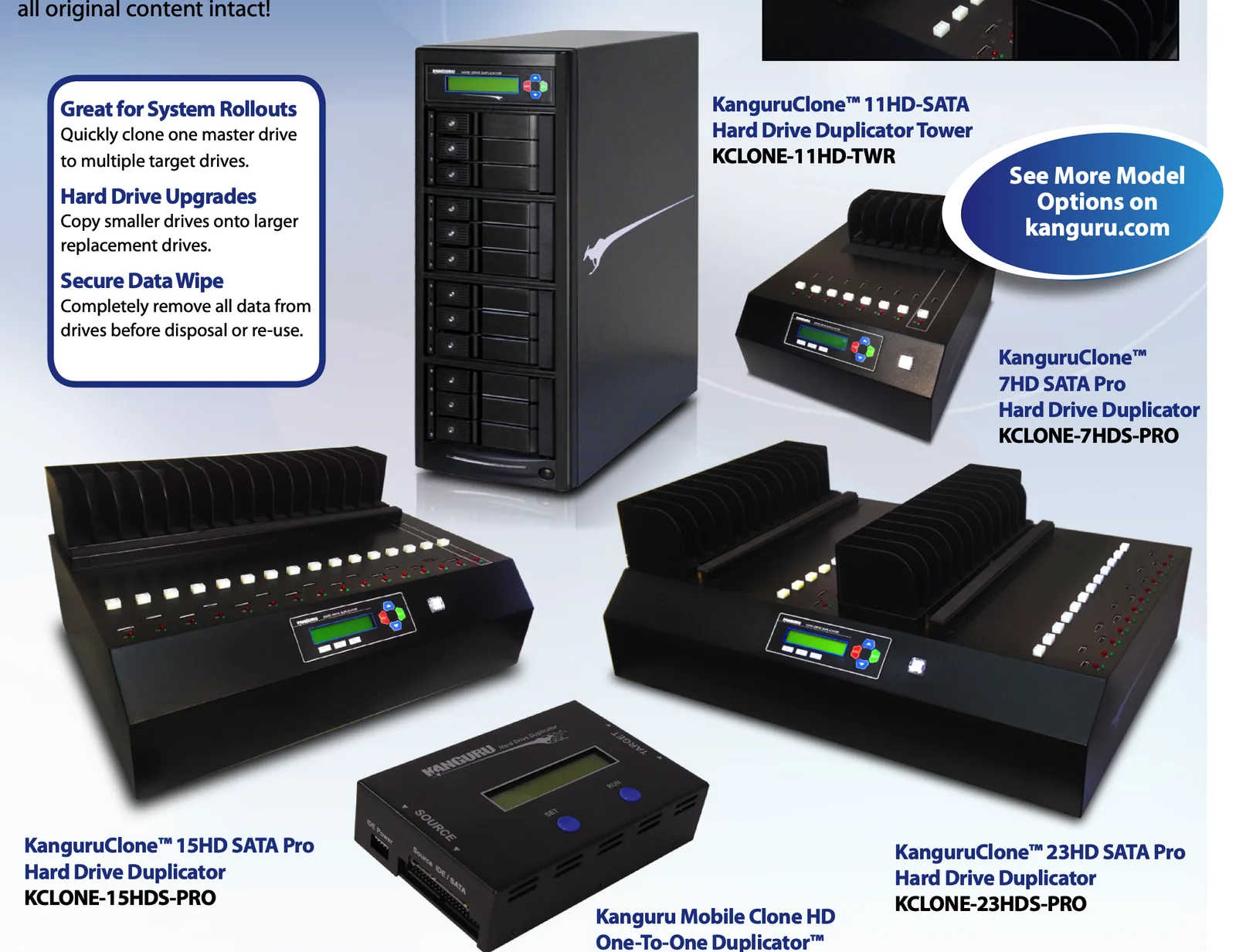
| M.2 NVMe and M.2 SATA SSDs | KanguruClone 11 (dual-channel, Kanguru’s newest duplicator) | 11 targets | Up to 25GB/min (dual-channel units sold since October 2023) | 7-inch touch screen. One 2.5- or 3.5-inch SATA drive through the included 7-pin adapter, which Kanguru positions for copying a SATA drive to NVMe. See our KanguruClone 11 guide. |
| M.2 NVMe SSDs, small batches | KanguruClone 4 | 4 targets | Up to 12GB/min | NVMe only, 4.3-inch touch screen, logs exported over USB. |
| 2.5- and 3.5-inch SATA hard drives and SSDs | KanguruClone 7HD, 15HD and 23HD SATA Pro | 7, 15 or 23 targets | Up to 12GB/min | Stand-alone, with copy and compare modes including Resize for copying to a larger drive. Adapters take M.2 SATA and older IDE drives. |
| SATA drives, tower format | KanguruClone 11HD-SATA tower | Up to 11 targets | Up to 6GB/min | Holds up to 11 target SATA drives in a tower case. |
| One drive at a time, on site | Kanguru Mobile Clone HD | One-to-one | Up to 6GB/min | Portable. Takes SATA and older PATA (IDE) drives, for a technician’s bag. |
| USB flash drives | KanguruClone USB duplicators | 7, 15 or 31 targets | Up to 33MB/s per port (USB 2.0) | Copy, compare, verify and erase. The copies are ordinary, unencrypted USB sticks. |
Speeds are Kanguru’s ratings. For the hard drive and SSD duplicators, Kanguru does not say whether a rating is per target or shared across targets; the USB rating is per port. The dual-channel KanguruClone 11, updated in October 2023, is Kanguru’s newest duplicator, and no newer model has been announced since. The SATA units date from Kanguru’s 2016 range and are still listed; the 11HD tower and the Mobile Clone HD can have longer lead times, so ask us before you plan around one.
Two checks prevent most wrong orders. An M.2 slot can hold either a SATA or an NVMe SSD, so read the protocol on each drive’s label or datasheet: the KanguruClone 4 takes NVMe only. And none of the Kanguru duplicators documented here takes SAS or U.2 server drives, so data-centre drives need a different route.
How many drives at once: from one-to-one to 23 targets
Multi hard drive duplicators save time by grouping the work, not by removing it. Someone still loads each run, checks the compare result and labels the drives. So choose the number of targets from your real batch size and how often you repeat it.
- One-to-one. A field engineer upgrading a single laptop, or a service desk replacing the odd failed drive. The Mobile Clone HD fits in a technician’s bag.
- 4 targets. Small NVMe batches, such as one department’s laptop refresh or a team that grows by a few people a month. The KanguruClone 4.
- 7 to 11 targets. Regular refresh cycles in a bank, hospital or school IT team. The 7HD SATA Pro or the 11HD tower for SATA drives, the KanguruClone 11 for M.2.
- 15 to 23 targets. Staging benches, system integrators and refurbishers who image or wipe drives every day. The 15HD and 23HD SATA Pro.
Hypothetical example. A system integrator in Dubai is preparing 230 identical desktops for a government client, all with 2.5-inch SATA SSDs. On a 23-target SATA duplicator that is ten full runs. On a 7-target unit it is 33 runs.
The master image, the compare pass and a boot test from each batch are the same either way. What changes is how many times someone loads the machine.
The SATA Pro units copy at up to 12GB per minute and the current KanguruClone 11 at up to 25GB per minute, as Kanguru rates them. Use those figures to compare models, not to promise a finish time. The amount of data on the master, the copy mode, a compare after copying and the slowest target drive decide the real time.
Duplicator, cloning software or a docking station?
A hard drive cloning machine is not the only way to copy drives. It earns its place when the same image goes onto many loose drives, again and again.
| Option | Best when | Weak when |
|---|---|---|
| Stand-alone duplicator | Many identical drives, repeated batches, a staging bench, and drives that must be wiped in bulk | The drives are already inside the PCs, or every machine needs a different image |
| Cloning software on a PC | One-off migrations and single drives | Batches: the PC is tied up and every drive is a separate job |
| Dock with a clone button | Occasional one-to-one copies | Batches of more than one or two drives |
| Network deployment | Refreshing drives that stay inside managed PCs, and mixed hardware | New drives that are not yet in a machine, or sites without a fast network |
Often the answer is two of these. New and replacement drives are prepared on a duplicator; drives already installed are refreshed over the network, which our FileWave endpoint management guide covers.
What makes data duplication secure
A secure data duplication machine, or secure data copying machine, is a duplicator used with controls around it. The machine provides some of those controls; your process provides the rest.
- No PC or software in the copy path. The copy runs on the unit itself, so it does not depend on a workstation, a cloning licence or a network connection. The KanguruClone 4 has an optional network port, which your policy may say to leave unplugged.
- Compare after copy. The SATA Pro units, the KanguruClone 4 and 11 and the USB duplicators can compare each target with the master, and the KanguruClone 11 adds a quick CRC32 checksum option. On the KanguruClone 11, Verify only confirms that a drive can be read, so use Compare when accuracy matters.
- Job logs. The SATA Pro units and the KanguruClone 4 and 11 save logs to a USB stick. For the SATA Pro units, Kanguru notes that USB logging is not the method to rely on for audits, and that its Control Manager software on a Windows PC keeps fuller records.
- A wipe at the end. The same machine clears drives before they are reused or leave the building, as the next section explains.
There are three jobs a duplicator cannot do for you. It does not encrypt: an unencrypted master gives unencrypted targets, so files that must travel protected belong on Kanguru Defender encrypted drives. It is not a forensic imager either: Kanguru documents no write-blocking or evidential hashing, so police, legal and investigation work needs forensic tools. And it is not a backup: identical drives made today are not a versioned copy kept somewhere else, as our backup and disaster recovery guide explains. For an offline copy, use an encrypted drive in a rotation, such as the Defender HDD350.
Windows images need two more steps. Generalise the master with Sysprep before cloning, and switch BitLocker on for each PC after it is deployed rather than cloning an encrypted system drive.
Wiping drives on the same machine
Every KanguruClone duplicator in this guide can also erase drives, and the multi-target SATA and NVMe units work as secure hard drive wiping machines, clearing many drives at once without a PC. What each unit can do depends on the model and the drive type, and that decides which NIST SP 800-88 outcome you can claim: Clear or Purge. Destroy means physical destruction, a separate step.
| Drives and model | Erase options Kanguru lists | What it amounts to |
|---|---|---|
| SATA hard drives and SSDs on the 7HD, 15HD and 23HD SATA Pro | Quick Erase (partition table only), Disk Erase (zeros to every sector), a repeatable Disk Wipe (Kanguru says seven cycles comply with DoD 5220.22-M), and ATA Secure Erase on drives that support it | Quick Erase is not sanitisation. Overwriting is Clear, and on SSDs it can miss blocks the host cannot reach. ATA Secure Erase runs in the drive’s own firmware and is the option to use towards Purge, where the drive supports it. |
| M.2 SATA SSDs on the KanguruClone 11 | Erase and disk wipe that Kanguru says comply with DoD 5220.22-M, plus Secure Erase and Sanitize Erase | Secure Erase and Sanitize Erase hand the job to the drive’s firmware, which can reach every block. Kanguru warns that a drive firmware bug can leave a drive unusable, so check with the drive maker first. |
| M.2 NVMe SSDs on the KanguruClone 11 | Overwrite only | Clear, not Purge. NVMe drives leaving your control need a Purge method, such as the drive maker’s cryptographic erase, or destruction. |
| M.2 NVMe SSDs on the KanguruClone 4 | Erase and disk wipe that Kanguru says comply with DoD 5220.22-M | An overwrite, so Clear, not Purge, on NVMe drives. |
| Hard drives on the Mobile Clone HD | A four-pass disk wipe that Kanguru says meets DoD 5220.22-M guidelines | Clear, for hard drives being reused. |
| USB flash drives on the USB duplicators | Erase function | Kanguru’s own guidance is that overwriting is less effective on flash memory. For sensitive files, use encrypted drives from the start. |
DoD 5220.22-M is an old overwrite method that many specifications still name. Current guidance, NIST SP 800-88 (Revision 2, September 2025), asks instead which outcome you need: Clear for drives reused inside the organisation, Purge for drives leaving it, and Destroy for drives that fail or held the most sensitive data. Our secure data erasure guide covers the outcomes, SSD sanitisation and the records auditors expect.
Whichever method you use, the duplicator gives you a wiped drive, not the evidence. Log each drive’s serial number, the method, the result, the date and the operator, and reconcile the log against your asset register.
Which duplicator for your organisation
This is how the range maps to common jobs in UAE and Gulf organisations. The examples are hypothetical, not customer cases.
As a bank or exchange house, we are refreshing branch PCs and retiring the old drives. Which duplicator do we need?
Start with the KanguruClone 11 if the new PCs take M.2 SSDs, or a 7HD to 23HD SATA Pro if they take 2.5-inch SATA drives. Build one hardened master per PC model, generalise Windows with Sysprep, clone the batch, compare it, then switch BitLocker on for each deployed PC.
For the old drives, the SATA Pro units wipe SATA hard drives and SSDs in batches, with ATA Secure Erase where the drive supports it. Where cardholder data was stored, PCI DSS v4.x Requirement 9.4.7 expects the media to be destroyed or the data made unrecoverable. Retired NVMe drives need a Purge method or destruction, because the KanguruClone 11 can only overwrite them.
Hypothetical example. A bank in Abu Dhabi replacing 300 branch PCs runs the new SSDs through a KanguruClone 11 in 28 runs. It then wipes the old SATA drives on a 23HD SATA Pro in 14 runs, logging each drive by serial number. For the encrypted drives staff carry, see the banking section of our FIPS guide.
We run IT for a hospital or clinic group in Dubai or Abu Dhabi. Can a duplicator image clinical workstations and wipe the old drives?
Yes, for the PCs you control. Clone administrative and clinical workstation images in batches on the KanguruClone 11 or a SATA Pro unit, and wipe retired SATA drives on a SATA Pro unit. Drives that held patient data and are leaving the hospital need Purge or destruction, recorded drive by drive.
Not a fit for storage built into medical devices such as scanners: ask the device maker how its drives may be copied or replaced before touching them. Moving imaging studies between sites is a job for an encrypted drive, covered under healthcare and ADHICS in our FIPS guide.
As a government entity, how do we image drives for a department refresh and wipe 1,000 old drives with records an auditor accepts?
Start with the highest target count your drive type allows: the 23HD SATA Pro for SATA drives, the KanguruClone 11 for M.2. For 1,000 SATA drives that is 44 runs on a 23-target unit.
For the records, on the SATA Pro units use Kanguru’s Control Manager software on a Windows PC rather than a USB stick for logging; the KanguruClone 11 saves its logs to a USB stick. Either way, keep your own register of serial number, method, result, date and operator. The UAE Information Assurance Standard covers removable media management, and Saudi entities work to the NCA Essential Cybersecurity Controls on external storage media. Failed and classified drives go to destruction. Tender wording for encrypted drives is in our government and defence guide.
As a school or university IT team in Sharjah, how do we set up 120 lab laptops before term?
If the laptops are new and their SSDs can be prepared before fitting, the KanguruClone 11 copies one master to 11 SSDs per run, so 120 laptops take 11 runs. For older labs with 2.5-inch SATA drives, a 15HD or 23HD SATA Pro does the same job.
If the drives stay inside the laptops, network deployment is usually quicker than removing every drive. Exam teams copying course material onto many USB sticks can use a USB duplicator, but those copies are not encrypted, so confidential papers belong on encrypted drives.
We are a system integrator in Riyadh or Dubai rolling out 500 laptops. Which duplicator handles that volume?
The KanguruClone 11 for M.2 SSDs, which is 46 runs of 11 for 500 drives, or the 23HD SATA Pro for SATA drives, which is 22 runs. Two units side by side, each with its own operator, halve the elapsed time.
What goes wrong most often is the master, not the machine: an image that was not generalised, drivers for the wrong model, or BitLocker left on. Our KanguruClone 11 guide walks through the rollout step by step. Saudi customers are supported with the group’s PRONEXT team in Riyadh.
We refurbish, lease or dispose of IT equipment. Which duplicator wipes drives in batches?
The 15HD and 23HD SATA Pro wipe up to 15 or 23 SATA hard drives and SSDs per run, and the same units copy a customer’s data from an old drive to a larger one when you offer that service.
Be precise about what you certify. An overwrite is Clear. Purge on SATA drives relies on the drive’s own firmware erase where the drive supports it: ATA Secure Erase on the SATA Pro units, or Secure Erase and Sanitize Erase on the KanguruClone 11. Kanguru documents no Purge method for NVMe on its duplicators, and lists no SAS or U.2 drives. Send failed drives and anything you cannot sanitise to destruction, and issue records per serial number.
As a retail or hospitality chain, can we image POS terminals and load signage content in bulk?
For POS and kiosk drives that can be removed, a SATA Pro unit or the KanguruClone 11 puts the same image on every store’s terminals, depending on the drive type. Check first that the POS vendor allows cloning and that the terminals use removable drives at all. When POS drives that stored cardholder data are retired, PCI DSS Requirement 9.4.7 applies, as it does for banks.
For signage and promotions, a USB duplicator copies the same content onto 7, 15 or 31 USB sticks at a time.
We run control systems in oil, gas or utilities. Can we clone HMI and engineering workstation drives?
Only where the control-system vendor allows it. Where it does, the Mobile Clone HD suits one-to-one copies on site and a SATA Pro unit suits a bench of identical HMI drives. Keep a labelled, tested copy of each master offline.
Moving patches and files into an air-gapped network is a different job, better done with a write-protected encrypted drive, as our government and defence guide explains.
We are a production house. Can a duplicator copy footage or screeners for clients?
For distribution copies, a USB duplicator loads the same promo or screener onto many sticks at once. Those copies are unencrypted, so unreleased footage should travel on an encrypted drive such as the Defender SSD350. Edit-suite workstation images can be cloned on the KanguruClone 11 or a SATA Pro unit.
Six checks before buying a KanguruClone duplicator
- List the drives. Form factor (2.5-inch, 3.5-inch or M.2), protocol (SATA or NVMe) and capacity, for the masters and the targets.
- Size the batch. How many drives per job and how often. That sets the number of targets.
- Decide the erase outcome. Clear, Purge or Destroy for each drive type, and whether the model offers that method for your drives.
- Plan the records. Where the logs go (a USB stick, or Control Manager on a PC for the SATA Pro units) and how they reach your asset register.
- Prepare the master. Sysprep for Windows images, drivers for the target model, and BitLocker switched on after deployment.
- Test before the full run. Update the unit to Kanguru’s current firmware, clone a small batch and boot-test a drive from it. Ask us for a demonstration in Dubai before you order.
Buying Kanguru duplicators in the UAE, Saudi Arabia and the GCC
PRO TECHnology in Dubai is Kanguru’s exclusive distributor and partner for the Middle East. Kanguru’s EMEA partner directory lists PRO TECHnology for the UAE, Saudi Arabia, Qatar, Kuwait, Oman, Bahrain and Jordan, and Kanguru’s own online store sells only within the United States.
We advise on the model, arrange demonstrations at our showroom (Showroom 3, Aswar Building, Sheikh Zayed Road, Business Bay, Dubai), quote with Kanguru’s specification sheets, and handle warranty claims and replacements. Saudi enquiries are handled with the group’s PRONEXT team in Riyadh. Tell us which drives you use, how many per batch and the erase outcome you need, and we will recommend a model and quote.
Sources
Model details are taken from Kanguru’s product pages, knowledge base and sales sheets, including its July 2016 hard drive duplicator sheet and its 2021 KanguruClone 4 and 11 sheets, checked in September 2026. Speeds are Kanguru’s ratings. Hypothetical examples are illustrations only; they are not customer cases.
- Kanguru: hard drive duplicators
- Kanguru: KanguruClone 23HD SATA Pro hard drive duplicator
- Kanguru: 7, 15 and 23-target Pro SATA duplicator knowledge base
- Kanguru: KanguruClone 11HD-SATA hard drive duplicator tower
- Kanguru: Mobile Clone HD one-to-one duplicator
- Kanguru: KanguruClone 4 M.2 NVMe SSD duplicator
- Kanguru: KanguruClone 11 M.2 NVMe SSD Pro duplicator
- Kanguru knowledge base: Sanitize Erase on the 11-target NVMe duplicator
- Kanguru: 1-to-7 target USB duplicator
- Kanguru knowledge base: securely erasing flash memory
- NIST: SP 800-88 Revision 2, Guidelines for Media Sanitization (September 2025)
- Kanguru: where to buy, EMEA partner directory
- PCI Security Standards Council: document library (PCI DSS v4.x)
- Microsoft: Sysprep (generalise a Windows installation)
- Kanguru: partnership with PRO TECHnology, 1 September 2021
Frequently asked questions
What is the difference between a hard drive duplicator and an SSD duplicator?
The drive’s interface, meaning its connector and protocol. 2.5- and 3.5-inch SATA SSDs use the same SATA duplicators as hard drives, such as the KanguruClone 7HD, 15HD and 23HD SATA Pro. M.2 NVMe SSDs need an NVMe duplicator: the KanguruClone 4 for up to 4 targets or the KanguruClone 11 for up to 11, which also takes M.2 SATA SSDs on units sold since October 2023.
Are data duplicators, hard drive cloning machines and SSD cloning machines the same thing?
For drives, yes. Data duplicator, data duplication machine, hard drive cloning machine and SSD cloning machine all describe a stand-alone unit that copies one master drive to several others. Kanguru calls them duplicators. The phrase data duplicator is also used for key and access-card copiers, which are unrelated.
How many targets does the biggest KanguruClone multi hard drive duplicator take?
Up to 23, on the 23HD SATA Pro, the biggest SATA model in this guide. The Mobile Clone HD copies one-to-one and the KanguruClone 4 copies to 4 M.2 NVMe SSDs. The 7HD SATA Pro copies to 7, the 11HD tower and the KanguruClone 11 to 11, and the 15HD and 23HD SATA Pro to 15 and 23 SATA drives.
Which duplicator should a bank in the UAE use for a branch PC refresh?
The KanguruClone 11 if the new PCs take M.2 SSDs, or a KanguruClone SATA Pro unit if they take 2.5-inch SATA drives. Clone a generalised master image for each PC model, compare each batch, and switch BitLocker on after deployment. The SATA Pro units then wipe the old SATA drives in batches, while retired NVMe drives need a Purge method or destruction.
We are a hospital in Abu Dhabi: which duplicator suits our IT department?
The KanguruClone 11 for workstations with M.2 SSDs, or a SATA Pro unit for 2.5- and 3.5-inch SATA drives, in both cases for PCs the hospital controls. Drives from medical devices should only be copied or replaced as the device maker allows. Drives that held patient data and leave the hospital need Purge or destruction, with a record for each one.
Which duplicator should a system integrator use for a 500-laptop rollout?
The KanguruClone 11 for M.2 NVMe or M.2 SATA SSDs, which is 46 runs of 11 for 500 drives, or the 23HD SATA Pro for 2.5-inch SATA drives, which is 22 runs. The time goes into preparing the master: generalise it with Sysprep, use drivers for the target model, and leave BitLocker off until each PC is deployed.
Can a school or university copy course files onto hundreds of USB sticks in batches?
Yes, with a Kanguru USB duplicator, which copies one master stick to 7, 15 or 31 sticks per run over USB 2.0 and can compare and verify them. The copies are ordinary unencrypted USB sticks, so exam papers and student records should go on encrypted drives instead.
Can one machine clone and securely wipe drives?
Yes. Every KanguruClone duplicator in this guide has erase functions, so the machine that images new drives also clears old ones, in batches on the multi-target units. The methods differ: the SATA Pro units offer repeatable overwrites and ATA Secure Erase for drives that support it, while M.2 NVMe drives on the KanguruClone 11 can only be overwritten.
Does wiping on a duplicator meet NIST SP 800-88?
It depends on the drive and the outcome you need. Overwriting counts as Clear. Purge needs the drive’s own secure erase or sanitise commands, cryptographic erase or, for hard disks, degaussing. On the SATA Pro units, ATA Secure Erase is available for drives that support it. On the KanguruClone 11, Secure Erase and Sanitize Erase work only with SATA drives, and NVMe drives can only be overwritten, so they reach Clear, not Purge. Kanguru documents no Purge method for NVMe drives on any of its duplicators.
Is DoD 5220.22-M wiping still good enough?
It is still named in many specifications, and Kanguru says several of its wipe functions comply with it. It is an overwrite method, so for drives leaving your control, current NIST SP 800-88 guidance looks for Purge or destruction instead. Write the outcome you need into your policy, not only the method.
Is a duplicator a forensic imager?
No. Kanguru documents no write-blocking or evidential hashing on its duplicators. The integrity checks are Compare against the master and, on the KanguruClone 11, a CRC32 checksum. Police, legal and investigation work needs forensic imaging tools designed for evidence.
Is a cloned drive a backup?
No. Identical drives made on the same day hold the same mistakes and the same malware as the master, and they usually sit in the same place. A backup is a separate, versioned copy kept away from the original. Use a duplicator for deployment and upgrades, and an encrypted drive in a rotation, such as the Defender HDD350, for offline backups.
Can a duplicator copy a smaller drive to a larger one?
Yes. Kanguru’s SATA duplicators copy a smaller drive to a larger one with the content intact, using the Resize mode, which is useful when moving to larger replacement drives in bulk. Resize does not support encrypted partitions.
What should a secure data duplication process record?
For each copy job: the master image and its version, the number of drives, the compare result and the operator. For each wiped drive: serial number, method, result, date and operator. Keep the logs in your own register. For audits on its SATA Pro duplicators, Kanguru recommends its Control Manager software on a Windows PC over logging to a USB stick.
Can we buy KanguruClone duplicators in Saudi Arabia, Qatar or Kuwait?
Yes. Kanguru’s EMEA partner directory lists PRO TECHnology for the UAE, Saudi Arabia, Qatar, Kuwait, Oman, Bahrain and Jordan. We quote duplicators for delivery across the GCC, and Saudi enquiries are handled with the group’s PRONEXT team in Riyadh.
أجهزة نسخ الأقراص الصلبة وأقراص SSD في الإمارات ودول الخليج: كيف تختار جهاز النسخ والمسح الآمن
جهاز نسخ الأقراص الصلبة، ويُسمّى أيضًا جهاز استنساخ الأقراص، ينسخ قرصًا رئيسيًا واحدًا إلى عدة أقراص في الوقت نفسه دون حاسوب، ويمسح الأقراص بأمان عند انتهاء استخدامها. تغطي أجهزة KanguruClone الأقراص الصلبة وأقراص SSD بواجهة SATA من النسخ الفردي حتى 23 قرصًا في الدورة الواحدة، وأقراص M.2 NVMe بأربعة أو أحد عشر قرصًا، إضافةً إلى أجهزة نسخ فلاشات USB. وتقدّر Kanguru سرعة أجهزة نسخ الأقراص بما يصل إلى 6 أو 12 أو 25 غيغابايت في الدقيقة بحسب الطراز (25 غيغابايت في الدقيقة لوحدات KanguruClone 11 المبيعة منذ أكتوبر 2023).
تناسب هذه الأجهزة البنوك وشركات الصرافة عند تحديث أجهزة الفروع، والمستشفيات، والجهات الحكومية، والمدارس والجامعات، وشركات تكامل الأنظمة، وشركات إعادة تأهيل الأجهزة. ويجب مطابقة طريقة المسح مع نوع القرص: فأقراص NVMe على جهاز KanguruClone 11 تُمسح بالكتابة فوق البيانات فقط، وهو مستوى Clear وليس Purge وفق إرشادات NIST SP 800-88. وجهاز النسخ لا يشفّر النسخ ولا يغني عن النسخ الاحتياطي.
بروتكنولوجي في دبي هي الموزع الحصري والشريك لـ Kanguru في الشرق الأوسط، ويُدرجها دليل شركاء Kanguru للإمارات والسعودية وقطر والكويت وعُمان والبحرين والأردن. نقدّم الاستشارة والعروض التوضيحية وعروض الأسعار، وتُخدم الاستفسارات في السعودية عبر فريق PRONEXT في الرياض.
Tell us your drives and your batch size
Send us the drive types, how many drives per job and how often, and the erase outcome your policy needs. We will recommend the KanguruClone model and send a quotation.