
KanguruClone 11 NVMe Duplicator: Cloning SSDs in Batches for PC Rollouts
Published · Updated · PRO TECHnology Enterprise IT
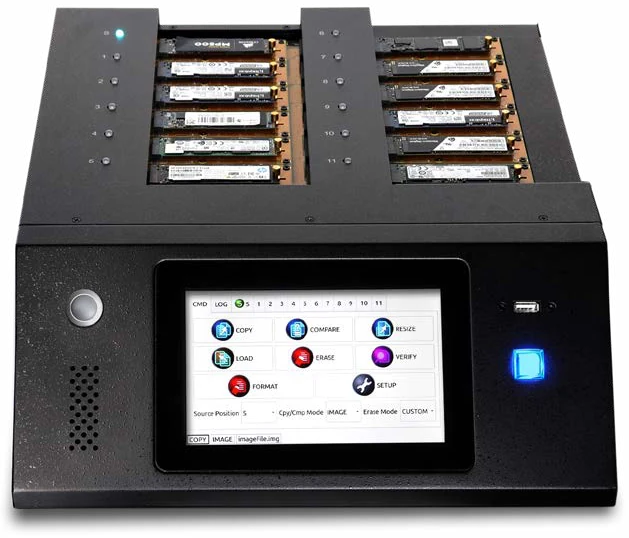
The KanguruClone 11 M.2 NVMe SSD Pro Duplicator copies one master SSD to up to 11 target SSDs at the same time. It has twelve M.2 sockets, one for the source and eleven for targets, and it runs on its own from a touch screen, with no separate computer or cloning software. It suits IT teams, system integrators and deployment teams that put the same prepared image on many drives for a batch of PCs or replacement SSDs. PRO TECHnology supplies Kanguru duplicators in the UAE and across the GCC.
- Targets per run
- Up to 11 per run (12 M.2 sockets: one master, eleven targets)
- Computer needed
- No. It runs stand-alone from a 7-inch touch screen
- Drives
- M.2 NVMe and M.2 SATA SSDs on units sold since October 2023
- Rated speed
- Up to 25GB/min to all targets simultaneously, per Kanguru
Key takeaways
- It suits teams that load the same prepared image onto many identical PCs or replacement SSDs. One-off migrations and mixed fleets are better served by other tools.
- It needs no PC or cloning software to run, but you still need a PC to build and test the master drive.
- Units sold since October 2023 take M.2 NVMe and M.2 SATA drives; earlier units need Kanguru’s M.2 SATA adapters, bought separately. M.2 is a shape, not a protocol, so check every drive.
- Kanguru rates it at up to 25GB/min to all targets simultaneously, but its page and press release give no test conditions or say whether that is per target or shared. Real batch time depends on data volume, copy mode, drives and verification.
- A cloned drive is not a finished PC. Windows images must be generalized with Sysprep, and BitLocker should be switched on after deployment, not copied.
Where one-at-a-time cloning becomes the bottleneck
Cloning one drive is easy. Cloning fifty the same way is where the time goes. Each drive has to be fitted, started, watched, checked and labelled, and the dock or PC doing the work is tied up throughout.
Hypothetical example. An IT team in Riyadh is fitting new M.2 NVMe SSDs to 55 identical laptops, all from one prepared master image. With a single-slot dock, every drive is its own job: connect, clone, check, swap. The team runs that cycle 55 times.
With an 11-target duplicator, the same master goes to up to 11 drives per run, so the job becomes five full runs of 11. Each run still needs loading, a compare pass and labelling, and a drive from each batch still needs a boot test in a laptop. The work does not disappear. It is grouped.
That grouping is the whole case for a multi-target duplicator. Whether it saves your team time depends on batch size, how often you repeat the job, and the work before and after the copy.
What the KanguruClone 11 Pro is, and what “11” means
The KanguruClone 11 M.2 NVMe SSD Pro Duplicator, part number KCLONE-11NVMe, is a stand-alone M.2 NVMe SSD duplicator, or M.2 SSD cloning machine, from Kanguru. It has twelve M.2 sockets (Kanguru product page): one takes the master and eleven take targets, which Kanguru’s 2021 manual labels S and 1 to 11. So “11” is the maximum number of targets per run, not the number of sockets.
You fit the master SSD in the source socket and up to eleven drives in the target sockets, choose a mode on the 7-inch touch screen and start. Kanguru’s manual notes that the duplicator powers the drives itself, so they need no external power, and that drives must not be connected or removed while an operation is running.
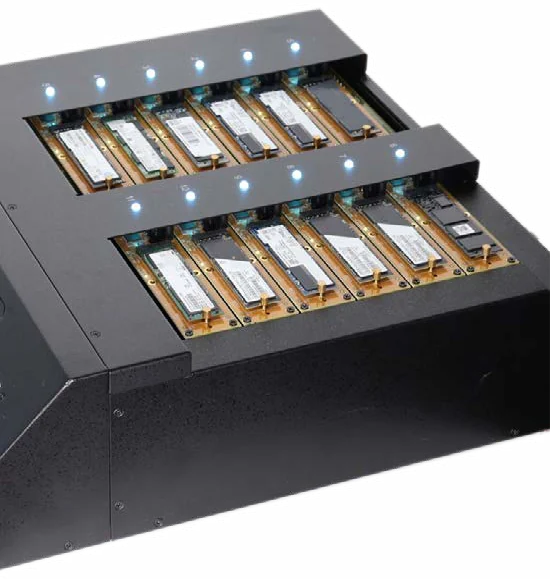
In October 2023 Kanguru replaced the original single-channel version with a dual-channel one. Kanguru says the newer unit copies M.2 NVMe and M.2 SATA drives, even in the same run, without separate adapters, at up to 25GB/min (Kanguru press release, 17 October 2023; Kanguru adapter guide). The earlier version was rated at up to 18GB/min in Kanguru’s 2021 manual and product sheet, and needed separately purchased adapters for M.2 SATA drives. The part number did not change. This guide describes the current version unless it says otherwise. The KanguruClone duplicators were part of the range from the start of the partnership in 2021; see Kanguru appoints PRO TECHnology for the Middle East.
Who it suits, and who it does not
- It suits IT departments that prepare identical drives for a fleet of the same PC models, system integrators and deployment teams building batches of workstations or replacement SSDs, and any team that repeats the job, such as a refresh cycle or new-starter kits.
- It does not suit a one-off migration of a single PC, where a one-to-one dock or cloning software is enough; mixed fleets where every PC needs a different image; or organisations that deploy over the network to drives already inside the machines.
KanguruClone 11 Pro specifications
| Specification | KanguruClone 11 Pro, current dual-channel version |
|---|---|
| Part number | KCLONE-11NVMe (the same number was used for the earlier version) |
| Sockets | 12 PCIe M.2 sockets, M-keyed: 1 source and up to 11 targets |
| SSD support | PCIe M.2 NVMe and M.2 SATA, without separate adapters |
| Other drives | One 2.5- or 3.5-inch SATA drive through the single included 7-pin adapter (more sold separately), positioned for SATA-to-NVMe copies |
| Transfer rate | Up to 25GB/min to all target devices simultaneously (Kanguru; no test conditions or per-target basis given) |
| Copy operations | Full, Brief, Resize and Image on Kanguru’s product page; its knowledge base also documents Ratio |
| Erase | Quick, Full, Wipe, Custom and Ratio overwrites, which Kanguru says comply with DoD 5220.22-M; Secure Erase and Sanitize Erase for SATA drives only |
| Logs | Detailed, downloadable system logs |
| Ports | USB 2.0, for saving log files and updating firmware |
| Current firmware | 1.5.6, in Kanguru’s list of current versions (27 February 2026) |
| Controls | 7-inch full-colour touch screen; no PC required |
| Power | 100 to 240V; Kanguru’s product page gives 600W and its knowledge base 60W, so ask for the site power requirement |
| Size and weight | 16.5 x 14.25 x 4.75 in, 16.5 lb (about 42 x 36 x 12 cm and 7.5 kg) |
| Operating range | 41 to 122°F (5 to 50°C), 15 to 90% relative humidity |
| In the box | Duplicator, power cable, one SATA to M.2 NVMe (7-pin) adapter |
| Warranty | One-year limited warranty: one year parts, 90 days labour; 1- and 2-year extensions available |
| TAA compliant | Yes |
Sources: Kanguru product page, adapter guide (March 2025) and knowledge base (February to May 2026). Metric conversions are ours. Kanguru’s September 2021 product sheet and manual describe the earlier single-channel version, rated at up to 18GB/min and without native M.2 SATA support.
From master drive to deployed PCs: the workflow
- Prepare the source. Build the master on a reference PC of the target model: operating system, drivers, applications and settings. Generalize Windows with Sysprep before copying, and leave BitLocker off on the master.
- Check compatibility. Confirm each target drive’s protocol (NVMe or SATA), length and capacity, and that the PCs accept that drive.
- Connect the targets. Fit the master in the source socket and up to eleven targets, before starting the job.
- Select the mode. Brief for speed when the file system is supported, Full for anything else, Resize for larger targets within its limits, Image to write a stored master image.
- Copy and compare. Run the copy with Compare after copy or Fast Checksum switched on, read the result screen and save the log to a USB stick.
- Test deployment. Boot a sample drive in a real PC before fitting the batch: first-start setup, drivers, activation, domain join and encryption.
Copy and compare modes in plain terms
Kanguru’s product page lists four copy operations. Its knowledge base for the 11-target duplicator, updated between February and May 2026, documents the same modes plus Ratio, and is the most current description of how they behave. Kanguru’s earlier user manual was written for the single-channel version.
- Full copy copies every sector. Kanguru calls it the slowest mode but the most compatible, for any operating system and file system. Every target must be at least as large as the master.
- Brief copy copies only the sectors that hold data, so it is usually the fastest. It needs a supported file system; Kanguru’s list includes FAT, exFAT, NTFS, HFS, EXT1 to EXT4, XFS and LVM, but not APFS. Targets must still be at least as large as the master.
- Resize copy copies to targets of a different capacity. It supports FAT, FAT32 and NTFS only, all targets should be the same capacity, the duplicator switches to a whole-disk copy if the master’s file system is not supported, and Kanguru warns that a compare after a Resize copy usually fails.
- Image copy writes a stored image to the targets. Masters are captured with the Load function as image files on a Storage Center drive, an NVMe drive formatted as NTFS.
- Ratio copy copies or compares a set percentage of the master, defined in the settings. The knowledge base documents it; the product page does not list it.
- Compare checks the targets against the master and can be run by hand after a copy. Two settings make the check automatic: Compare after copy, and Fast Checksum, which checks for a matching CRC32 between master and targets. Kanguru lists both as disabled by default, so switch them on for rollout batches.
- Verify is not a copy check. It confirms that every sector on each target can be read.
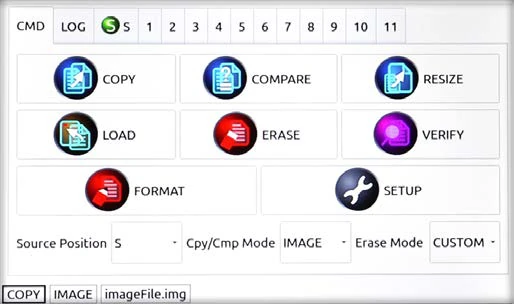
Kanguru’s duplication modes chart lists Full, Brief, Resize and Image for its M.2 NVMe duplicators. Confirm the modes on your unit’s firmware; Kanguru lists 1.5.6 as the current firmware for the 11-target duplicator (27 February 2026).
How long does a batch take?
Kanguru rates the 11 Pro at “up to 25GB/min transfer rates to all target devices simultaneously”. Its page and press release give no test conditions, such as drive models, copy mode or data type, and do not say whether 25GB/min is what each target receives or a total shared across targets. Treat it as a best case, not a planning number.
Real completion time depends on:
- how much data the master holds, and whether you copy only used sectors (Brief) or every sector (Full);
- the capacity of the master, which sets the size of a Full copy;
- the sustained write speed of the target drives, because a batch is finished only when its slowest drive is;
- the mix of drives, since M.2 SATA drives are slower than NVMe drives by design;
- a compare pass or checksum, which reads the data again;
- read errors on the master and the retries they cause; Kanguru’s Skip read error setting, off by default, writes zeros in place of unreadable sectors, so fix a failing master rather than skipping;
- handling: loading, labelling, boot-testing and record keeping.
Illustrative arithmetic, not a measured result. Take a master holding 200 GB of data, a Brief copy and no compare. If each target received the full advertised 25GB/min, the copy phase for a run of up to 11 drives would take about 8 minutes, and a Full copy of a 1 TB master about 40 minutes. If 25GB/min were shared across 11 targets, the same 200 GB run would take about 88 minutes. Kanguru does not say which applies.
A compare pass, slower drives or read errors add to both, and none of it counts handling time. Run a pilot batch with your own drives before you plan a rollout.
Checks before you order: interface, length and capacity
- M.2 is a shape, not a protocol. An M.2 SSD can be NVMe (PCIe) or SATA. Kanguru’s knowledge base (May 2026) says supported NVMe drives are M-keyed and M.2 SATA drives B+M-keyed, but check each drive’s specification sheet rather than relying on the notch.
- Unit version. Current dual-channel units take M.2 NVMe and M.2 SATA drives. Single-channel units sold before October 2023 need Kanguru’s M.2 SATA adapters, bought separately. The part number is the same for both versions, so get written confirmation of a dual-channel unit if you need M.2 SATA.
- Drive length. The Kanguru documents we reviewed do not list supported lengths such as 2230, 2242 or 2280. If your PCs use short drives, confirm before ordering.
- Capacity. Kanguru’s current FAQ for the 11-target unit says every target must be at least as large as the master for Full and Brief copies, and that Resize copies a smaller master to larger targets of one capacity. A Lock Capacity setting can hold larger targets at the master’s capacity.
- 2.5-inch and 3.5-inch SATA drives. Dual-channel units include one 7-pin SATA adapter. Kanguru’s knowledge base (May 2026) says it replaces the Source port board, which means powering off and opening the top panel, so that a 2.5- or 3.5-inch SATA drive can be the master; more adapters are sold for the other ports. For regular SATA-to-SATA work, Kanguru’s SATA hard drive duplicators are the matching tool.
- Power and placement. Kanguru asks for good ventilation and no high temperatures, and its 2021 manual highly recommends a UPS. Its pages disagree on the power rating (600W on the product page, 60W in the knowledge base), so confirm the supply needed at your bench.
Bootable drives, encryption and what a clone is not
Bootable operating-system drives
Kanguru says the duplicator clones any operating system, including Windows, Linux and macOS. A sector copy carries the boot structures across, but whether a copy starts in another PC depends on that PC: the same model and firmware settings, the right drivers and a correctly prepared image. Boot-test a sample from every batch.
Windows images must be generalized first
Microsoft states that before you deploy a Windows image to new PCs you have to generalize it, which removes computer-specific information such as installed drivers and the security identifier (SID), and that this applies even to PCs with similar hardware (Microsoft: Sysprep (Generalize) a Windows installation). Run Sysprep on the reference PC, then copy that drive.
BitLocker and other encryption
Kanguru’s FAQ for the 11-target unit (February 2026) says software-encrypted drives can be copied with a Full copy, and that the copies stay encrypted. That makes an exact replica. It is not a way to deploy encrypted PCs. Microsoft lists moving a BitLocker-protected drive into a new computer among the changes that can prevent the TPM releasing the key, and says BitLocker keys are unique to the TPM and the operating system drive (Microsoft BitLocker FAQ). Build the master unencrypted, deploy, then turn BitLocker on in each PC; Microsoft notes this can be automated with PowerShell or manage-bde. Kanguru’s documents do not cover hardware-encrypted or self-encrypting drives, so check with Kanguru before copying one.
What the duplicator does not do
- It does not encrypt the target drives.
- It does not replace backup: a set of identical drives is not a versioned, off-site copy. See our guide to backup and disaster recovery.
- It does not finish the PC. Licensing, activation, domain join and user set-up still happen on each machine, under your own licence agreements and deployment process.
Erasing drives on the 11 Pro
Kanguru lists erase and disk-wipe features that it says comply with DoD 5220.22-M, and its product page notes that Secure Erase and Sanitize Erase work only with SATA drives on this duplicator. Its knowledge base (February to May 2026) describes the modes: Quick (partition table only, least secure), Full (every sector), Wipe (zeros, ones and a random pattern, then a verify of the last pass, repeatable up to seven times), Custom (passes chosen in the settings), Ratio (a set percentage of each drive), and the two firmware commands, Secure Erase and Sanitize Erase. By default the drive in the Source socket is not erased. On NVMe drives that leaves the overwrite modes only.
On flash storage an overwrite is not the same as a verified purge, because wear levelling keeps data in areas the host cannot address. Use the duplicator’s erase to reset drives for reuse inside the organisation, and follow our guide to secure data erasure and drive decommissioning for drives that are leaving it. Kanguru also publishes a statement of volatility for its 4- and 11-target NVMe duplicators, which security teams can review before the unit enters a controlled area.
When a smaller duplicator or software deployment fits better
| Option | Fits when | Limits |
|---|---|---|
| KanguruClone 11 Pro | Regular batches of identical drives, up to 11 per run, M.2 NVMe or M.2 SATA | Drives are copied out of the PCs; one master per run |
| KanguruClone 4 (Kanguru’s four-target model) | Smaller or occasional batches: up to 4 targets at up to 12GB/min, per Kanguru; its October 2026 sheet lists M.2 NVMe and M.2 SATA SSDs | Four targets per run; Kanguru lists no Secure Erase or Sanitize Erase on it |
| One-to-one dock or cloning software | A single PC migration or a handful of drives | One copy at a time, with a technician or PC tied up for each |
| Network deployment or endpoint management | Mixed hardware, drives already inside the PCs, or per-device settings | Needs network infrastructure and an image or package prepared for it |
Details of the four-target model are on Kanguru’s KanguruClone 4 page. Our hard drive and SSD duplicator guide compares the KanguruClone SATA, NVMe and USB duplicators, from one-to-one units to 23 targets. For mixed hardware, endpoint management tools such as FileWave fit better than copying drives.
NVMe duplicator buying checklist
- Batch size and frequency. How many drives per rollout, and how often.
- Drive list. Protocol, length, capacity and model of the master and the targets.
- Unit version. The part number did not change in 2023; get written confirmation of a dual-channel unit if you need M.2 SATA or the 25GB/min rating.
- Copy mode. The file systems on your master, and whether Brief or Resize applies.
- Verification and firmware. Your compare policy, checksum setting and where logs are kept; update the firmware first (Kanguru lists 1.5.6 as current, 27 February 2026).
- Image preparation. Sysprep, drivers, licensing, and who signs off the master.
- Encryption. Enabled after deployment, never cloned from the master.
- Erasure. What the duplicator’s erase covers on NVMe, and what goes through decommissioning.
- Bench and power. Space, ventilation and a UPS.
- Warranty and service. Kanguru’s standard warranty is one year for parts and 90 days for labour, with extensions available; confirm how warranty service is handled in your country.
- Adapters. The included 7-pin SATA adapter, and any others you need.
Buying the KanguruClone 11 Pro in the UAE and GCC
Kanguru announced its partnership with PRO TECHnology on 1 September 2021 (Kanguru announcement). Kanguru’s partner directory for Europe, the Middle East and Africa lists PRO TECHnology for the UAE, Saudi Arabia, Qatar, Kuwait, Oman and Bahrain, and for Jordan (Kanguru: where to buy). PRO TECHnology is Kanguru’s exclusive distributor and partner for the Middle East.
Contact us for product selection and a quotation. It helps to send the drive models, batch size, how often you run batches, and whether you need M.2 SATA or 2.5-inch SATA support. kanguru.com sells only within the United States, so ask us for a regional quotation. The wider range is on our Kanguru page, part of our Enterprise IT division.
Sources
Specifications come from Kanguru’s product pages, adapter guide and press release, checked on 21 September 2026; modes, settings, erasure and firmware were re-checked against Kanguru’s knowledge base on 17 October 2026. Details marked as coming from the user manual are from Kanguru’s published manual for the earlier version. Deployment and encryption points cite Microsoft’s documentation. Examples marked hypothetical are illustrations, not customer cases.
- Kanguru: KanguruClone 11 M.2 NVMe SSD Pro Duplicator (product page)
- Kanguru knowledge base: 11-target duplicator copy and compare modes (25 February 2026)
- Kanguru knowledge base: 11-target duplicator copy settings, including Fast Checksum (18 May 2026)
- Kanguru knowledge base: 11-target duplicator erase modes (25 February 2026)
- Kanguru knowledge base: connecting standard SATA drives (18 May 2026)
- Kanguru knowledge base: current client and firmware versions (27 February 2026)
- Kanguru knowledge base: NVMe duplicator statement of volatility
- Kanguru: KanguruClone 4 product sheet, October 2026 (PDF)
- Kanguru: enhanced dual-channel 11-target NVMe duplicator, press release, 17 October 2023
- Kanguru: adapters for the 11NVMe purchased after October 2023 (PDF, March 2025)
- Kanguru: KanguruClone 4 M.2 NVMe SSD Duplicator (product page)
- Kanguru: duplication modes chart
- Kanguru: KanguruClone 11 M.2 NVMe Pro SSD Duplicator user manual, v1.2, 2021 (PDF hosted by iStorage, Kanguru’s parent group; earlier version)
- Kanguru: M.2 NVMe SSD duplicator information sheets (including the September 2021 KanguruClone 11 sheet)
- Kanguru: 11-target NVMe duplicator release notes
- Microsoft: Sysprep (Generalize) a Windows installation
- Microsoft: BitLocker FAQ
- Kanguru: where to buy in Europe, the Middle East and Africa
- Kanguru: partnership with PRO TECHnology, 1 September 2021
Frequently asked questions
How many NVMe SSDs can KanguruClone 11 Pro copy at once?
Up to 11. It has 12 M.2 sockets: one for the master drive and eleven for targets, so each run copies one master to as many as eleven SSDs.
Does it need a computer or cloning software?
No. It runs stand-alone from its 7-inch touch screen, and a USB 2.0 port is used for saving logs and updating firmware. You still need a PC to build and test the master drive.
Does it support both M.2 NVMe and M.2 SATA SSDs?
Units sold since October 2023, the dual-channel version, support both without separate adapters, according to Kanguru. Earlier single-channel units, which share the same part number, support M.2 NVMe natively and need Kanguru’s M.2 SATA adapters, bought separately. M.2 describes the shape, not the protocol, so check each drive’s specification sheet.
Can the source and target drives have different capacities?
Kanguru’s current FAQ for the 11-target unit says that for Full and Brief copies every target must be at least as large as the master. Resize copy goes from a smaller master to larger targets, supports FAT, FAT32 and NTFS only, needs all targets to be the same capacity, and usually fails a compare afterwards.
Can it clone a bootable operating-system drive?
It copies the drive, including its boot structures, and Kanguru says it clones any operating system. Whether the copy starts in another PC depends on that PC’s model, firmware settings and drivers, and a Windows image must be generalized with Sysprep before copying. Boot-test a sample from each batch.
Can it clone a BitLocker-encrypted or otherwise encrypted drive?
Kanguru’s current FAQ says software-encrypted drives can be copied with a Full copy, and the copies stay encrypted. That is not a deployment method for BitLocker system drives: Microsoft lists moving a protected drive into a new computer among the changes that can prevent the TPM releasing the key. Build the master unencrypted and enable BitLocker on each PC afterwards. Kanguru’s documents do not cover hardware-encrypted or self-encrypting drives.
How long does a batch take, and what affects the speed?
Kanguru rates it at up to 25GB/min to all targets simultaneously, but gives no test conditions and does not say whether that is per target or shared. Actual time depends on the data on the master, Brief or Full mode, drive capacity, the slowest target drive, M.2 SATA versus NVMe, compare passes, read errors and handling. Time a pilot batch with your own drives.
How can the operator verify the copies?
Run Compare, which checks the targets against the master. Kanguru’s current knowledge base also describes a compare-after-copy setting and a CRC32 fast checksum option, both off by default, and logs can be saved to a USB stick; its Verify function only checks that drives can be read. Then boot-test a sample in the target PCs.
When should we choose the four-target model instead?
Choose the KanguruClone 4 for smaller or occasional batches. Kanguru rates it at up to 4 targets at up to 12GB/min, and its October 2026 sheet lists M.2 NVMe and M.2 SATA SSDs; the January 2021 sheet listed NVMe only, so confirm the specification on the quotation. If your batches regularly exceed four drives, or you need Secure Erase or Sanitize Erase for SATA drives, the 11 Pro is the better fit.
Who supplies Kanguru NVMe duplicators in the UAE and GCC?
Kanguru’s partner directory lists PRO TECHnology, based in Dubai, for the UAE, Saudi Arabia, Qatar, Kuwait, Oman and Bahrain, and Kanguru announced the partnership in September 2021. PRO TECHnology is Kanguru’s exclusive distributor and partner for the Middle East. Call +971 4 343 5501 or email sales@protech.ae for a quotation.
We are a school or university: can we use it to re-image a computer lab every term?
Only for drives you can take out. The KanguruClone 11 copies M.2 SSDs fitted in its own sockets, so it suits new or replacement SSDs prepared before they go into identical lab PCs. For re-imaging drives that stay inside the machines every term, network deployment is usually the better tool. A lab can use both: the duplicator for new batches and replacements, and network deployment for routine refreshes.
نسخ أقراص NVMe بالجملة لتجهيز أجهزة الحاسوب: شرح جهاز KanguruClone 11 Pro
جهاز KanguruClone 11 M.2 NVMe SSD Pro Duplicator ينسخ قرصًا رئيسيًا واحدًا إلى ما يصل إلى 11 قرصًا من أقراص SSD في الوقت نفسه، إذ يضم 12 منفذًا من نوع M.2: منفذًا للمصدر وأحد عشر منفذًا للأقراص المستهدفة، ويعمل مستقلًا من شاشة لمس دون حاسوب أو برنامج نسخ. تدعم الأجهزة المبيعة منذ أكتوبر 2023 أقراص M.2 NVMe وM.2 SATA، وتقدّر Kanguru سرعة النقل بما يصل إلى 25 غيغابايت في الدقيقة إلى جميع الأقراص في وقت واحد دون أن تحدد ظروف الاختبار أو ما إذا كانت هذه السرعة لكل قرص أم موزعة على الأقراص، لذا يعتمد الوقت الفعلي على حجم البيانات ونمط النسخ وسرعة الأقراص والمقارنة بعد النسخ. والقرص المنسوخ ليس جهازًا جاهزًا: يجب تعميم صورة Windows بأداة Sysprep قبل النسخ، وتفعيل BitLocker على كل جهاز بعد التوزيع لا نسخه من القرص الرئيسي. يُدرج دليل شركاء Kanguru شركة PRO TECHnology شريكًا لها في الإمارات والسعودية وقطر والكويت وعُمان والبحرين، وPRO TECHnology هي الموزع والشريك الحصري لـ Kanguru في الشرق الأوسط.
Plan your next batch with us
Send us your drive list, batch size and deployment plan. We will compare your drive list with Kanguru’s published specifications and quote the model that fits.