Secure IT Workstation Deployment for Government and Defence: Offline NVMe SSD Imaging at Scale
Published · PRO TECHnology Enterprise IT
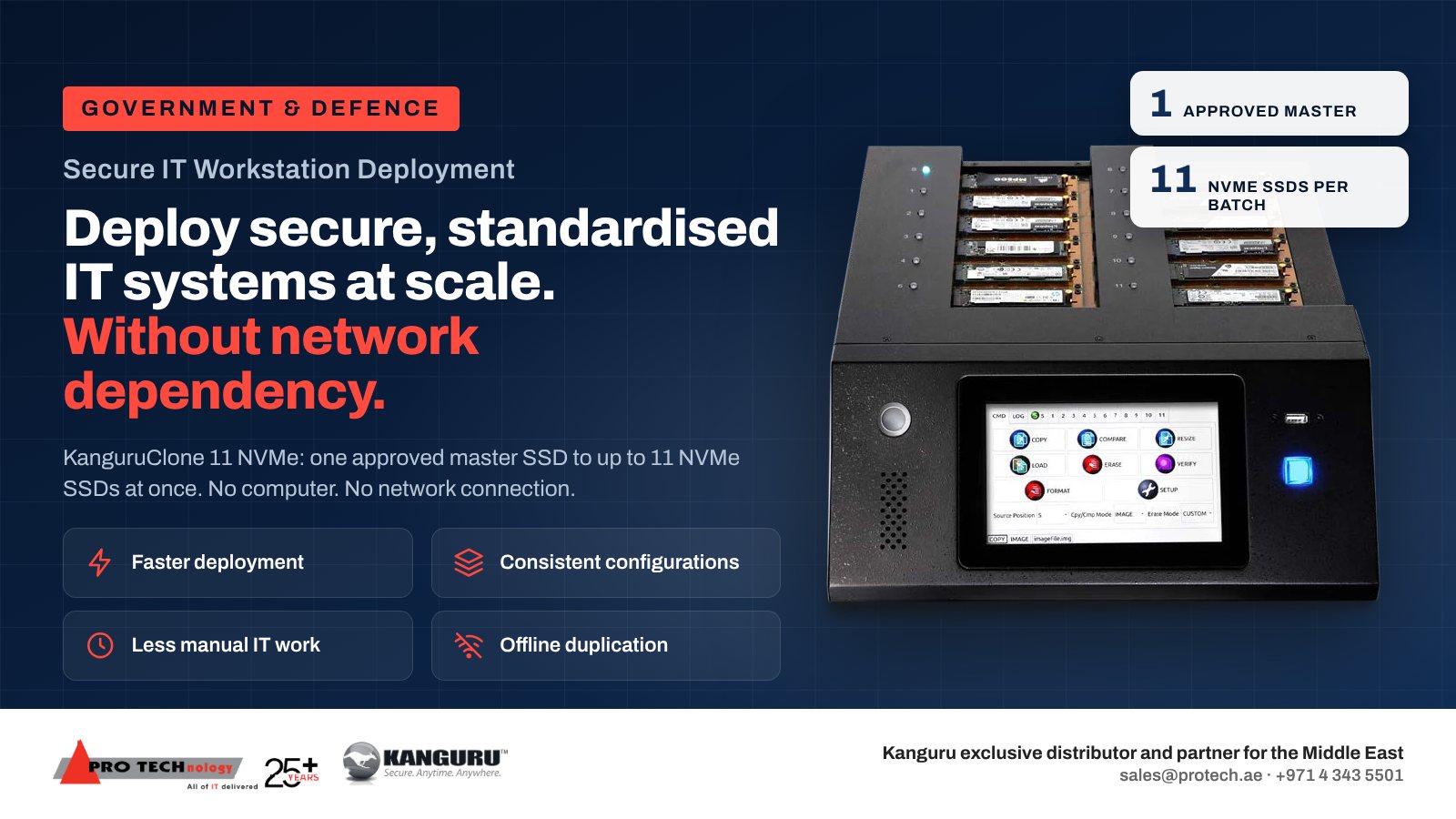
Government and defence IT teams that build workstations for closed or segregated networks can copy one approved master SSD onto as many as 11 NVMe SSDs at a time with the KanguruClone 11, a stand-alone duplicator that needs no computer and no network connection. The image is built and approved once, copied offline in batches, checked against the master and logged, so every workstation starts from the same controlled baseline. PRO TECHnology is Kanguru's exclusive distributor and partner for the Middle East.
- Per batch
- One approved master, copied to as many as 11 SSDs
- Network or PC needed
- Neither: the unit is operated from its own touch screen
- Drives
- NVMe or SATA M.2 SSDs on dual-channel units sold from October 2023 (same part number)
- Records
- Compare after copy, CRC32 checksum and downloadable logs
Key takeaways
- An offline duplicator suits workstations that must be built away from any network: closed or classified networks, segregated build rooms and sites without a deployment server.
- The KanguruClone 11 copies one approved master SSD to up to 11 M.2 NVMe SSDs per batch, with no computer or network connection, and can compare every target with the master.
- The security work happens before and after the copy. The master is built, scanned and approved under change control; encryption, device identity and domain membership are set on each machine after duplication.
- Logs from every batch, saved to a USB stick, let an auditor trace each workstation from the master image version to the drive serial numbers.
- Kanguru rates the unit at up to 25GB/min, a best case without published test conditions. Plan from a trial batch using your real drives and image.
Why do government and defence teams build workstations offline?
Network deployment tools assume the new machine can reach a deployment server or the internet during its build. Many government and defence environments cannot allow that. Classified and segregated networks are kept apart from the internet and often from the organisation's own business network, field and remote sites may have no deployment server at all, and a build room may be deliberately cut off so that nothing reaches a new machine before it is approved.
A stand-alone duplicator removes the network from the build. The approved image sits on a master SSD in a controlled room, the duplicator copies it to blank drives in batches, and the drives go into the workstations. Nothing crosses a network, and the only external data port on the unit is a USB 2.0 port that saves logs and installs firmware.
The point is consistency as much as isolation. Saudi Arabia's National Cybersecurity Authority (NCA) sets the Essential Cybersecurity Controls, and alongside them publishes a Secure Configuration and Hardening standard template, which organisations adapt into their own policies, that asks for new systems to be built on an approved secure baseline, and its policy template asks for configuration reviews at least once a year or after any change. Copying one approved master to every drive is a direct way to make each workstation match the baseline. In the UAE, government entities may map the build process to the UAE Information Assurance Regulation; your information security team decides which controls, if any, it evidences.
From approved master to deployed workstation: the offline workflow
- Prepare the master on a reference workstation of the model you are deploying: operating system, drivers, applications, security agents and the hardening settings from your build standard.
- Scan and check before you generalise. Scan the reference build for malware and check it against the baseline while it can still be started.
- Make it generic. Generalise Windows with Sysprep, which strips out details tied to one computer, such as the security identifier (SID). Do not switch on BitLocker on the master, and confirm with manage-bde -status that Windows has not switched on device encryption by itself. Keep user data, credentials, certificates and any device-specific secret off it. Once Sysprep shuts the reference workstation down, do not start it from that drive again; any later scan is done with the drive attached to another computer as a secondary drive.
- Approve and store. Give the master a version number and sign it off under change control. Store the approved master SSD under lock, labelled with its version.
- Copy offline in batches. Put the master in the source socket and as many as 11 blank drives in the target sockets, choose the copy mode and turn on the compare or checksum check before you start.
- Record the batch. Save the duplicator log to a USB stick and add the master version, batch number, target serial numbers, operator and date to your deployment record.
- Personalise each machine at first start. Give it its own computer name, join it to the domain, switch on BitLocker with the recovery key escrowed, enrol it in endpoint management and issue its certificates.
- Start a sample workstation from every batch and check it before the batch is released.
Our KanguruClone 11 guide covers each copy mode and the drive checks in detail; this page covers the controls around them.
What the KanguruClone 11 brings to a secure build room
| Feature | What it means for a secure build |
|---|---|
| Stand-alone operation | Runs from its own 7-inch touch screen. No computer, cloning software or network connection is involved in the copy. |
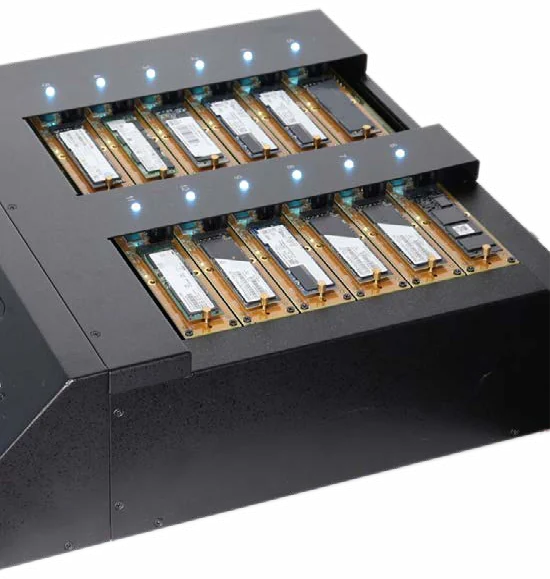
| Twelve sockets | The master goes in one and blank drives in up to eleven. Dual-channel units sold from October 2023 accept NVMe and SATA M.2 drives with no adapters. |
| Copy modes | Full copies every sector and suits any file system; Brief copies only used sectors on supported file systems; Resize and Image cover larger targets and stored images. |
| Compare and checksum | Fast Checksum (a CRC32 match between master and copies) or a full compare after the copy confirms each target. Both ship disabled, so the build procedure should turn them on. |
| Logs | A log of every operation, exported through the USB 2.0 port that also takes firmware updates. |
| Erase modes | Overwrite passes that Kanguru describes as DoD 5220.22-M compliant, plus Secure Erase and Sanitize Erase, two commands limited to SATA drives. |
| TAA compliant | Yes, per Kanguru. This is a United States federal procurement rule on country of origin, not a GCC certification. |
| Warranty | A limited warranty of one year on parts and 90 days on labour, which Kanguru extends by one or two years on request. |
Kanguru's 25GB/min rating comes without test conditions. Kanguru's own pages quote both 600W and 60W for power, so confirm the supply your build room needs.
Limits to keep in mind
- It does not check that the master is clean or correctly hardened. That is the job of the approval step.
- It does not encrypt. If the master is unencrypted, so is every copy; if the master is encrypted, every copy shares its keys, which is not how encrypted workstations should be deployed.
- It does not give each workstation its own identity. Computer names, domain membership, certificates and recovery keys are set per machine after duplication.
Controls around the duplicator: people, the master SSD and the records
The duplicator is one device in a controlled process. These are the controls we suggest government customers write into their build procedure; adapt them to your own classification rules.
- Location
- Keep the unit in the build room or secure store, not on a shared IT bench, and record who has access.
- Two-person approval
- Have one person build the master and another approve it, so no single administrator can change the image that goes to every workstation.
- Master custody
- Label each master SSD with its version, keep it under lock when not in use, and retire superseded masters through your media disposal process.
- USB port
- Use a dedicated, scanned USB stick for logs and firmware, and only install firmware downloaded from Kanguru and checked by your team.
- Records
- Keep the duplicator logs with the change record for the master, so each deployed drive traces back to an approved image.
- Trial batch
- Copy a trial batch with the real drives and image before a programme starts, and again after every master or firmware change.
Hypothetical example. A defence IT unit is building 220 identical workstations for a segregated network from one approved master holding 120 GB of data. At up to 11 drives per batch, that is 20 batches. If each target received Kanguru's full 25GB/min with a Brief copy, the copy phase of a batch would take about 5 minutes; if that rate were shared across 11 targets, about 53 minutes. Compare passes, loading, labelling and boot tests come on top, which is why the pilot batch sets the real plan.
Offline duplicator, network deployment or factory image: which fits your programme?
| Approach | Needs a network during the build | Fits best | Watch out for |
|---|---|---|---|
| Offline duplicator (KanguruClone 11) | No | Segregated or classified networks, build rooms, field sites and repeated batches of identical machines | Drives must be removable; identity and encryption are applied after the copy |
| Network deployment server | Yes, a local deployment network | Large sites with an established deployment network that the security policy allows | The deployment server becomes part of the trusted build |
| Cloud enrolment (such as Windows Autopilot or Apple Automated Device Enrollment) | Yes, the internet | Connected offices and remote staff | Not available to machines that must never reach the internet |
| Manufacturer's factory image | Not on your site | Standard builds that the manufacturer can load under contract | The image is prepared outside your build room and must be checked on arrival |
Many organisations combine them: duplicators for the closed network, cloud enrolment for connected offices. Our duplicator buying guide compares duplicators with cloning software and docks.
Drives at the end of their life
The same unit can erase drives before re-use, with overwrite passes on NVMe and SATA drives and two extra commands for SATA drives. On M.2 NVMe drives it can only overwrite, which NIST SP 800-88 treats as Clear rather than Purge, so drives leaving a controlled area need a Purge method or destruction. Kanguru publishes a statement of volatility for the unit for security officers who approve equipment in controlled areas. For media that held classified information, follow your authority's sanitisation policy, which may require destruction rather than overwriting. Our duplicator guide explains the erase modes, and files that must move between networks belong on Kanguru Defender encrypted drives, which can be tracked centrally with Kanguru KRMC.
Buying the KanguruClone 11 for a government programme in the GCC
We supply Kanguru duplicators and encrypted drives to government, defence and enterprise customers from our office in Business Bay, Dubai. Saudi enquiries come to our account team, who visit the Kingdom often, with local work delegated to PRONEXT, our company in Riyadh.
- Unit version in writing. Old single-channel and current dual-channel units share one part number, so we confirm in writing that you are getting the dual-channel version when M.2 SATA support matters.
- Your drive list checked. Send the workstation models and SSD part numbers, including length, and we check them against Kanguru's published specifications.
- Batch plan. Tell us the number of workstations, the image size and the deadline, and we propose how many units and batches the programme needs.
- Warranty extension. Kanguru offers one- and two-year extensions on top of the standard limited warranty.
Sources
Kanguru's product page, knowledge base, press release and duplication modes chart, Microsoft's Sysprep documentation and the NCA templates below were checked on 6 November 2026. The NCA documents are templates that organisations adapt into their own policies. This page is a deployment guide, not legal or compliance advice.
- Kanguru: product page for the 11-target M.2 duplicator
- Kanguru support articles for the 11-target NVMe unit
- Kanguru announcement of the dual-channel version, October 2023
- Microsoft Learn: generalising a Windows installation with Sysprep
- NCA: Secure Configuration and Hardening standard template
- NCA: Configuration and Hardening policy template
- UAE Government portal: UAE Information Assurance Regulation
Frequently asked questions
Can the KanguruClone 11 be used in a classified or air-gapped build room?
Yes. It works without a computer or network connection, operated from its own touch screen. Its only data port is a USB 2.0 port for saving logs and installing firmware, so control that port with a dedicated, scanned USB stick under your own policy.
Where is our approved image kept during duplication?
In Full and Brief copy modes, the image stays on the master SSD you fit in the source socket. In Image mode, image files are held on a separate NVMe drive formatted as NTFS that you fit and control. Keep both under the same custody rules as any classified media.
How do we keep encryption and device identity unique when every drive is a copy?
Duplicate an unencrypted, generalised master, then personalise each workstation at first start: its own computer name, domain membership, certificates and BitLocker key, escrowed to your directory. Copying an already encrypted drive gives identical keys on every copy.
How many secure workstations can one KanguruClone 11 prepare in a day?
It depends on the image size, copy mode, drive speed, compare passes and handling time, and Kanguru publishes no test conditions for its 25GB/min rating. A pilot batch with your own master and drives gives a figure you can plan a programme on.
What records should a government workstation build keep?
For each batch: the master image version and its approval, the duplicator log, the target drive serial numbers, the operator, the date and the boot-test result. Kept together, they let an auditor trace any deployed workstation back to an approved image.
Does TAA compliance matter for UAE or Saudi government buyers?
TAA compliance is a United States federal procurement rule about where a product is made. Kanguru lists the KanguruClone 11 as TAA compliant, but it is not a UAE or Saudi certification, so check your own procurement and security requirements separately.
Can we image Mac workstations with a duplicator?
Usually not. Apple silicon Macs have storage built into the main board, so there is no removable SSD to copy, and Brief copy does not support APFS. Macs are normally set up through Apple Automated Device Enrollment and device management instead.
Who supplies Kanguru duplicators to government entities in the Middle East?
PRO TECHnology in Business Bay, Dubai, as Kanguru's exclusive distributor and partner for the Middle East. We quote government and defence programmes across the GCC, and in Saudi Arabia we work with PRONEXT, our company in Riyadh.
نشر محطات العمل الآمنة للجهات الحكومية والدفاعية: نسخ أقراص NVMe دون اتصال بالشبكة
تحتاج فرق تقنية المعلومات في الجهات الحكومية والدفاعية أحياناً إلى تجهيز محطات عمل لشبكات مغلقة أو معزولة لا يُسمح فيها بالاتصال بخادم نشر أو بالإنترنت. يتيح جهاز KanguruClone 11 نسخ قرص SSD رئيسي معتمد إلى ما يصل إلى 11 قرص NVMe في الدفعة الواحدة، دون حاسوب ودون أي اتصال بالشبكة، مع مقارنة كل قرص بالقرص الرئيسي وحفظ سجل لكل دفعة.
تبقى أعمال الأمن قبل النسخ وبعده: تُبنى الصورة الرئيسية وتُفحص وتُعتمد ضمن إدارة التغيير، ثم يُضبط التشفير واسم الجهاز والانضمام إلى النطاق لكل محطة على حدة بعد النسخ. شركة PRO TECHnology في دبي هي الموزع الحصري والشريك لشركة Kanguru في الشرق الأوسط.
Plan a secure workstation build with us
Send us the workstation models, SSD type and length, image size, number of workstations and whether the build room is offline. We will confirm the unit version, propose a batch plan and quote from Dubai.