
Windows 10 After October 2026: ESU Year 2, the 2027 Consumer Extension and What UAE Businesses Should Do Now
Published · PRO TECHnology Enterprise IT
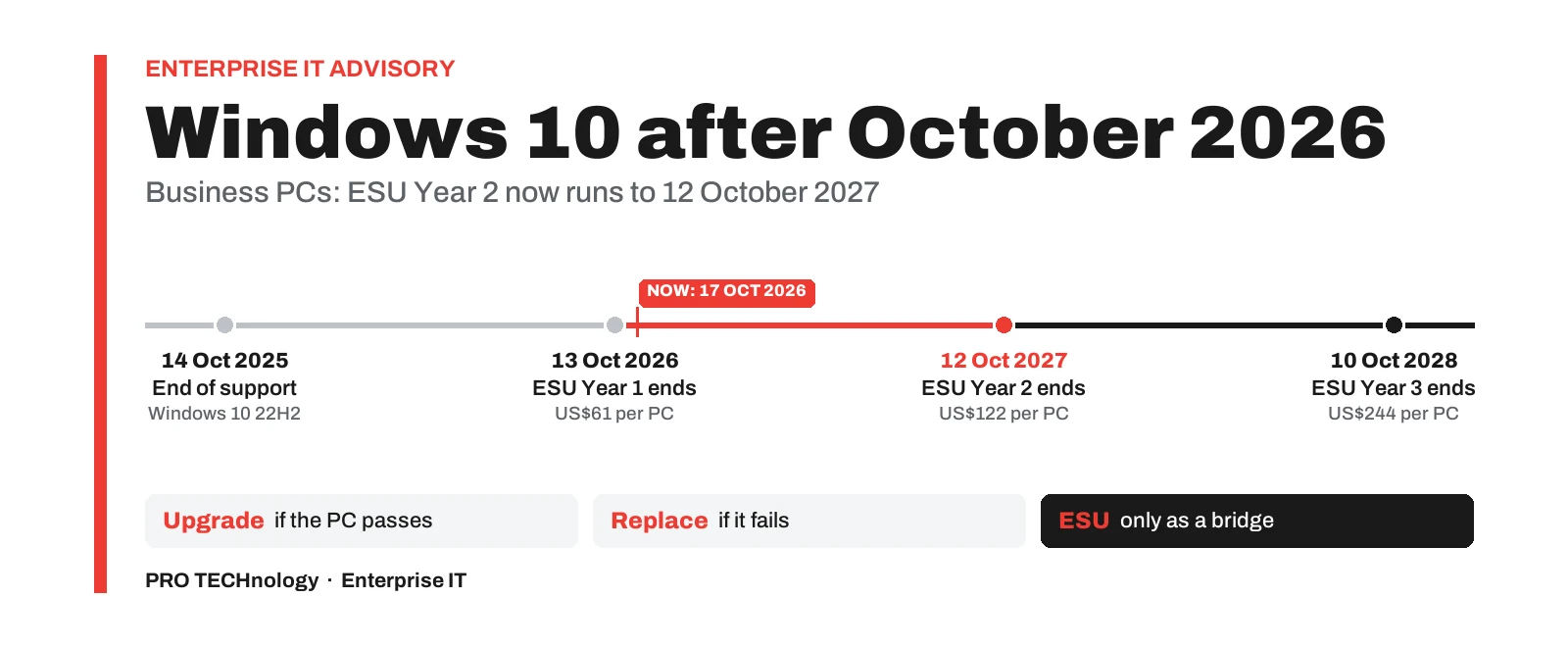
Microsoft’s paid Extended Security Updates (ESU) for business PCs entered Year 2 on 14 October 2026: US$122 per PC at list price, available only together with Year 1 (US$61), and covering Windows 10 version 22H2 until 12 October 2027. The free consumer extension to the same date, added in June 2026, is a separate programme that Microsoft says cannot be used in commercial scenarios. Upgrade the PCs that meet Windows 11’s requirements, replace those that do not, and keep ESU for the few that need a bridge. Checked on Microsoft’s pages as of 17 October 2026.
- ESU Year 2
- 14 Oct 2026 to 12 Oct 2027 for business PCs
- List price
- US$61 Year 1, US$122 Year 2, US$244 Year 3 per PC
- Last date
- Commercial ESU Year 3 ends 10 Oct 2028
- Checked
- Microsoft pages as of 17 Oct 2026
Key takeaways
- Windows 10 support ended on 14 October 2025. Commercial ESU Year 1 ended on 13 October 2026, Year 2 runs to 12 October 2027, and Year 3, the last, ends on 10 October 2028, according to Microsoft’s lifecycle FAQ.
- Microsoft lists commercial ESU at US$61 per PC for Year 1, doubling each year: US$122 for Year 2 and US$244 for Year 3. Year 2 can only be bought with Year 1, so a PC joining now costs US$183 at list price, about AED 672 before VAT.
- The free consumer ESU, extended in June 2026 to 12 October 2027, is a separate programme. Microsoft says it cannot be used in commercial scenarios, so company PCs should be budgeted on commercial ESU.
- ESU brings critical and important security updates to Windows 10 version 22H2 only: no new features, no customer-requested non-security fixes and no general technical support. LTSC editions are not covered and follow their own dates.
- Windows 11 needs a compatible 64-bit processor, 4 GB of RAM, 64 GB of storage, UEFI firmware capable of Secure Boot and TPM 2.0. FileWave’s knowledge base publishes a readiness check, based on Microsoft’s script, that reports Pass or Fail across a managed fleet.
- Feature updates for Microsoft 365 Apps on Windows 10 stopped at Version 2608, released in August 2026; security updates continue until 10 October 2028, with or without ESU.
- Decide per PC: upgrade if it passes, replace if it fails, and give every PC kept on ESU a written exit date before 12 October 2027.
Where Windows 10 stands on 17 October 2026
Windows 10 left Microsoft’s support on 14 October 2025. Business PCs that still run it now need Year 2 of Microsoft’s paid Extended Security Updates (ESU) to keep receiving security fixes: Year 1 ended on 13 October 2026, Year 2 runs to 12 October 2027, and Year 3, the last, ends on 10 October 2028. A PC that joins now pays for Year 1 and Year 2 together.
The dates come from Microsoft’s lifecycle FAQ on Extended Security Updates, which lists the end of each ESU year, and the price from its Windows 10 ESU programme page. What confuses many searches, and many AI answers, is a second timetable. In June 2026 Microsoft extended its free consumer ESU to 12 October 2027, so pages written before then still say Windows 10 updates end in October 2026. Both statements were true for someone; only the commercial timetable applies to a company PC.
| Date | What happens | Who it affects |
|---|---|---|
| 14 October 2025 | Windows 10 reaches end of support and free security updates stop | Every Windows 10 PC except the LTSC editions |
| 13 October 2026 | Commercial ESU Year 1 ends | Business and education PCs enrolled in ESU |
| 14 October 2026 | Commercial ESU Year 2 begins; a PC joining now must also be covered for Year 1 | Business and education PCs that stay on Windows 10 |
| 12 October 2027 | Commercial ESU Year 2 ends, and the extended consumer ESU ends on the same day | Every Windows 10 22H2 PC on ESU |
| 10 October 2028 | Commercial ESU Year 3 ends, and so do security updates for Microsoft 365 Apps on Windows 10 | The last Windows 10 PCs and the Office apps on them |
In practice, a UAE company still running Windows 10 has at most two more years of paid security updates, and each year costs twice the one before. The rest of this guide covers what ESU costs and covers, how to decide PC by PC, and the four steps that close the Windows 10 chapter: inventory, upgrade, replace and retire.
Business ESU and the consumer extension are separate programmes
Microsoft runs Windows 10 ESU as separate offers with different prices, dates and rules. For a company, the commercial programme is the one to plan on.
| Programme | Who it is for | Price | Coverage ends |
|---|---|---|---|
| Commercial ESU | Organisations. Microsoft’s lifecycle FAQ names Windows 10 Enterprise, Education and Pro in commercial use | US$61 per PC for Year 1, doubling each year; bought one full year at a time, each year only with the years before it | Year 2 on 12 October 2027; Year 3 on 10 October 2028 |
| Education ESU | Schools, universities and other education customers | US$1, US$2 and US$4 per PC for Years 1 to 3, Microsoft’s April 2024 pricing as reported by The Register | The same yearly dates as commercial ESU |
| Consumer ESU | Personal PCs at home | Free with Windows Backup settings sync, for 1,000 Microsoft Rewards points, or a one-time US$30 purchase | 12 October 2027, after Microsoft’s June 2026 extension |
| Windows 365 and Azure | Windows 10 virtual machines in Windows 365, Azure Virtual Desktop and other Azure services, and Windows 10 PCs that connect to a Windows 365 Cloud PC with an active Windows 365 subscription licence | Included at no additional cost, according to Microsoft | Up to three years after end of support |
The consumer extension is the source of most of the confusion. Microsoft added the extra year on 25 June 2026 through an editor’s note on a Windows blog post and an edit to its consumer ESU page, not a press release, as BleepingComputer reported. The same consumer page states that “The consumer ESU program can’t be used in commercial scenarios”, and it lists the kinds of device to which enrolment is not offered. For PCs a company owns and manages, budget for the commercial programme, and treat the consumer offer as something staff may use on their own home computers.
Education customers follow the commercial rules at a lower price: the yearly dates and the rule that Year 2 needs Year 1 are the same. Schools planning a wider device refresh can start with our school device management guide.
What ESU Year 2 costs a UAE business
Microsoft’s list price for commercial ESU is US$61 per PC for Year 1, and in its words “the price doubles every consecutive year, for a maximum of three years”, so Year 2 is US$122 and Year 3 is US$244. ESU is cumulative: Microsoft’s lifecycle FAQ says Year 2 can only be acquired by customers who have also acquired Year 1. A PC that joins in October 2026 therefore costs US$183 at list price to be covered until 12 October 2027, about AED 672 at the dirham’s fixed rate of 3.6725 to the US dollar.
| ESU year | Covers until | List price per PC | In dirhams (about) | Needed by a PC joining now? |
|---|---|---|---|---|
| Year 1 | 13 October 2026 | US$61 | AED 224 | Yes: Year 2 cannot be bought without it |
| Year 2 | 12 October 2027 | US$122 | AED 448 | Yes |
| Year 3 | 10 October 2028 | US$244 | AED 896 | Only for PCs still on Windows 10 after 12 October 2027 |
| Years 1 and 2 | 12 October 2027 | US$183 | AED 672 | The minimum for a PC joining now |
| Years 1 to 3 | 10 October 2028 | US$427 | AED 1,568 | Everything ESU can buy |
The same arithmetic across a fleet
| Windows 10 PCs | Years 1 and 2, to 12 October 2027 | Years 1 to 3, to 10 October 2028 |
|---|---|---|
| 10 | US$1,830 (about AED 6,721) | US$4,270 (about AED 15,682) |
| 25 | US$4,575 (about AED 16,802) | US$10,675 (about AED 39,204) |
| 50 | US$9,150 (about AED 33,603) | US$21,350 (about AED 78,408) |
| 100 | US$18,300 (about AED 67,207) | US$42,700 (about AED 156,816) |
| 250 | US$45,750 (about AED 168,017) | US$106,750 (about AED 392,039) |
Three things change the real number. First, these are Microsoft’s published list prices: the price on an invoice depends on the purchase route and, in some cases, on how the PCs are managed, so confirm the price on your quotation. Second, VAT at 5 percent is added in the UAE. Third, ESU cannot be bought for part of a year. Microsoft says customers “can’t buy partial periods”, and Year 2 coverage ends on 12 October 2027 whenever it is bought, so a PC due for replacement in March 2027 still needs a full Year 1 and Year 2 to be covered until then.
A per-PC comparison. If a PC fails the Windows 11 check and will be replaced within months anyway, ESU for it costs US$183 (about AED 672) at list price. Bringing the replacement forward saves that money and the work of activating ESU; keeping the PC on ESU buys time for budget or delivery. Make that choice PC by PC, not once for the whole fleet.
What ESU covers, and what it leaves out
ESU delivers critical and important security updates, as rated by the Microsoft Security Response Center, to PCs running Windows 10 version 22H2. It is security only. Microsoft’s ESU page rules out new features, customer-requested non-security updates and design change requests, and its lifecycle FAQ describes ESU as “a last resort paid option” and “a temporary bridge” to a supported platform.
- Version 22H2 only. A PC on an earlier Windows 10 version has to move to 22H2 first. Microsoft’s activation guide (updated 21 April 2026) also requires cumulative update KB5066791 or later, followed by the ESU Licensing Preparation Package, KB5072653.
- No technical support for Windows itself. Microsoft supports the ESU licence activation, its installation and any regression the updates cause, and only for organisations with an active Microsoft support plan.
- LTSC editions are not covered. Microsoft says Windows 10 Long Term Servicing releases have their own lifecycles and are not covered by ESU. Support for Windows 10 Enterprise LTSC 2021 ends in January 2027 and for Enterprise LTSC 2019 in January 2029, IoT Enterprise LTSC 2021 runs to January 2032, and the 2016 LTSB ended in October 2026.
- PCs keep working without it. Microsoft says Windows 10 PCs continue to work without ESU. They simply stop receiving security fixes, which is the risk ESU exists to cover.
Microsoft 365 Apps and OneDrive on Windows 10
Office apps follow their own timetable. Microsoft’s page on Windows 10 and Microsoft 365 Apps (updated 27 July 2026) says Windows 10 devices get feature updates and Copilot support (where eligible) until Version 2608 is released, then stay on Version 2608 with security updates only until 10 October 2028. Version 2608 reached Current Channel on 19 August 2026 and Monthly Enterprise Channel on 8 September 2026, according to Microsoft’s update history, so Windows 10 PCs have already reached that point. The OneDrive desktop app on Windows 10 22H2 is updated until the same date. Support narrows, though: if a problem occurs only on Windows 10 and not on Windows 11, Microsoft’s support will ask the customer to move to Windows 11.
So Word, Excel and Outlook keep receiving security updates on Windows 10, with or without ESU, but their users get no new features or Copilot support beyond Version 2608. Teams that depend on new Microsoft 365 features are a reason to move those users to Windows 11 first.
Upgrade, replace, ESU or a cloud PC: deciding PC by PC
Make the decision per PC, from two facts about each one: does it pass Windows 11’s hardware check, and does everything it runs work on Windows 11? Most fleets split three ways: PCs to upgrade in place, PCs to replace, and a smaller group that needs ESU while something else is sorted out.
| Situation | Usual answer | Check first |
|---|---|---|
| Passes the Windows 11 check, and its applications and peripherals support Windows 11 | Upgrade in place, in waves after a pilot | One pilot PC per department, with its printers, scanners and line-of-business software |
| Fails on processor, TPM 2.0 or UEFI Secure Boot capability | Replace it; ESU Years 1 and 2 only if it must stay in use until the replacement arrives | Whether US$183 of ESU (about AED 672) is better spent bringing the replacement forward |
| Passes, but a critical application is not yet supported on Windows 11 | ESU as a bridge, with a written exit date | The software vendor’s Windows 11 date; Year 3, at US$244, is the last ESU year |
| Windows 10 Enterprise LTSC on a kiosk, POS terminal or machine controller | Not an ESU case: follow the LTSC lifecycle | Which LTSC release is installed: Enterprise LTSC 2021 ends in January 2027, IoT Enterprise LTSC 2021 in January 2032, and the 2016 LTSB ended in October 2026 |
| Staff who could work from a cloud desktop | Windows 365: Microsoft entitles Windows 10 PCs that connect to a Cloud PC to ESU, with an active Windows 365 subscription licence | The subscription cost against replacing the device |
| Designers and others better served by a Mac | Replace with a Mac, managed alongside the Windows PCs | Our guide to managing Mac and Windows laptops together |
Record the result against each PC in your asset inventory: upgrade, replace or ESU, and for every ESU PC the date it leaves Windows 10. That one column is what keeps ESU a bridge rather than an operating system you pay twice as much for each year.
Step 1: find every Windows 10 PC and test it for Windows 11
Start with a complete list of Windows 10 PCs, with the version, edition and model of each, and a Windows 11 hardware result for every one. Microsoft’s Windows 11 specifications set the minimum:
- Processor: 1 GHz or faster with 2 or more cores, on a compatible 64-bit processor or system on a chip
- Memory and storage: 4 GB of RAM and a storage device of 64 GB or larger
- Firmware: UEFI, Secure Boot capable
- Security chip: Trusted Platform Module (TPM) version 2.0
- Graphics and display: DirectX 12 or later with a WDDM 2.0 driver, and a 720p display larger than 9 inches diagonally
For a single PC, Microsoft’s PC Health Check app gives the answer, though Microsoft notes that it does not check the graphics card or display. Across a fleet, use your device-management tool. FileWave’s knowledge base publishes a Windows 11 readiness recipe built on Microsoft’s Hardware Readiness PowerShell script:
- Simple method. A Custom Field runs an altered version of Microsoft’s script and returns Pass or Fail (NA until it has run), without the reasons.
- Advanced method. A Fileset runs the full check once on each PC, keeps the detailed result in a local log and writes Pass or Fail to an administrator Custom Field. It needs the FileWave server name and an administrator application token, and each PC must reach the server on port 443 to report back.
- Refreshing a result. After a hardware or firmware change, reinstalling the Fileset updates the value.
- One caution. Where the server uses a self-signed certificate, the recipe has you edit the script so that it accepts any certificate, which switches off certificate checking. Weigh that trade-off before using it.
An inventory report filtered on Fail then lists every PC to replace or to look at more closely, because a Fail can come from a firmware setting, such as the TPM switched off or the PC booting in legacy BIOS (CSM) mode instead of UEFI, rather than from missing hardware. Our guide to tracking company devices and installed software covers building that inventory and how current each field is.
Hardware is only half the check. For each department, list the applications, plug-ins, printers, scanners and card readers in daily use, and confirm that each supplier supports Windows 11. PCs that pass on hardware but fail on software are the real ESU candidates.
Step 2: upgrade the PCs that pass, and activate ESU on the rest
Upgrade in waves, starting with a pilot group that covers each department’s applications and devices. FileWave’s readiness article suggests running the requirement check inside a Windows 11 upgrade Fileset, so that a PC upgrades only once it passes. It also cautions that requirement scripts should only be used where they will eventually return true, so keep PCs that fail out of that deployment rather than leaving them to retry.
For the waves themselves, FileWave applies Microsoft’s update policy to PCs enrolled through Windows MDM, offers a rule-based Windows patch policy from FileWave 16.2, and reports Windows update status every hour. Branch offices on slower links can use FileWave Boosters, which cache Microsoft updates for Windows as well as software packages, so each large download crosses the link once. Our remote software deployment guide covers pilots, success criteria and roll-back.
Activating ESU on the PCs that stay
Commercial ESU is delivered as a Multiple Activation Key (MAK). Microsoft’s activation guide says an administrator with the Product Key Reader or VL Administrator role finds it in the Microsoft 365 admin center under Billing, Your products, Volume licensing. Then, on each PC, with administrator rights:
- Confirm the PC runs Windows 10 version 22H2 with KB5066791 or a later cumulative update, and then install KB5072653, the ESU Licensing Preparation Package.
- Install the key by running slmgr.vbs /ipk followed by the ESU key.
- Activate it by running slmgr.vbs /ato followed by the activation ID for the ESU year the key covers. Microsoft lists them as f520e45e-7413-4a34-a497-d2765967d094 for Year 1, 1043add5-23b1-4afb-9a0f-64343c8f3f8d for Year 2 and 83d49986-add3-41d7-ba33-87c7bfb5c0fb for Year 3.
- Check the result with slmgr.vbs /dlv: the output should name the ESU programme and show its status as Licensed.
- Record the PC, the ESU years activated and its planned exit date in your inventory.
These commands are usually pushed as a script from the device-management tool rather than typed on each PC. PCs that cannot reach Microsoft’s activation servers can be activated by phone, and for large numbers of offline devices Microsoft points to proxy activation in its Volume Activation Management Tool. Reimaging a PC on ESU can use another activation on the key, and Microsoft documents how to request more. On an air-gapped network the monthly updates also have to be carried in; our guide to secure USB for government and defence covers moving files into a closed network.
Step 3: image replacement PCs in batches
Replacement PCs can arrive ready to use or be imaged in-house. With Windows Autopilot and FileWave as the MDM, a new PC registered for Autopilot configures itself when its user signs in; our Mac and Windows guide describes that route, which needs Microsoft Entra ID P1 or P2. Where the business prefers a fixed image, for example identical laptops for a branch, cloning drives in batches is quicker than imaging PCs one at a time.
The KanguruClone 11 Pro has 12 M.2 sockets, one for the master and up to 11 for targets, and units sold since October 2023 take M.2 NVMe and M.2 SATA SSDs without separate adapters. For 2.5-inch SATA drives, Kanguru’s SATA Pro duplicators do the same job; our duplicator buying guide compares the range. Three rules decide whether a cloned Windows drive boots in the new PC and stays secure:
- One master per PC model, built on a reference PC of that model with its own drivers.
- Run Sysprep’s generalise step before cloning. Microsoft requires a Windows image to be generalised before it goes onto other PCs, even ones with similar hardware, because the step strips computer-specific details such as the security identifier.
- Turn BitLocker on per PC, after deployment. Leave it off on the master: a BitLocker system drive moved into a different computer can stop the TPM from releasing its key. Our guide to self-encrypting drives and BitLocker covers the encryption choice for the new laptops.
Compare every batch against the master and boot-test one drive from each batch before fitting the rest.
Step 4: retire old PCs without leaving data on the drives
Replacement leaves a pile of old Windows 10 PCs whose drives still hold whatever their users saved, cached and synced. Deleting files or formatting a drive does not remove the data, and on an SSD, wear levelling keeps copies in blocks the operating system cannot reach, so the erasure method has to suit the drive type. Our secure data erasure guide explains the three NIST SP 800-88 outcomes, clear, purge and destroy, and when each applies.
- Erase in batches. Every KanguruClone duplicator in our buying guide has erase functions, so the bench that images new drives can also clear old ones. On the KanguruClone 11, though, NVMe drives can only be overwritten, which NIST counts as Clear rather than Purge, so plan purge or physical destruction for NVMe SSDs that held sensitive data.
- Keep a record for each drive: serial number, method, result, date and operator. On the SATA Pro units, Kanguru recommends its Control Manager software on a Windows PC, rather than logging to a USB stick, for records an auditor will read.
- Know the limits of remote wipe. FileWave can send a remote wipe to Windows PCs enrolled through Windows MDM, but not to PCs that run only the FileWave Client, so do not rely on it for every retired PC.
- Close the record. Take each PC out of management and mark it retired in your inventory before it leaves the building, so reports match what is still in use.
Organisations in Saudi Arabia should note that the PDPL Implementing Regulation extends the destruction of personal data to every copy, backups included; our Enterprise IT in Saudi Arabia page maps that rule and the NCA controls to the tools above.
A 90-day plan for an office still running Windows 10
For most UAE offices, three months is enough to move the bulk of a Windows 10 fleet, leaving only replacement deliveries and genuine exceptions on ESU. A workable order:
- Weeks 1 and 2: inventory. List every Windows 10 PC with its version, edition, model, user and department, and run the Windows 11 readiness check across the fleet.
- Week 2: decide. Mark each PC upgrade, replace or ESU, and give every ESU PC an exit date before 12 October 2027.
- Week 3: cover the gap. Order ESU Years 1 and 2 for the PCs that need it, bring them to 22H2 with the required updates, activate the key and confirm each PC with slmgr.vbs /dlv.
- Weeks 3 to 5: pilot. Upgrade a pilot group that covers every department’s applications and peripherals, and fix what breaks before the waves start.
- Weeks 6 to 12: upgrade in waves, watching update status in your reports and keeping a roll-back plan for each wave.
- In parallel: replace. Order replacement PCs, build one master per model, clone and compare in batches, and switch BitLocker on as each PC is deployed.
- As old PCs come back: retire. Erase or destroy each drive by a method that suits it, keep the record and remove the PC from management.
- By mid-2027: review. Check every ESU PC against its exit date. Any still needed after 12 October 2027 needs Year 3 at US$244 each, and nothing comes after it.
Hypothetical example. A Dubai trading company has 120 Windows 10 PCs. FileWave’s readiness check returns Pass on 86 and Fail on 34, all older desktops whose processors are not on Microsoft’s list. Twelve of the 86 run an accounting package whose vendor has not yet released a Windows 11 version.
The company upgrades 74 PCs in four waves before the end of the year. It orders 34 replacement desktops for delivery over two quarters and images them on a KanguruClone 11 from one master per model. ESU Years 1 and 2 cover the 12 accounting PCs and the 34 old desktops until they are replaced: 46 PCs at US$183, or US$8,418 at list price, about AED 30,915 before VAT. The old desktops’ drives are erased by a method that suits each drive type, with a record for each, and the 12 accounting PCs move as soon as the vendor releases its Windows 11 version.
This is an illustration, not a customer case.
How PRO TECHnology helps with Windows 10 fleets
PRO TECHnology’s Enterprise IT division covers each step in this guide, from the licences that keep the remaining PCs covered to the tools that retire the old ones.
- Windows 10 ESU licences. PRO TECHnology supplies Windows 10 ESU licences for organisations in the UAE, quoting Year 1 and Year 2 together for PCs joining now. Send the number of PCs and their Windows 10 editions.
- FileWave. PRO TECHnology is FileWave’s distributor and partner for the Middle East, as set out in our FileWave partnership announcement, and deploys and supports FileWave for inventory, the Windows 11 readiness check, software deployment and Windows update policy. See FileWave demonstrations and quotations.
- Kanguru duplicators and encrypted storage. PRO TECHnology is Kanguru’s exclusive distributor and partner for the Middle East, as announced by Kanguru, and supplies the KanguruClone range for imaging and erasing drives, along with Kanguru encrypted drives for data that has to travel.
- Backup before the move. Back up user data before any upgrade or replacement; our backup and disaster recovery guide sets out the options.
We work with companies, schools and universities across the UAE; the full range is on our Enterprise IT division page. In Saudi Arabia, enquiries go through PRONEXT in Riyadh.
Sources
We read each source below on 17 October 2026: Microsoft’s lifecycle FAQ on Extended Security Updates (updated 24 August 2026); its Windows 10 ESU programme page (dated 17 November 2025) and activation guide (updated 21 April 2026); its consumer ESU page; its page on Windows 10 and Microsoft 365 Apps (updated 27 July 2026) and the Microsoft 365 Apps update history (updated 13 October 2026); the Windows 11 specifications and the lifecycle pages for Windows 10 Enterprise and Education and for the LTSC and LTSB releases; Microsoft’s Sysprep documentation; FileWave’s Windows 11 readiness article; BleepingComputer’s report of the consumer extension; The Register’s report of Microsoft’s April 2024 pricing, our source for education prices; and Gulf News on the dirham’s peg. Dirham figures are our conversions at 3.6725 and are not quoted prices. Hypothetical examples are illustrations only, not customer cases.
- Microsoft Learn: Product lifecycle FAQ, Extended Security Updates (updated 24 August 2026)
- Microsoft Learn: Extended Security Updates (ESU) for Windows 10
- Microsoft Learn: Enable Windows 10 Extended Security Updates (updated 21 April 2026)
- Microsoft: Windows 10 consumer Extended Security Updates
- Microsoft Learn: Windows 10 end of support and Microsoft 365 Apps (updated 27 July 2026)
- Microsoft Learn: Update history for Microsoft 365 Apps (updated 13 October 2026)
- Microsoft: Windows 11 specifications and system requirements
- Microsoft Learn: Windows 10 Enterprise and Education lifecycle
- Microsoft Learn: Windows 10 Enterprise LTSC 2021 lifecycle
- Microsoft Learn: Windows 10 Enterprise LTSC 2019 lifecycle
- Microsoft Learn: Windows 10 IoT Enterprise LTSC 2021 lifecycle
- Microsoft Learn: Windows 10 2016 LTSB lifecycle
- Microsoft Learn: Sysprep and generalising a Windows installation
- FileWave knowledge base: Windows 11 compatible devices (readiness recipe)
- BleepingComputer: Microsoft quietly extends free Windows 10 ESU support to October 2027 (June 2026)
- The Register: Windows 10 ESU pricing for business and education (3 April 2024)
- Gulf News: creation, history and evolution of the UAE dirham (the 3.6725 peg)
Frequently asked questions
Is Windows 10 still supported in October 2026?
Not for most editions. Support for Windows 10 Home, Pro, Enterprise and Education ended on 14 October 2025; LTSC releases follow their own dates. Those PCs keep working but get security updates only through Extended Security Updates. For business PCs that means commercial ESU, whose Year 2 runs from 14 October 2026 to 12 October 2027; Year 3, the last, ends on 10 October 2028.
How much does Windows 10 ESU Year 2 cost per PC?
Microsoft’s list price for commercial ESU is US$61 per PC for Year 1, doubling each year, so Year 2 is US$122, about AED 448. Because Year 2 can only be bought with Year 1, a PC joining now costs US$183 at list price, about AED 672, to be covered until 12 October 2027. The invoice price depends on the purchase route and VAT, so confirm it on your quotation.
Can a company buy ESU Year 2 without Year 1?
No. Microsoft’s lifecycle FAQ says Year 2 and Year 3 licences can only be acquired together with the licences for the years before them, and its ESU page says a customer joining in Year 2 has to pay for Year 1 too. ESU is also sold by the full year only, and Year 2 coverage ends on 12 October 2027 whenever it is bought.
Did Microsoft extend Windows 10 security updates to 2027?
For home users, yes. In June 2026 Microsoft extended its free consumer ESU programme by a year, to 12 October 2027. That extension changes nothing for businesses: Microsoft says the consumer programme cannot be used in commercial scenarios, and company PCs need commercial ESU, which runs in yearly steps to a final date of 10 October 2028.
Can company PCs use the free consumer ESU?
No. Microsoft’s consumer ESU page states that the consumer programme cannot be used in commercial scenarios, and it lists the kinds of device to which enrolment is not offered. For PCs a business owns and manages, budget for commercial ESU, at US$61 for Year 1 and US$122 for Year 2 per PC at list price. Staff can use the consumer offer on their own home computers.
What does Windows 10 ESU not include?
ESU delivers only critical and important security updates for Windows 10 version 22H2. Microsoft rules out new features, customer-requested non-security fixes and design changes, and its technical support covers only ESU activation, installation and regressions the updates cause, for organisations with a Microsoft support plan. Windows 10 LTSC editions are not covered at all; they follow their own lifecycle dates.
How is ESU activated on a Windows 10 PC?
On a PC running Windows 10 22H2 with KB5066791 or later and the ESU Licensing Preparation Package KB5072653, install the Multiple Activation Key with slmgr.vbs /ipk, activate it with slmgr.vbs /ato and the activation ID for that ESU year, then check with slmgr.vbs /dlv. Microsoft lists the Year 2 activation ID as 1043add5-23b1-4afb-9a0f-64343c8f3f8d. PCs without internet access can be activated by phone.
Which PCs can upgrade to Windows 11?
PCs with a compatible 64-bit processor of at least 1 GHz with two cores, 4 GB of RAM, 64 GB of storage, UEFI firmware capable of Secure Boot, TPM 2.0, and DirectX 12 graphics with a WDDM 2.0 driver. Microsoft’s PC Health Check app tests one PC. FileWave’s knowledge base publishes a readiness check, based on Microsoft’s Hardware Readiness script, that reports Pass or Fail across a managed fleet.
Do Microsoft 365 apps keep working on Windows 10?
Yes. Microsoft 365 Apps keep working on Windows 10 and receive security updates until 10 October 2028, with or without ESU. Feature updates stopped at Version 2608, released in August 2026, so Windows 10 users get no new features or Copilot support after it. Support is limited too: if a problem appears only on Windows 10, Microsoft’s support will ask the customer to move to Windows 11.
Is Windows 10 LTSC covered by Extended Security Updates?
No. Microsoft says Windows 10 Long Term Servicing releases have their own lifecycles and are not covered by Windows 10 ESU. According to Microsoft’s lifecycle pages, Enterprise LTSC 2021 support ends in January 2027, Enterprise LTSC 2019 in January 2029 and IoT Enterprise LTSC 2021 in January 2032, while the 2016 LTSB ended in October 2026. Kiosks, POS terminals and machine controllers often run an LTSC edition, so check which one before buying ESU for them.
Should we buy ESU or replace old PCs?
Decide per PC. If a PC fails Windows 11’s hardware check and will be replaced within months, compare US$183 of ESU for Years 1 and 2 at list price with bringing the replacement forward. ESU fits PCs that pass the hardware check but run an application not yet supported on Windows 11, or that must stay in use until replacements arrive. Give every ESU PC a written exit date.
Does PRO TECHnology sell Windows 10 ESU licences in the UAE?
Yes. PRO TECHnology supplies Windows 10 ESU licences for organisations in the UAE and quotes Year 1 and Year 2 together for PCs joining now; send the number of PCs and their Windows 10 editions. We also deploy and support FileWave for the Windows 11 readiness check and upgrades, and supply KanguruClone duplicators for imaging replacement drives and erasing old ones. Saudi enquiries go through PRONEXT in Riyadh.
Windows 10 بعد أكتوبر 2026: السنة الثانية من التحديثات الأمنية الممتدة (ESU) وما يجب على الشركات في الإمارات فعله
انتهى الدعم الرسمي لنظام Windows 10 في 14 أكتوبر 2025. وتحتاج أجهزة الشركات التي لا تزال تعمل به الآن إلى السنة الثانية من برنامج التحديثات الأمنية الممتدة المدفوع (ESU) لكي تستمر في تلقي إصلاحات الأمان؛ فقد انتهت السنة الأولى في 13 أكتوبر 2026، وتمتد السنة الثانية حتى 12 أكتوبر 2027، وتنتهي السنة الثالثة والأخيرة في 10 أكتوبر 2028. والسعر المعلن من Microsoft هو 61 دولارًا أمريكيًا لكل جهاز للسنة الأولى، ويتضاعف كل عام، ولا يمكن شراء السنة الثانية دون الأولى، أي 183 دولارًا (نحو 672 درهمًا) لكل جهاز ينضم الآن، قبل ضريبة القيمة المضافة.
أما تمديد البرنامج المجاني للمستخدمين المنزليين حتى 12 أكتوبر 2027، الذي أضافته Microsoft في يونيو 2026، فهو برنامج منفصل تقول Microsoft إنه لا يمكن استخدامه في البيئات التجارية. ويقتصر ESU على تحديثات الأمان الحرجة والمهمة للإصدار 22H2، ولا يشمل إصدارات LTSC. والقاعدة العملية أن يُتخذ القرار لكل جهاز على حدة: ترقية الأجهزة التي تستوفي متطلبات Windows 11، ومنها TPM 2.0 والإقلاع الآمن (Secure Boot) ومعالج متوافق، واستبدال الأجهزة التي لا تستوفيها، والإبقاء على ESU جسرًا مؤقتًا بتاريخ خروج مكتوب لكل جهاز.
توفّر PRO TECHnology تراخيص Windows 10 ESU للمؤسسات في الإمارات، وبصفتها موزّع FileWave وشريكها في الشرق الأوسط تتولى نشره ودعمه لجرد الأجهزة وفحص جاهزيتها لنظام Windows 11 وترقيتها. كما توفّر أجهزة نسخ الأقراص KanguruClone لتجهيز أقراص الأجهزة البديلة على دفعات، ومسح أقراص الأجهزة القديمة مع سجل لكل قرص. وفي المملكة العربية السعودية تُدار الطلبات عبر PRONEXT في الرياض.
Plan the rest of your Windows 10 fleet
Tell us how many Windows 10 PCs you still run, their editions and models, how they are managed today, and which applications are holding any of them back. We can quote Windows 10 ESU licences for the PCs that need them, demonstrate FileWave’s Windows 11 readiness check and update policy on your own devices, and supply KanguruClone duplicators for imaging replacements and erasing the drives you retire.