
How Print Shops Fix Low-Resolution Customer Logos with VKTR Studio
Published · PRO TECHnology AI Solutions
A low-resolution customer logo can usually be saved for print when it is made of flat shapes, such as lettering, icons or a flat graphic: trace it into vector shapes, check every letter against the brand, then build the production file for the machine. VKTR Studio, the browser-based image-to-vector tool that PRO TECHnology’s AI Solutions division built and launched in 2026, does the tracing, and a free account downloads one file a day. Tracing gives sharp edges with no pixel blocks; it cannot bring back detail, or letters, that the file never had, so outlines traced from a very small file can still come out uneven.
- Works best on
- Logos, lettering, icons, line art and flat graphics; photographs stay images
- Downloads
- SVG, PDF, EPS and DXF, at a width of 1 to 5,000 mm
- Free account
- 1 download credit a day, no credit card; converting and editing need no account
- Built by
- PRO TECHnology’s AI Solutions division, Dubai, launched in 2026
Key takeaways
- Tracing rebuilds a low-resolution logo, lettering or flat graphic as vector shapes whose edges stay sharp at any size; it cannot add detail the file never had, so outlines from a tiny file can be uneven and photographs stay images.
- Check a file before quoting: stair-steps, JPEG blocks and blur at 100% at the final size, and a PDF, EPS or SVG that only wraps a pixel image.
- Letters that were a blur trace sharp but wrong, so compare every letter with the brand guide, retype or redraw where needed, and get written approval of a proof.
- VKTR Studio downloads PDF and SVG with named layers, EPS for older software and DXF in millimetres; open each in your design or CAD software and build white-ink, raised and other layers there before the machine’s own RIP.
- The wallPen app opens image files only, so a vector is exported as an image at the wall’s real size first, and an embroidery digitiser, not VKTR, makes the stitch file.
- A free VKTR Studio account gets 1 download credit a day for as long as it is open, with no credit card; converting, previewing and editing need no account.
What is VKTR Studio, and why did PRO TECHnology’s AI division build it?
VKTR Studio is a browser-based image-to-vector tool that PRO TECHnology’s AI Solutions division built and launched in 2026. It turns PNG, JPG, WebP and HEIC images into editable vector artwork, with named layers in SVG and PDF and one layer per colour in DXF, and also saves EPS. Images are converted in the browser, not uploaded, and a free account gets one download a day, free for life.
VKTR’s own origin story says it grew out of print work in Dubai, where the approved design often arrives as a flat JPG, a screenshot or an AI-generated image, with no source file anyone can edit. Its Terms of Service say it comes from the AI division of Pro Technology Middle East and name the operator as PRO TECHNOLOGY CO. (L.L.C.), a Dubai company established in 1998.
VKTR traces the shapes in your image with a vector-tracing algorithm based on the open-source VTracer, plus its own separation of the artwork into elements: background, objects and lines of text. It is not a generative AI model and does not draw a new logo. Where the browser supports WebGPU, small learned models first run on the visitor’s own device to reduce JPEG damage or grain and to enlarge small images 2×. They do not generate new artwork, and the enlargement only approximates fine detail, so every letter still needs checking.
The team says VKTR as “vector”. It is a separate product from the xAIa AI employees that the same division deploys for businesses.
Why low-resolution customer files keep reaching the print floor
In our experience, customers often send low-resolution files and blurry lettering: a logo forwarded on WhatsApp, a screenshot from Instagram or a website, an image lifted from a presentation, an AI-generated logo or a phone photo of old signage. Each one looks fine on a phone screen and falls apart at print size, because the pixels that would draw a clean edge were never saved.
- Forwarded chat images. Chat apps compress photos to save data, and each time a picture is saved and sent on it can be compressed again, adding square blocks and grey halos around letters.
- Screenshots. A logo captured from a website or a social post is only as big as it appeared on screen, often a few hundred pixels wide.
- Presentations and email signatures. Logos pasted into slides or signatures are usually small copies, not the brand file.
- AI-generated logos. Image generators can produce lettering that reads as words from a distance but has odd, half-formed letters up close.
- Phone photos of signage. A photo of an old sign brings perspective, glare and texture that have to be dealt with before anything can be traced.
Sun Studio, a sister company in the same Dubai group, sees the same pattern from the customer side. Its corporate gifting guide calls a low-resolution logo lifted from a presentation the single most common cause of a disappointing print. Its guide to wall murals for homes adds that a photo forwarded through a chat app three times can no longer carry a two-metre wall.
UV printing shows the damage plainly. Bottles, gifts and acrylic signs are handled and read close up, at arm’s length or nearer, where stair-stepped curves and JPEG halos are obvious, and large formats magnify every flaw. Redrawing a logo by hand can add hours, which is why our wall-printing business guide advises charging artwork as its own line. VKTR’s JPG page explains how to clean up a compressed JPG so that its specks do not turn into shapes.
How to check a customer’s logo before it reaches the printer
Check three things before you quote: the logo’s effective resolution at the final size, visible damage at 100% zoom, and whether a file sold as vector really holds paths. For resolution, divide the pixel width by the print width in inches. A 600 px logo printed 20 cm wide is about 76 PPI, far below the roughly 300 dpi at real size that our UV printing guide asks for images.
At 300 PPI, that 20 cm logo would need about 2,360 pixels across. Treat the figure as a guide rather than a rule: items handled at arm’s length, such as bottles, gifts and desk signs, show every stair-step, while a large sign read from across a room hides more. Logos and lettering are worth rebuilding as vectors at any viewing distance, because their edges are what people read.
- View it at 100% at the final size. Look for stair-stepped curves, soft edges, square 8 × 8 pixel JPEG blocks and grey halos around dark letters.
- Read the smallest text. If a letter is already a smudge, plan to retype or redraw it; tracing will not decide what it was.
- Test the “vector” file. A PDF, EPS or SVG can wrap a pixel image. Open it in a vector editor’s outline view, or check whether a customer’s “vector” file really is one with VKTR’s two-minute test.
- Wall jobs. Size wall images with the wallPen app’s own figures; our wall-printing business guide explains how to check an image at wall size.
Ask for the original first
The cheapest fix is the real file. Ask for the logo from the customer’s designer or brand guide (AI, PDF, EPS or SVG), or for the largest original image, sent as a file or document rather than as a photo. Tracing becomes the plan only when no original exists, and then the customer approves a proof in writing.
Trace or upscale? Choosing the fix by type of artwork
Trace artwork made of flat shapes; enlarge or replace artwork made of continuous tone. Logos, lettering, icons and line art rebuild as vector shapes in VKTR Studio whose edges stay sharp at any size, though outlines traced from a very small file can come out uneven. Photographs and soft murals stay images: use the original, an upscaler or a smaller print. No method recovers detail the file never had.
| Artwork | Best fix | Why |
|---|---|---|
| Logos, lettering, icons, line art and flat graphics | Trace into vector shapes in VKTR Studio | Flat colour areas become solid, editable shapes that scale to any size |
| Gradients, glows and soft shadows inside a logo | Trace, then check the gradient fills on a proof | VKTR can turn smooth colour ramps into gradient fills, but banding and colour still need checking |
| Photographs and soft murals | Keep as an image: the original file, an upscaler such as Upscayl, or a smaller print | VKTR’s photo mode makes stylised vector art, not a copy of the photograph |
| Arabic calligraphy known only from a photo or typed text | A designer or calligrapher draws outlined vector artwork | Letter shapes and joins have to be drawn by someone who reads the script |
| A logo printed over a photograph | Split it: trace the logo and keep the photo as a raster image | Each part gets the treatment that suits it |
VKTR is open about the limit. Its PNG-to-SVG page says it works at 1,500 to 2,400 pixels on the long edge, enlarging small images first, and that detail a tiny PNG never had cannot come back. What it adds, in browsers that support WebGPU, is clean-up before tracing: one learned model reduces JPEG compression damage, another reduces grain, and opaque images whose long side is 400 px or less are enlarged 2× so their curves trace smoothly. All of it runs on the visitor’s device.
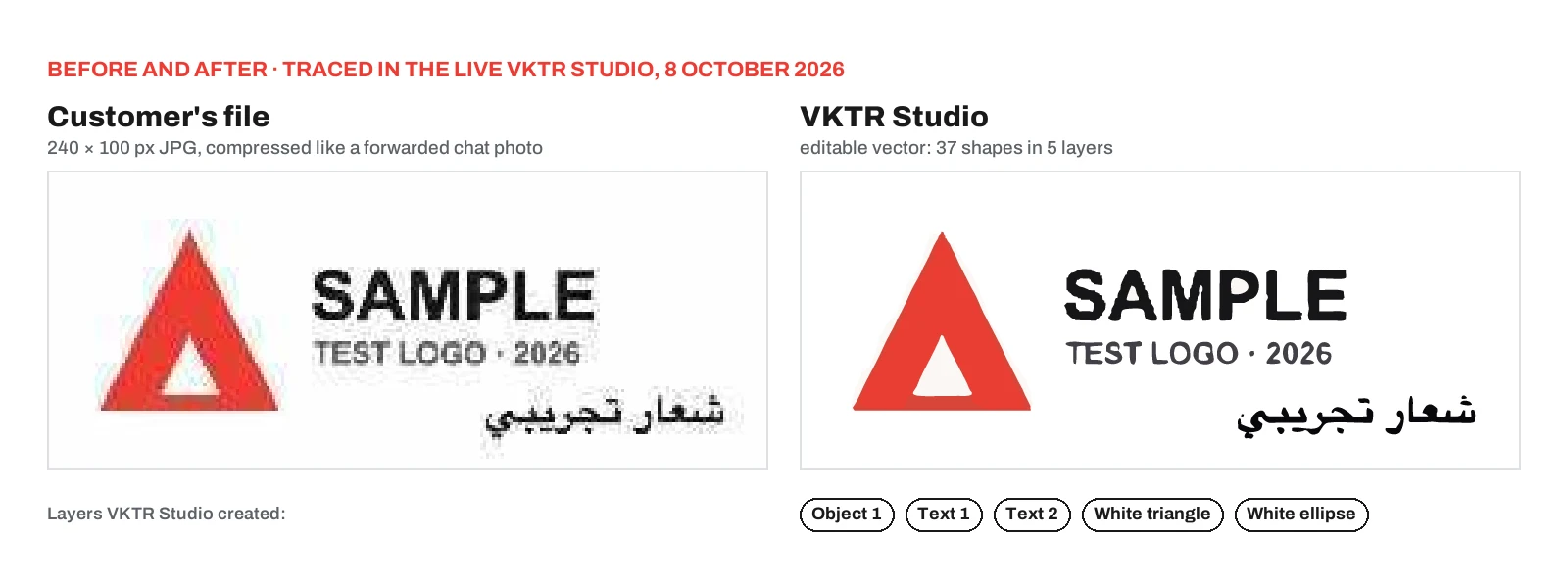
In the test at the top of this page, the Studio ran the JPEG clean-up and the 2× enlargement on our 240 px file before tracing it. The pixel blocks and JPEG noise were gone, but the letter edges came out uneven, as the close-up in the section on blurry lettering shows, so every letter still needed a close look.
Rebuilding a low-resolution logo in VKTR Studio, step by step
Open the file, set the colour count, read the layers, clean up, check every letter, then download at the real width in millimetres. In VKTR Studio, converting, previewing and editing are free with no account; only the download needs a free account and one credit. Free-plan images can be up to 3 MB, and the paid plans take 20 MB.
- Open the file. Open the customer’s file in VKTR Studio by dropping, choosing or pasting a PNG, JPG, WebP or HEIC image. Use the largest, least-forwarded copy you have.
- Set the colours. Auto picks between 2 and 32 flat colours; for a logo, set the number of brand colours, or use black and white for one-ink line art. A plain white page behind the artwork is removed automatically, so it does not become a white shape in the file. White parts inside the logo, like the triangle’s centre in our test, stay as white shapes; on clear or dark surfaces decide whether they print as white ink or are deleted so the surface shows through.
- Read the Layers panel. VKTR groups the artwork by position and colour into background, objects and text, with text split into lines and then words; lettering groups are named Text 1, Text 2 and so on. Our test logo came out as Object 1, Text 1, Text 2, White triangle and White ellipse.
- Clean up. Recolour shapes to the brand’s colour values, select all shapes of one colour at once, delete specks, separate parts, group or ungroup, reduce nodes, and undo anything that goes wrong.
- Check every letter. Compare the result at 100% with the original and the brand guide, and mark any letter that needs retyping or redrawing.
- Download. Set the width in millimetres (1 to 5,000 mm) and download the format the next step needs. Downloading needs a free account, and each file in each format uses one credit, so an SVG and a PDF of the same logo use two. VKTR’s PDF, SVG and EPS files carry RGB colours, so set the brand’s CMYK or spot colours in your design software or RIP before output.
For the same job on a single page, VKTR’s logo converter is where you can turn a low-resolution logo into editable vector shapes. VKTR’s About page is plain about the result: it is editable vector artwork, and lettering, fine lines, colours and size still need checking against what the job asks for.
Blurry lettering in a logo: what tracing fixes and what it cannot
Tracing makes the edges of letters crisp, but it cannot work out what a blurred letter was meant to be. VKTR’s own guidance warns that a letter that was a blur in the image becomes a sharp but wrong letter in the vector. Clear lettering traces well; merged or misshapen letters need retyping in the right font or redrawing, and the customer approves a proof.
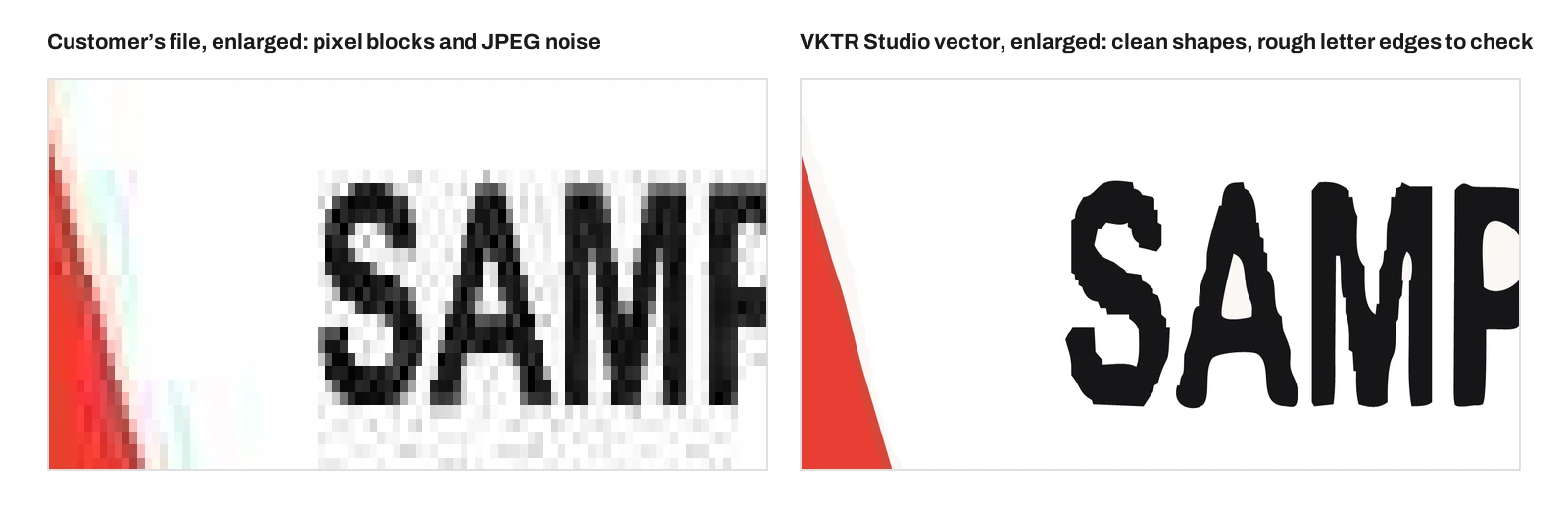
The close-up shows both sides of that. The traced letters are solid shapes with no pixel blocks or JPEG noise, but their edges wander, because a 240 px file did not hold enough information for a smooth S or a straight-sided M. At a small size on a bottle that may pass; on a shop sign it will not. Retype the line in the brand font, or redraw the letters, whenever the edges show at the final size. Retyping a line in the brand font is routine; redrawing damaged letters or reconstructing a logo is designer work, as our guide for new wall-printing businesses also says.
VKTR’s optional editable-text tool helps when the lettering is clear. It reads clear English or Arabic words and can swap the outlines for live text in one of five common system fonts when one matches closely. It does not identify the original font, and editable text downloads as SVG only. For production, keep lettering as shapes, with fonts converted to outlines, as our UV printing guide asks.
Arabic needs extra care. Printed Arabic type, like the line in our test logo, traces into readable shapes, but check every dot and join. Arabic calligraphy known only from a photo or typed text goes to a designer or calligrapher, who returns outlined vector artwork; it is never re-set in a font.
Whatever the fix, send the customer a proof at the final size and get approval in writing before printing. It takes minutes and settles any question about a letter later.
From one vector to each machine: UV flatbed, cylindrical, belt, wall and cutting work
No VKTR file goes onto a machine unchanged. Open the PDF, SVG or EPS in your design software, check the paths and the size, build any white-ink, varnish or raised layer there, and output through the machine’s own RIP and workflow. For a wallPen, export an image at the wall’s real size. Run a test on the actual material before production.
| Format | What VKTR writes | Typical next step |
|---|---|---|
| Vector paths at an exact size in millimetres; for logos and graphics, each top-level element (background, objects, Text 1 and so on) is a PDF layer that Acrobat lists | The usual hand-off to design software and a print workflow | |
| SVG | Vector paths in named groups that Illustrator lists | Editing in a vector editor; the only format that keeps editable text |
| EPS | EPSF-3.0 paths with no transparency and no groups or names | An EPS for older print and sign software |
| DXF | R12 in millimetres, closed polylines, one layer per colour | DXF outlines in millimetres for cutters, lasers and CNC |
No VKTR file embeds an image, and there is no TIFF or PNG download. VKTR checks its EPS and DXF files structurally but says it has not opened them in Illustrator or CorelDRAW, so open and check them in your own software, and test a DXF on scrap material first, as VKTR’s DXF page advises. A short test costs far less than a spoiled batch of bottles.
- UV flatbeds. On DCS UV flatbed printers, the vector goes into your layout at its exact size. VKTR’s shapes can serve as the outline for a white-ink or raised layer, but the operator builds that layer in the design or print workflow; VKTR creates no white, varnish or raised channel.
- Cylindrical printers. On the LSINC PeriOne and PeriQ360, set the logo width in millimetres in VKTR, lay out the wrap in your design software and build colour, white and extra channels as separate layers there; that production file, not the VKTR download, is ripped in Onyx Thrive.
- Belt printers. On the IQDEMY EVO 2500 belt printer, place the vector in your layout and output it through the machine’s Caldera workflow, as you would any other artwork.
- Wall printers. The wallPen E2 app opens JPG, PNG, TIF, PSD and PSB files only, so it never takes a VKTR SVG, PDF or EPS directly. Place the vector at the wall’s real size in a design app such as Adobe Illustrator through PRO TECHnology, then export an image; our wall-printing business guide explains why it standardises on TIFF.
- Cutters, lasers and CNC. Use the DXF, open it in your CAD or laser software, confirm the size and layers, and cut a test piece.
Embroidery: giving the digitiser clean, separated colours
A vector file is not strictly required for embroidery: a digitiser can start from a clean, high-resolution image. A clean vector with flat, separated colours is still the better starting point, and the digitiser then makes the stitch file, such as DST or PES, that the embroidery machine reads. VKTR Studio does not make stitch files; it prepares the artwork the digitiser works from.
Embroidery services say much the same. One supplier’s artwork guide prefers vector artwork but accepts clean PNG files and warns against low-resolution JPGs; a digitising studio takes JPG, PNG, PDF, AI or EPS and returns the machine format the customer names. A blurry logo is the real risk, whatever the format.
- Set the colour count to the number of thread colours, so each thread becomes one flat colour.
- Delete specks and stray fragments that a digitiser would otherwise have to remove.
- Reduce nodes to simplify the outlines.
- Download a layered SVG or PDF, so each colour arrives as a separate shape.
Small text, hairlines and fine gradients may still need simplifying for stitching, and that is the digitiser’s call. PRO TECHnology does not supply embroidery machines; we include this because many merchandise and print businesses hand logos to a digitiser.
Who uses VKTR Studio: Sun Studio and other printing businesses
PRO TECHnology says many of the printing businesses that run machines it supplies have started using VKTR Studio for customer artwork, and that Sun Studio, the group’s print studio in Al Quoz, uses it in its wall-printing work. VKTR’s own published story adds that Sun Studio tested four files, had a call and a demonstration, and now uses a VKTR Enterprise subscription.
Sun Studio has been PRO TECHnology’s production and demonstration centre in Al Quoz since 2011. You can read how Sun Studio tested VKTR Studio before subscribing, and Sun Studio’s own guide to which VKTR file to send for each surface.
For any wallPen operator, the rule follows from the app: a vector is exported as an image at the wall’s real size before it is printed, and photographs for murals stay high-resolution images. Brand owners in the UAE who want a wall printed rather than a file prepared can look at wall printing at Sun Studio.
Our Digital Printing division has supplied and supported printing machines since 2011, and VKTR Studio, from our AI Solutions division, helps prepare the artwork that goes onto them. To see the machines run on real artwork, book a printing demo at Sun Studio in Al Quoz. If you do not own a machine yet, start with how to choose a UV printing machine.
A note on independence: VKTR Studio, Sun Studio and PRO TECHnology belong to the same group, so nothing here is an independent review. Try VKTR on a few of your own files before you rely on it.
Free for life: what a free VKTR Studio account includes
A free VKTR Studio account is free for life in a precise sense: it gets 1 download credit every day for as long as the account is open, with no credit card. Converting, previewing and editing need no account at all. One credit downloads one file in one format, and the daily credit resets at 00:00 UTC without building up.
VKTR’s pricing page lists the plan as free for life with a free account, and VKTR’s own guide to what its free plan covers explains how to use the daily credit. The details that matter in a print shop:
- Downloading needs a free account, opened with an email and password or with Google, and one credit.
- An SVG and a PDF of the same logo use two credits, and downloading the same file again uses another. VKTR’s Terms say a download that fails, or a file that will not open, gets its credit back.
- The free credit resets at 00:00 UTC, which is 04:00 in the UAE, and an unused credit is not added to the next day.
- Free-plan images go up to 3 MB; Starter and Enterprise take 20 MB.
- One free account per person or business. Opening extra accounts to collect more free credits is not allowed.
For daily production, the paid plans as listed on 8 October 2026 are Starter at US$7 a month for 40 credits with no daily limit, and Enterprise at US$29 a month for unlimited downloads for one person under fair use; sharing an account is not normal use. Prices include VAT where it applies, payment is through Stripe, and the pricing page has the current figures.
This VKTR offer is separate from the free-for-life software updates on wallPen machines PRO TECHnology supplies: one covers a VKTR account, the other covers machine software. VKTR’s Terms add that the free service is offered as it is.
Sources
We checked VKTR Studio’s live Studio, pricing page, Terms, free-plan guide and the converter and insight pages linked above, and VKTR’s llms.txt at vktrstudio.com/llms.txt, on 8 October 2026, including the free plan, credits, plan limits, export formats and the operator line. We also checked Sun Studio’s published guides and two embroidery providers’ artwork pages that day. Prices are as listed on 8 October 2026 and can change. The test logo in the images is a made-up mark that PRO TECHnology traced in the live VKTR Studio on 8 October 2026, not a customer job. VKTR Studio, Sun Studio and PRO TECHnology belong to the same group.
- VKTR Studio: Terms of Service (operator, accounts, credits and plans), checked 8 October 2026
- VTracer, the open-source raster-to-vector tracer by Vision Cortex
- Sun Studio: corporate gifting guide (low-resolution logos from presentations)
- Sun Studio: wall murals for villas and homes (photos re-compressed by chat apps)
- Exclaim: logo requirements for embroidery (vector preferred, clean PNG accepted)
- Digit-IT: how its embroidery digitising service works (artwork in, DST or PES out)
Frequently asked questions
How do you fix a pixelated or blurry logo for printing?
Ask for the original file first. If none exists and the artwork is a logo, lettering or a flat graphic, trace it into vector shapes, for example in VKTR Studio, so its edges stay sharp at any size, then check every letter and colour against the brand. On a very small file the outlines can still come out uneven and need retyping or redrawing. A photograph cannot be fixed this way: get the original, enlarge it with an upscaler or print it smaller. Tracing cannot add detail the file never had.
How can you tell that a customer’s logo needs rebuilding as a vector?
View it at 100% at the final print size. Stair-stepped curves, soft edges and square JPEG blocks around the letters mean it needs rebuilding. For a quick number, divide the pixel width by the print width in inches: a 600 px logo printed 20 cm wide is about 76 PPI. A PDF, EPS or SVG can still hold a pixel image, so check it in a vector editor’s outline view.
What should you ask for when a customer’s logo arrives as a WhatsApp image or a screenshot?
Ask for the original file from their designer or brand guide, such as AI, PDF, EPS or SVG, or the largest original image, sent as a file or document rather than as a photo. Chat apps compress pictures, and each time a picture is saved and sent on it can be compressed again. If no original exists, rebuild the logo as vector artwork and get the customer’s written approval of a proof.
Can blurry text in a customer’s logo be made sharp?
The edges can, but the letters may not be right. A letter that was a blur traces sharp but wrong, so merged or misshapen letters need retyping in the correct font or redrawing. VKTR Studio’s editable-text option reads clear English or Arabic lettering, can swap it for one of five system fonts when one matches closely, and downloads as SVG only; it does not identify the original font. Keep text as outlines for print.
Does VKTR Studio use AI to redraw a logo?
No. It was built by PRO TECHnology’s AI Solutions division, but it traces the shapes in the image with a VTracer-based vector-tracing algorithm plus its own element and scene separation. It is not a generative AI model and does not draw a new logo. In browsers with WebGPU, small on-device models first reduce JPEG damage or grain, and enlarge opaque images whose longer side is 400 px or less 2×.
Do you need a vector file for embroidery?
Not strictly. A digitiser can start from a clean, high-resolution image, but a clean vector with flat, separated colours is the better starting point. The digitiser then makes the stitch file, such as DST or PES, that the embroidery machine reads. Small text and hairlines may still need simplifying for stitching.
Can VKTR Studio make an embroidery file such as DST or PES?
No. VKTR Studio makes editable vector artwork as SVG, PDF, EPS or DXF. A digitiser or digitising software turns that artwork into stitches. VKTR helps by giving them flat, separated colour shapes, with the colour count set to match the thread colours.
Can a VKTR Studio file go straight into a wallPen or a printer’s RIP?
Not unchanged. The wallPen app opens JPG, PNG, TIF, PSD and PSB files, so place the vector at the wall’s real size in a design app and export an image such as a TIFF. For UV flatbed, cylindrical and belt printers, open the PDF or EPS in your design software, build any white-ink or raised layer there, output through the machine’s own RIP and print a test first.
What does VKTR Studio’s free-for-life account give a print shop?
A free account, opened without a credit card, gets 1 download credit every day for as long as the account is open: enough for one customer file a day in one format, such as an SVG or a PDF. Unused credits do not build up. Free-plan images go up to 3 MB, and each person or business may open one free account. Converting, previewing and editing need no account at all, so you can judge a result before signing up.
Who makes VKTR Studio, and is it related to vktr.com?
VKTR Studio is built and run by PRO TECHnology’s AI Solutions division in Dubai. The legal entity is PRO TECHNOLOGY CO. (L.L.C.), established in 1998. It is not related to vktr.com, which is a publication about enterprise AI.
كيف تعالج المطابع شعارات العملاء منخفضة الدقة باستخدام VKTR Studio
في تجربتنا، تصل شعارات كثيرة إلى المطبعة بدقة منخفضة: صورة أُعيد إرسالها عبر واتساب، أو لقطة شاشة، أو شعار مأخوذ من عرض تقديمي. وأداة VKTR Studio، التي طوّرها وأطلقها قسم حلول الذكاء الاصطناعي في PRO TECHnology بدبي عام 2026، تتتبّع الأشكال الموجودة في الصورة لتحوّلها إلى رسم متّجه (فيكتور) قابل للتعديل، تُنزَّل ملفاته بصيغ SVG وPDF وEPS وDXF بعرض يُحدَّد بالمليمتر. ويجري التحويل داخل المتصفح دون رفع الصور، والأداة ليست نموذج ذكاء اصطناعي توليديًا ولا ترسم شعارًا جديدًا.
تحويل الشعار منخفض الدقة إلى ملف فيكتور للطباعة يمنح حوافّ حادّة بلا بكسلات بأي مقاس، وإن بقيت حواف الحروف المأخوذة من ملف صغير جدًا غير منتظمة، لكنه لا يُعيد تفاصيل لم تكن في الملف أصلًا: الحرف الذي كان مشوّشًا يظهر حادًّا لكنه خاطئ، فيجب مراجعة كل حرف، وإعادة كتابة الحروف المشوّهة بالخط الصحيح أو إعادة رسمها، مع موافقة العميل الخطية على البروفة. أما الصور الفوتوغرافية فتبقى صورًا، والخط العربي المأخوذ من صورة يحتاج إلى مصمم أو خطاط. ولا يذهب أي ملف من VKTR إلى الآلة مباشرةً: يُفتح في برنامج التصميم وتُبنى فيه طبقات الحبر الأبيض أو الطباعة البارزة، ويُصدَّر لجهاز wallPen صورةً بالمقاس الحقيقي للجدار لأن تطبيقه يفتح ملفات JPG وPNG وTIF وPSD وPSB، كما لا تصنع الأداة ملفات تطريز مثل DST أو PES.
الحساب المجاني في VKTR Studio «مجاني مدى الحياة» بمعنى محدد: تنزيل ملف واحد بصيغة واحدة يوميًا ما دام الحساب مفتوحًا، دون بطاقة ائتمان، وحساب مجاني واحد لكل شخص أو منشأة، أما التحويل والمعاينة والتعديل فلا تحتاج إلى حساب أصلًا. وتقول PRO TECHnology إن كثيرًا من منشآت الطباعة التي تشغّل الآلات التي توفّرها بدأت تستخدم الأداة، وإن صن ستوديو، الشركة الشقيقة في المجموعة نفسها بدبي، تستخدمها في أعمال الطباعة على الجدران. وبحسب القصة التي نشرتها VKTR، جرّبت صن ستوديو أربعة ملفات، ثم أجرت مكالمة وحضرت عرضًا توضيحيًا، وهي تستخدم الآن اشتراك VKTR Enterprise.
Try it on your next customer file
Open a customer’s logo in VKTR Studio and judge the result before you create an account; a free account then downloads one file a day. For machines, artwork workflows and printing demos at Sun Studio in Al Quoz, talk to our printing team.