
Adobe for Education in the UAE: what students, schools and universities get, and who is eligible
Published · PRO TECHnology Enterprise IT
Adobe for Education is the Adobe software that accredited schools, colleges and universities license for their staff and students: Creative Cloud for education, Acrobat, Adobe Express for Education and the Firefly features inside them, plus Substance 3D in higher education. The institution holds the licences and manages them in the Adobe Admin Console. Students and teachers can instead buy Creative Cloud Pro for students and teachers directly from Adobe, which checks their eligibility. Institutions usually buy through an authorised Adobe reseller such as PRO TECHnology in Dubai, which prepares a quotation for each institution. Adobe’s pages were checked on 6 November 2026.
- Adobe pages checked
- 6 November 2026
- Eligible institutions
- Accredited K-12 schools, colleges and universities
- Two routes
- Institutions usually through an authorised reseller; students and teachers from Adobe directly
- Supplier
- PRO TECHnology, Dubai: authorised Adobe reseller

Key takeaways
- Adobe for Education licences belong to the institution and are managed in its Admin Console; the student and teacher plan is a separate purchase on Adobe’s own website, with eligibility checked by Adobe.
- Accredited K-12 schools, colleges and universities qualify; a training centre without accreditation buys commercial licences instead.
- Free options are limited: Adobe names Student Spaces, Adobe Express and Adobe Firefly as free tools for students; K-12 schools get Adobe Express for Education at no cost; higher-education students and teachers can claim a 12-month Substance 3D licence; Acrobat Reader is free. Creative Cloud itself is paid for, by the institution or the individual.
- Named-user licences follow people and shared device licences stay with lab computers; minimum orders, terms and paperwork are in the full buying guide.
- Primary and secondary schools must sign every Adobe user in with a school-provisioned Federated ID or Enterprise ID; personal Adobe IDs are not allowed.
- Adobe publishes no UAE price list for institutional education licences, so PRO TECHnology prepares each quotation from the institution’s head counts, labs and directory.
What Adobe for Education includes for UAE schools and universities
Adobe for Education is a set of institutional licences: Creative Cloud for education, Acrobat, Adobe Express for Education and, for colleges and universities, Substance 3D, with Adobe Firefly’s generative features built in. Adobe says the institutional plan “is purchased by a school or university and managed centrally by IT administrators”. Company licensing is a separate subject, covered on our pages about Adobe licensing through a UAE reseller and Creative Cloud for teams.
| Product | K-12 schools | Colleges and universities |
|---|---|---|
| Creative Cloud for education | Named-user licences that include Adobe Express and Acrobat Pro, with UAE availability confirmed per quotation; shared device licences for labs | Named-user licences that also include Adobe Express, Acrobat Pro and Substance 3D, with two deployments per licence; shared device licences; the Student License Pack |
| Acrobat | Acrobat Pro inside the named-user licence; Acrobat Pro, AI Assistant for Acrobat and Acrobat Sign can also be bought alone on higher-education terms | Acrobat Pro inside the named-user licence; Adobe promotes Acrobat Studio, with AI Assistant and Student Spaces, to faculty |
| Adobe Express for Education | Free for schools and districts; the school’s IT administrator sets it up | Comes automatically with Adobe’s full Creative Cloud plan for higher education |
| Firefly generative AI | Firefly features in Adobe Express, available by default; administrators can switch them off | Firefly features in named-user licences; Content Credentials on AI output |
| Substance 3D | Not listed in Adobe’s K-12 named-user licence; the free education licence excludes high schools | In the named-user licence; separately, a free 12-month licence for individual students and teachers |
Creative Cloud for education
Creative Cloud for education puts Adobe’s desktop apps, such as Photoshop, Illustrator and Adobe Premiere, in front of students and staff, with the web and mobile versions added on a named-user licence. The licence belongs to the institution, not the person. Administrators decide who sees which apps, so a media class can have the video tools while younger pupils stay on Adobe Express. Adobe says both its student plan and its institutional plan come with “responsible AI features from Adobe Firefly”.
Acrobat for schools and universities
Every Creative Cloud named-user licence for education carries Acrobat Pro. A school office that only needs PDF editing and e-signatures has a second route: Adobe lets K-12 organisations buy Acrobat Pro, AI Assistant for Acrobat and Acrobat Sign on higher-education terms, without the creative apps. For universities, Adobe’s higher-education page says Acrobat Studio, “with tools like AI Assistant and Student Spaces”, helps faculty, and describes Student Spaces as an AI study companion that turns notes into quizzes. Acrobat Reader remains free. Plans for companies are on our page about Adobe Acrobat for UAE organisations.
What is Adobe Express for Education?
Adobe describes Adobe Express for Education as a free offer for schools and districts at K-12 level, covering graphics, photos, presentations, web pages and videos. Its help pages say IT administrators “globally” can roll it out through an onboarding wizard, signed in as a Global Admin of Microsoft 365 or a Super Admin of Google Workspace for Education. Adobe’s product page says the free K-12 licence unlocks Adobe Express Premium at no cost, with premium assets, student-friendly Adobe Stock images, curriculum-aligned templates, image and video safe search with content filtering, class codes, and no paywalls, ads or pop-ups. It adds that schools own the accounts, keep admin rights and can set up single sign-on with existing school IDs.
On availability, Adobe’s product page names no country limit for the school offer. The one limit Adobe states is on its K-12 page: teacher-created classroom accounts are for teachers in the US who have Google Workspace for Education accounts.
Firefly inside Adobe’s education products
Adobe’s education licensing lists no separate Firefly product: Firefly reaches schools inside Adobe Express and Creative Cloud. Adobe’s help article on Firefly for K-12 lists Firefly-powered features such as Generate image, Generate text effects, Generate template, Generative fill and a feature that creates colouring pages. They are available to educators and students by default. An administrator turns them off, or back on, by editing a product profile in the Admin Console, and the switch covers every Firefly feature in that profile, not one feature at a time. In higher education, Adobe’s page lists Content Credentials, “authorship transparency on every AI-generated file”, and “no training on student content”.
Substance 3D in higher education
Substance 3D is Adobe’s 3D family: Painter, Designer, Sampler, Stager and Modeler. Adobe includes it in the higher-education named-user licence. Separately, Adobe gives students and teachers at higher-education institutions a free Substance 3D licence, valid for 12 months and renewable while they stay eligible. It is for personal learning only, not for classrooms or labs, and Adobe says high-school students and teachers do not qualify. For classroom and lab use, Adobe points to the Substance 3D apps inside Creative Cloud for education.
Who is eligible, and the two licence types in brief
Education licences are for accredited institutions and the people who study or work in them. Adobe’s rules for its EMEA region admit accredited K-12 schools, colleges and universities and exclude training centres without accreditation, which buy commercial licences instead; PRO TECHnology supplies those too. Proof of status, such as a regulator licence or accreditation, comes with the request for a quotation.
Named-user licensing ties each licence to one person. That person gets the desktop, web and mobile apps with cloud storage and services, on campus and at home, and in higher education one licence covers two deployments. It fits teachers, staff and any student who needs Adobe outside a lab. When the person leaves, the institution reclaims the licence. For primary and secondary schools, Adobe does not name the UAE among the regions where it lists K-12 named-user licences, so each quotation confirms availability.
Shared device licensing ties each licence to one computer in a lab, library or classroom. Users the institution authorises sign in on that machine and use the desktop apps installed there; services, Firefly and fonts among them, need a user licence. Most institutions mix the two: named-user for people, shared device for rooms. Minimum orders, the Student License Pack and subscription terms are covered in the full buying guide.
Adobe for students and teachers: buying from Adobe or using the institution’s licence
Most searches for “Adobe for students” mean the plan Adobe sells to individuals: Creative Cloud Pro for students and teachers, sold on Adobe’s own website with Adobe running the eligibility check. No reseller is involved. Adobe opens the plan to current students aged 13 and older at accredited institutions, from primary and secondary schools and home-school programmes to colleges, universities and qualifying online courses, and to educators and staff employed by such institutions. The purchaser must be at least 18 and pay by credit card. Adobe may ask for a school-issued email address or documents from the current academic year, such as a student ID or class schedule, or a teacher ID, pay slip or offer letter. Adobe lists more than 20 apps, Adobe Express Premium, 4,000 monthly generative credits and 100GB of cloud storage. The UAE price is on Adobe’s page, so we do not repeat it.
Free use is narrower than many searches assume. Adobe’s education page names three free tools students can start with: Student Spaces, which makes flashcards and quizzes from notes, Adobe Express and Adobe Firefly. A K-12 school pays nothing for Adobe Express for Education, so its pupils use it free. The free Substance 3D licence is for higher education only, and Acrobat Reader is free. Creative Cloud itself is paid for: either the person buys the student and teacher plan, or the institution licenses it. Adobe’s student page notes that some colleges and universities give students Creative Cloud Pro at no cost through institution-wide licensing.
That institutional route is what “Adobe for schools” and “Adobe for universities” usually mean. The institution buys through a reseller, assigns licences to students and staff, who sign in with their school or university identity, and reclaims them when people leave. The student buys nothing, and the institution keeps control of accounts and files. Teachers have the same two options: a named-user licence from the school, which Adobe’s education buying page says includes work-at-home licensing for educators, or the individual plan bought personally.
Why K-12 schools sign in with Federated or Enterprise IDs
Adobe does not let primary and secondary schools deploy its products with personal Adobe IDs. Each user, shared device users included, must hold a school-provisioned Federated ID or Enterprise ID. With a Federated ID, the pupil signs in through the school’s identity provider, so one account opens email, learning apps and Adobe. An Enterprise ID is an Adobe account that the school itself creates and manages in the Admin Console. Adobe treats every K-12 licence as an enterprise licence with single sign-on support. In higher education, teams licences cannot hold Federated or Enterprise IDs, so a university’s identity plans settle which licence type it can use.
That makes the directory the first job. Adobe’s K-12 page says administrators can connect and sync the Admin Console with Google Workspace for Education or Microsoft Azure and then enable federated logins, and Adobe’s help pages also describe roster sync through Clever or ClassLink. Licences can then go out by group membership, on request through a URL or through a sign-in rule, rather than one pupil at a time. The four decisions to settle before anyone receives a licence are listed in the full buying guide.
What the Admin Console gives a school IT team
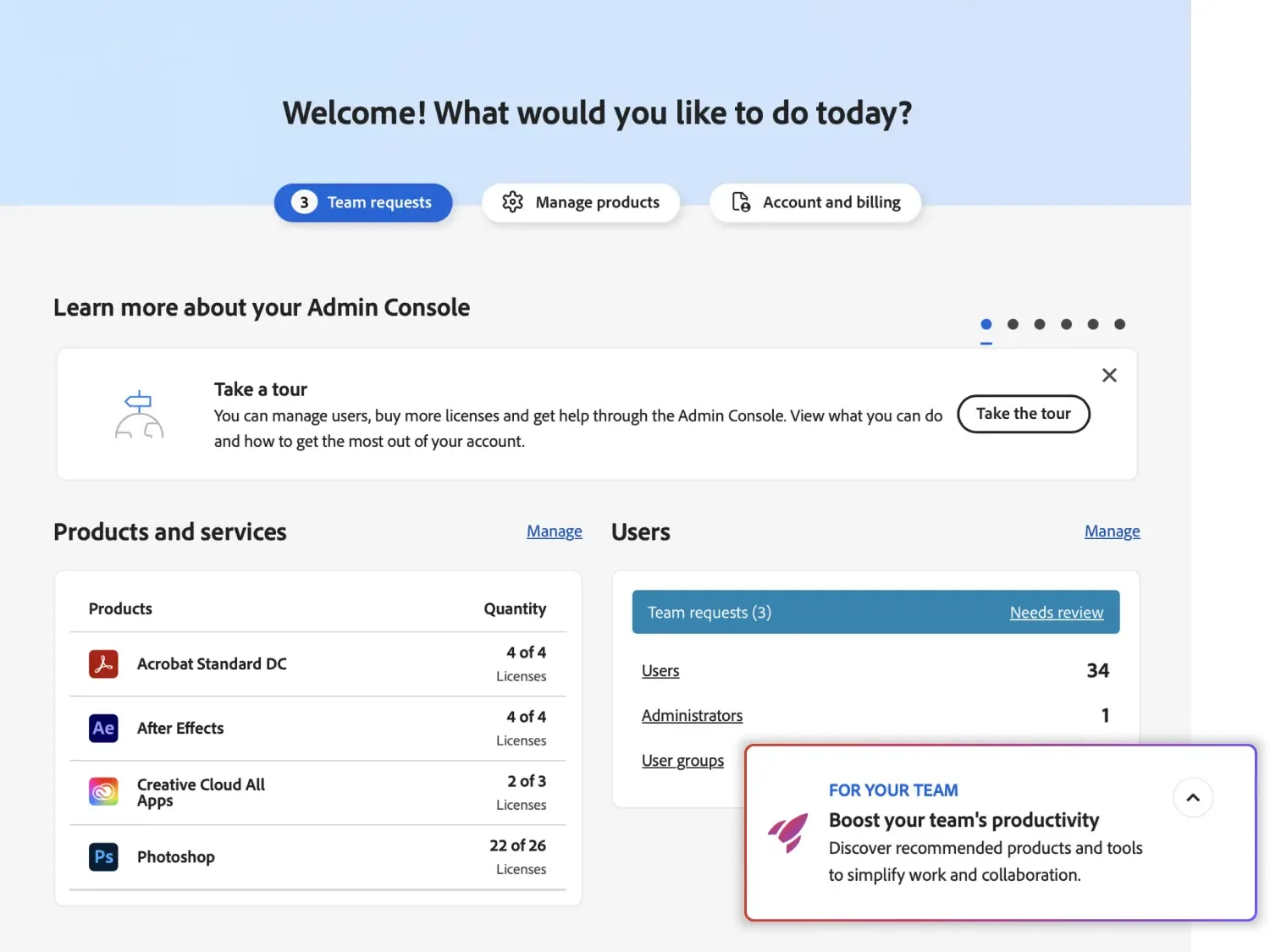
Adobe’s K-12 page says Adobe Express and Creative Cloud come with an Admin Console for adding or deleting users and assigning licences, and its higher-education page lists cost and access controls covering licences, spend and permissions in one console. The parts a school IT team uses most:
- Users and groups: add people one by one, in bulk or through directory sync, and remove leavers. On removal, the console offers to transfer the person’s files now, keep them for a later transfer, or delete them.
- Product profiles: a profile links a product to a set of users, so one group can have Creative Cloud and another only Adobe Express. Adding someone to a profile grants access but installs nothing.
- Firefly switch: each product profile carries its own Firefly setting, so generative features can be on for one group and off for another.
- Packages: installers that set which apps, versions and settings reach each computer, including the shared device package for a lab.
- Account: shows the current reseller. A reseller may join as an extra administrator but cannot become the primary one, so the institution keeps control of its account.
Hypothetical example. A Dubai secondary school syncs the Admin Console with its Microsoft directory. Pupils in Years 7 to 11 sit in an Adobe Express for Education profile with Firefly switched off. Once Adobe confirms K-12 named-user licences for the school, media students in Years 12 and 13 sit in a second profile with Creative Cloud named-user licences and Firefly on, and the media lab’s computers run a shared device package. When a year group leaves, its licences pass to the next intake.
The console builds packages but does not push them to school computers. Adobe names deployment tools such as Microsoft Intune, Jamf Pro and Munki for that, which is device-management work covered in our guide to managing school devices in the UAE. Laptops kept on a LapCabby charging trolley and shared between classes are shared machines, so they suit shared device licences; PRO TECHnology supplies, delivers and installs those trolleys and trains staff to use them.
ADEK and KHDA schools, and UAE universities
Abu Dhabi’s private and charter schools work under the ADEK School Digital Policy (version 1.1, September 2024). Clause 5.5 asks each school to assess the IT providers and products it selects, and clause 6.3 asks for safeguards such as single sign-on for external learning applications. School-owned Adobe licences signed in with school IDs fit that model. Adobe’s K-12 page, however, frames its privacy statement around US student data privacy law, so a school should still record Adobe in its own clause 5.5 assessment. Our ADEK School Digital Policy guide explains the IT clauses; PRO TECHnology supplies licences and does not audit compliance with the policy.
In Dubai, KHDA licenses private schools, and that licence is the eligibility evidence an Adobe quotation starts from. Our ADEK guide found no KHDA document with an IT control list like ADEK’s as of 8 October 2026, so Dubai schools work to their own policies.
Universities and colleges buy on higher-education terms, through VIP Marketplace or, for a large institution, Adobe’s Enterprise Term License Agreement (ETLA); the full buying guide compares the two. Adobe also publishes its UAE plans page in Arabic, with tabs for students and teachers and for schools and universities.
Getting an Adobe for Education quotation from PRO TECHnology
PRO TECHnology is an authorised Adobe reseller in Dubai and an Adobe Education partner, with a dealership agreement with Adobe dating from 2004. We quote accredited institutions across the UAE. Our Adobe services are onboarding and Admin Console set-up, not training in the apps themselves. Adobe publishes no UAE price list for institutional education licences, and its VIP Marketplace page says that on reseller orders the reseller determines the price, so each quotation is prepared for one institution.
- Tell us the institution, its regulator licence or accreditation, and whether the order covers one campus or several.
- Count people and rooms: teachers and staff, students who each need a licence, and the shared computers in every lab, library and classroom.
- Name your directory (Google Workspace for Education, Microsoft 365 or another identity provider) and say whether single sign-on already runs.
- Give the start date of your academic year, so the subscription term can follow it.
- Receive a written quotation. On order you get a UAE tax invoice, and the Admin Console is set up with your own administrators.
If another reseller holds your Adobe account, or you started on the free Adobe Express for K-12 offer and now want Creative Cloud, Adobe’s documentation makes a reseller change the first step, using your VIP number; the full buying guide explains it. Use the contact page, call +971 4 343 5501, or book a demo call.
Sources
Adobe’s education, buying-programme and product pages listed below were checked on 6 November 2026. Adobe’s help pages on helpx.adobe.com were read in a browser on the same day. Adobe shows UAE prices for individual plans on adobe.com; nothing on this page is a price. Adobe MAX runs online on 10 and 11 November 2026, and product line-ups may change after it. This page is a summary of Adobe’s published terms, not legal advice.
- Adobe: Adobe for Education (institutional plan managed centrally by IT administrators; free tools for students)
- Adobe: K-12 page (Admin Console sync, federated logins, classroom tools, US teacher classroom accounts, privacy wording)
- Adobe: higher education page (Acrobat Studio, Student Spaces, Content Credentials, no training on student content)
- Adobe: Creative Cloud Pro for students and teachers (eligibility and verification)
- Adobe: Adobe Express for Education product page
- Adobe help: Adobe Express for Education overview (onboarding wizard, access for higher education)
- Adobe help: Firefly generative AI features for K-12 (feature list, default setting, product profile switch, roster sync)
- Adobe help: primary and secondary school offerings (identity requirements, licence types)
- Adobe help: higher-education offerings (deployments, Student License Pack)
- Adobe help: key licensing concepts for education deployments (licence contents, enterprise and teams licences, reseller change)
- Adobe help: product profiles
- Adobe help: removing users and their files
- Adobe: Substance 3D for students and teachers
- Adobe: how to buy for education (VIP Marketplace terms and the ETLA)
- Adobe: VIP Marketplace buying programme (reseller pricing)
- Adobe: Acrobat for business (customer content and generative AI training)
- Adobe for Business: Adobe’s approach to Firefly (training data)
- Adobe: Firefly product page and plans (free plan)
- Adobe: Creative Cloud plans for the UAE in Arabic
Frequently asked questions
Is Adobe free for students in the UAE?
Only in part. Adobe names Student Spaces, Adobe Express and Adobe Firefly as free tools students can start with. Adobe Express for Education costs a K-12 school nothing, so pupils at a school that has set it up use it free. Higher-education students can claim a free 12-month Substance 3D licence for personal learning, and Acrobat Reader is free. Creative Cloud is not free: a student either buys Adobe’s student and teacher plan, which Adobe sells directly after checking eligibility, or uses a licence the school or university assigns. Adobe shows the UAE student price on its own site.
Is Adobe Creative Cloud free for teachers?
Not unless the school provides it. Adobe sells Creative Cloud Pro for students and teachers to educators and staff employed by accredited institutions, and may ask for a school email address or a teacher ID, pay slip or offer letter. The alternative is a named-user licence bought by the school, and Adobe’s education buying page includes work-at-home licensing for educators. Adobe Express for Education is free for schools and teachers; Adobe’s K-12 page limits teacher-created classroom accounts to US teachers with Google Workspace for Education, and a school-wide set-up is done by the school’s IT administrator.
Do students and universities get Substance 3D through Adobe for Education?
In higher education, yes. Adobe includes the Substance 3D apps, Painter, Designer, Sampler, Stager and Modeler, in the higher-education named-user licence. Separately, students and teachers at higher-education institutions can claim a free Substance 3D licence for 12 months, renewable while they stay eligible, for personal learning only and not for classrooms or labs. Adobe says high-school students and teachers do not qualify, and its K-12 named-user licence does not list Substance 3D. For lab use, Adobe points to the Substance 3D apps inside Creative Cloud for education.
What do K-12 pupils and teachers get with Adobe Express for Education?
Tools for making graphics, photos, presentations, web pages and videos. Adobe’s product page says the free K-12 licence unlocks Adobe Express Premium at no cost, with premium assets, student-friendly Adobe Stock images, curriculum-aligned templates, image and video safe search with content filtering, class codes, and no paywalls, ads or pop-ups. The school owns the accounts and keeps admin rights, and Firefly features can be switched off for a group of users. Colleges and universities receive Adobe Express for Education with Adobe’s full Creative Cloud plan for higher education.
How much is Adobe for universities?
Adobe publishes no UAE price list for institutional licences, so the cost depends on structure rather than a list figure. Under VIP Marketplace a university buys named-user, Student License Pack and shared device licences, with discount levels that rise as it buys more and terms from one year up to four years, including an 18-month option. A large institution may instead take a three-year Enterprise Term License Agreement based on full-time-equivalent count. Adobe says the reseller sets the price on reseller orders, so each quotation is prepared for the institution.
Does Adobe use student work to train its generative AI?
Adobe’s higher-education page lists “no training on student content” and says the institution’s data stays its own. Adobe’s Acrobat business page says Acrobat does not use customer content to train generative AI models, and Adobe says its current Firefly models were trained on licensed and public-domain content, not on subscribers’ personal content. These are Adobe’s statements as checked on 6 November 2026, and this answer is a summary, not legal advice. An institution that needs contractual wording should ask for Adobe’s current terms and record them in its vendor assessment.
Can a school switch off Firefly generative AI for its students?
Yes. Adobe’s help article on Firefly for K-12 says the Firefly features in Adobe Express are available to educators and students by default and that administrators can turn them off, or back on, by editing a product profile in the Admin Console. The switch covers all Firefly features in that profile rather than single features, but different groups can sit in different profiles. A shared device licence on its own gives no Firefly features, because it covers desktop apps only; Adobe says a named-user or Adobe Express licence is needed for them.
What happens to a student’s Adobe licence when they leave the school?
The licence stays with the institution. The school owns a named-user licence and only assigns it to a pupil, so an administrator removes the leaver in the Admin Console and gives the licence to someone else. The console asks whether the person’s files should be transferred now, kept for a later transfer or deleted, so plan any file hand-over before the end of term. A student who leaves and wants to keep using the apps buys a personal plan from Adobe.
Which classroom tools does Adobe Express for Education work with?
Adobe’s K-12 page shows Google Classroom, Google Drive, Microsoft 365, Canvas, Clever, ClassLink and Wakelet among the classroom tools Adobe Express works with. Adobe’s help pages also describe roster sync through Clever or ClassLink, and the K-12 page says administrators can sync the Admin Console with Google Workspace for Education or Microsoft Azure, so pupils sign in with their existing school account. Identity rules and the set-up decisions are covered in the full buying guide on this site.
Ask for an Adobe for Education quotation
Send your institution’s licence or accreditation, your numbers of teachers, students and lab computers, and the directory you use. We confirm eligibility and the offer that applies, then send a written quotation.