
LaCie 2big Dock: A 2-Bay Thunderbolt RAID, Card Reader and Desk Hub for UAE Photo and Video Studios
Published · PRO TECHnology Distribution & Retail
The LaCie 2big Dock is a 2-bay Thunderbolt RAID with a card reader, suited to UAE photo and video desks: CFexpress Type B, CFast 2.0 and SD slots, a two-disk hardware RAID of up to 60TB and a Thunderbolt 3 desk hub in one enclosure. Set to RAID 1, it keeps the work available through a single drive failure.
- Capacity
- 16TB to 60TB on two IronWolf Pro drives
- Rated speed
- Up to 550MB/s, according to LaCie
- Card slots
- CFexpress Type B, CFast 2.0 and SD
- Desk hub
- Thunderbolt 3 daisy-chain, DisplayPort 1.4, USB-A
Key takeaways
- According to LaCie, a Seagate brand, the 2big Dock combines a two-disk hardware RAID of up to 60TB, CFexpress Type B, CFast 2.0 and SD card slots, and a Thunderbolt 3 desk hub.
- LaCie rates the 2big Dock at up to 550MB/s, or 4.4Gb/s, so Thunderbolt matters more for monitors and daisy-chaining than for disk speed; LaCie’s manual adds up to 45W of laptop charging, or 30W with a device daisy-chained.
- LaCie ships every 2big Dock as RAID 0; in RAID 1 usable space halves, from 8TB on the 16TB model to 30TB on the 60TB model.
- LaCie says a failed 2big Dock drive can be hot-swapped without powering down; in RAID 1 the drive LEDs blink red and blue while the mirror resynchronises, and the storage stays usable.
- At LaCie’s rated 550MB/s, filling a 60TB 2big Dock takes at least 30.3 hours in RAID 0; its 30TB RAID 1 volume takes at least 15.2 hours, and longer in practice.
What is the LaCie 2big Dock?
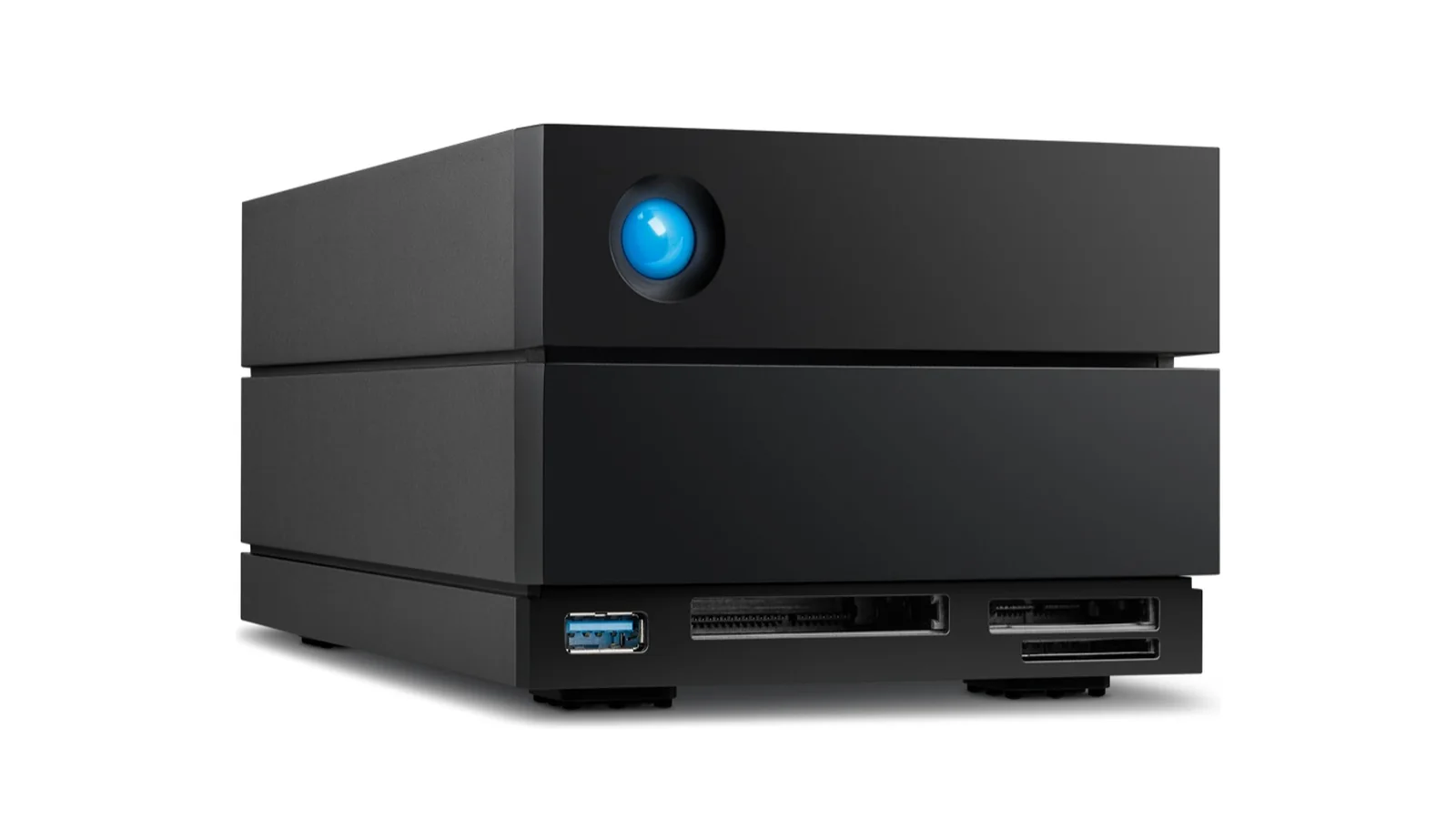
The LaCie 2big Dock, from Seagate’s LaCie brand, is a 2-bay Thunderbolt RAID with a built-in card reader: a desktop two-disk hardware RAID of up to 60TB, rated by LaCie at up to 550MB/s, that doubles as a Thunderbolt 3 dock. Its front panel reads CFexpress Type B, CFast 2.0 and SD cards, and it adds DisplayPort 1.4 output.
In the UAE and across the GCC, the 2big Dock suits photographers back from a shoot, DITs at base, in-house content teams and single-editor video or podcast desks. A post house that needs eight bays and parity RAID on one heavy edit or finishing workstation is better served by the LaCie 8big Pro5 eight-bay Thunderbolt 5 RAID; the wider range is on our LaCie professional storage page for the UAE.
LaCie 2big Dock specifications
| Specification | LaCie 2big Dock |
|---|---|
| Capacities | 16, 20, 28, 32, 36, 40, 48 and 60TB |
| Rated speed | Up to 550MB/s |
| RAID modes | RAID 0, RAID 1, JBOD; ships as RAID 0, exFAT |
| Drives | Two hot-swappable IronWolf Pro drives |
| Interface | 2 × Thunderbolt 3 (up to 40Gb/s): one host port to the computer, one peripheral port for daisy-chaining up to five Thunderbolt devices |
| Works with | USB 40, 20, 10 and 5Gbps; Thunderbolt 5, 4 and 3 |
| Card slots | CFexpress Type B, CFast 2.0, SD |
| Hub port | USB 3.2 Gen 2 Type-A, 7.5W charging |
| Display | DisplayPort 1.4 plus Thunderbolt: two 4K or one 8K (manual: one 5K); the computer must support DisplayPort 1.4 |
| Laptop charging | 45W, or 30W with a daisy-chained device |
| Systems | Most Windows and macOS systems; iPad with USB-C (see lacie.com/os) |
| Footprint | 217 × 118 mm |
| Weight | 3.782 to 3.933 kg by capacity |
| Warranty | 5-year limited; Rescue Data Recovery Services, not in all countries |
| In the box | Power supply, Thunderbolt 3 (40Gb/s) cable, Quick Install Guide, a two-month Adobe Creative Cloud Pro trial (terms apply) and Rescue (not in all countries); Seagate’s Middle East page lists a one-month Adobe offer instead, so confirm the current offer when ordering |
| Design | Neil Poulton |
Source: DS2100.4-2508US. JBOD, factory setup, port roles, charging, hub power, 5K display, DisplayPort 1.4 host note: user manual.
Capacities and model numbers
| Capacity | Model number |
|---|---|
| 16TB | STLG16000400 |
| 20TB | STLG20000400 |
| 28TB | STLG28000400 |
| 32TB | STLG32000400 |
| 36TB | STLG36000400 |
| 40TB | STLG40000400 |
| 48TB | STLG48000400 |
| 60TB | STLG60000400 |
Source: DS2100.4-2508US. All eight are black.
Three jobs in one box: card reader, 2-bay RAID and desk hub
The 2big Dock is a Thunderbolt dock with storage built in, replacing three desk boxes:
- Ingest station: a CFexpress Type B card reader dock with CFast 2.0 and SD slots and a USB-A port, in place of a separate reader.
- Protected storage: two IronWolf Pro drives in hot-swappable trays; switch the factory RAID 0 to hardware RAID 1 at setup, in place of a single-disk drive.
- Desk hub: DisplayPort 1.4 plus Thunderbolt for two 4K monitors or one 8K where the computer supports DisplayPort 1.4, a Thunderbolt 3 port for daisy-chaining and up to 45W of laptop charging (30W when daisy-chained), in place of a separate dock.
Ingesting CFexpress, CFast and SD cards without a separate reader
The LaCie 2big Dock reads CFexpress Type B, CFast 2.0 and SD cards in its front slots, making it a photo ingest station: in effect an SD card reader with RAID behind it. A card is copied to the array from the same box, through the connected computer.
Back at the studio, with the dock set to RAID 1:
- Insert the card. Many current mirrorless and cinema cameras record to CFexpress Type B; the slot does not take XQD.
- Copy to the mirrored volume.
- Verify the copy against the card with a checksum or file-comparison tool.
- Make a second copy elsewhere: both RAID 1 copies sit in the one dock; see backup and business continuity.
- Eject correctly. On Windows, LaCie says to eject the whole 2big Dock and unplug its Thunderbolt cable until the dock powers down before removing a CFexpress B card, which takes the RAID volume offline too.
For the on-location half, see our on-set card backup routine.
Why Thunderbolt matters for the desk, not the disks
On the LaCie 2big Dock, Thunderbolt earns its place for the hub, displays and daisy-chain, not the drives. LaCie rates the RAID at up to 550MB/s, which is 4.4Gb/s: less than half of a 10Gbps USB link and about a ninth of the dock’s 40Gb/s Thunderbolt 3 ports.
| Host link LaCie lists | Nominal link rate | Share of nominal link rate used by 4.4Gb/s |
|---|---|---|
| USB 5Gbps | 5Gb/s | 88%, but 8b/10b encoding limits this link to 4Gb/s (500MB/s) of data, so it caps the dock below 550MB/s |
| USB 10Gbps | 10Gb/s | 44% |
| USB 20Gbps | 20Gb/s | 22% |
| USB 40Gbps or Thunderbolt 3, 4, 5 (the dock’s Thunderbolt 3 ports cap it at 40Gb/s) | 40Gb/s | 11% |
Source: DS2100.4-2508US (rated speed and host list). Arithmetic from LaCie’s rated maximum; real transfers are slower. 550MB/s × 8 = 4.4Gb/s; share = 4.4 ÷ nominal rate. General note, not a LaCie figure: encoding and protocol overhead cut usable bandwidth on every link, and Thunderbolt shares its 40Gb/s with any display traffic.
LaCie describes daisy-chaining only over Thunderbolt, with any USB device last. It lists USB hosts from 5 to 40Gbps as compatible, but does not say which docking features work on a USB-only computer; Seagate states them only for USB-C iPads. For the slots, screens or daisy-chain, plan on a Thunderbolt host.
Usable capacity in RAID 1 for every 2big Dock size
In RAID 1 the LaCie 2big Dock writes an identical copy to each drive, so usable space is half the label: 8TB on the 16TB model, up to 30TB on the 60TB model. Every unit ships as RAID 0, so choose RAID 1 when Toolkit offers the change at installation, before copying any work.
| Model (raw capacity) | RAID 1 usable | RAID 1 in binary units |
|---|---|---|
| 16TB | 8TB | 7.3TiB |
| 20TB | 10TB | 9.1TiB |
| 28TB | 14TB | 12.7TiB |
| 32TB | 16TB | 14.6TiB |
| 36TB | 18TB | 16.4TiB |
| 40TB | 20TB | 18.2TiB |
| 48TB | 24TB | 21.8TiB |
| 60TB | 30TB | 27.3TiB |
Source: DS2100.4-2508US and the user manual. Arithmetic: usable = raw ÷ 2; binary = TB × 10¹² ÷ 2⁴⁰. LaCie counts 1TB as a trillion bytes; computers may report less.
RAID 0 suits only a scratch volume whose contents also exist elsewhere: LaCie warns that one drive failure loses all its data. JBOD, the third mode LaCie lists, gives no protection. Our LaCie storage guide has RAID 0 versus RAID 1 explained in full.
When a drive fails: hot-swapping the IronWolf Pro drives
The LaCie 2big Dock is a hot-swappable IronWolf Pro RAID enclosure: LaCie says a failed drive can be replaced without powering the dock down. In RAID 1 the other drive keeps the data available meanwhile. In RAID 0, one failure has already lost the volume. The steps below follow LaCie’s hard drive maintenance guide.
- If the drive is under warranty, contact LaCie support for the replacement disk.
- Put a finger in the small hole on the right of the tray and pull gently to free it from the SATA connector, then lift it out.
- To reuse the tray, remove its four screws and slide the old disk out.
- Seat the new disk label up, SATA connector on the left, and fasten the screws without forcing them.
- Push the tray in until it snaps into place.
In RAID 1, LaCie says the drive LEDs then blink red and blue while the mirror synchronises; the storage stays usable, more slowly, meanwhile. LaCie gives no rebuild time or replacement-drive rule, so check with LaCie support or Seagate’s drive compatibility list before fitting your own disk.
Trays only. LaCie says the components inside the chassis are not user-serviceable, and that removing the cover voids the warranty.
Using the 2big Dock with iPad, Mac and Windows
The LaCie 2big Dock works with most Windows PCs, Macs and USB-C iPads, according to LaCie, though compatibility varies by hardware and operating system. It ships formatted exFAT in RAID 0, so Time Machine needs a reformat to a Mac format first, which erases the drive.
iPad. As external storage for a USB-C iPad Pro (3rd generation or later) or iPad Air (4th generation or later), Seagate says the 2big Dock also powers the iPad and provides the USB-A port, card readers and monitor connections. Its compatibility note warns that the 10th-generation iPad’s USB 2.0 port is not compatible with Thunderbolt devices.
Formats. LaCie covers exFAT for mixed desks (not journaled; not recommended for Time Machine or File History), NTFS for Windows (read-only on a Mac) and APFS or HFS+ for Mac-only desks; see its optional formatting guide.
How long does it take to fill a 2big Dock?
Filling a 60TB LaCie 2big Dock in RAID 0 takes at least 30.3 hours at LaCie’s rated 550MB/s; its 30TB RAID 1 volume takes at least 15.2 hours, and longer in practice, because LaCie gives no RAID 1 speed and a mirror cannot stripe writes across both drives. The 16TB model in RAID 1 needs at least 4.0 hours.
| Model and mode | Data written | Minimum time = MB ÷ 550MB/s ÷ 3,600 |
|---|---|---|
| 60TB, RAID 0 | 60TB | 30.3 h |
| 60TB, RAID 1 | 30TB | 15.2 h |
| 16TB, RAID 1 | 8TB | 4.0 h |
Source: DS2100.4-2508US. Arithmetic from LaCie’s rated maximum; real transfers are slower. Example: 60,000,000MB ÷ 550MB/s = 109,091 s = 30.3 h. Treat the RAID 1 rows as theoretical floors.
A library move is therefore an evening’s job on the smallest model and can run past a day on the largest: verify before retiring the old drive, then wipe it using our secure data erasure guide. Finished projects belong on a long-term disk archive tier, not on the dock.
2big Dock or 8big Pro5?
Choose the LaCie 2big Dock for one desk that needs card ingest, up to 60TB of desktop storage and monitor docking. Choose the LaCie 8big Pro5 for one heavy edit or finishing workstation needing eight bays, RAID 5 or 6, up to 256TB, and up to 2,800MB/s in RAID 0 over Thunderbolt 5, as LaCie rates it.
| Feature | 2big Dock | 8big Pro5 |
|---|---|---|
| Bays | 2 | 8 |
| Maximum capacity | 60TB | 256TB |
| Rated speed | Up to 550MB/s (no RAID mode stated) | Up to 2,800MB/s (RAID 0), 2,500MB/s (RAID 5) |
| Interface | 2 × Thunderbolt 3, DisplayPort 1.4, USB 3.2 Gen 2 Type-A hub | Thunderbolt 5 host, 2 × Thunderbolt 5 hub, USB 20Gbps |
| RAID levels | 0, 1, JBOD | 0, 1, 5, 6, 10, 50, 60, JBOD, multi-RAID |
| Card slots | CFexpress B, CFast 2.0, SD | None listed |
| Displays | Two 4K or one 8K | Three 4K or two 8K |
| Laptop charging | 45W | 140W |
| Who it is for | Photographers, DITs, content teams, solo editors | One heavy edit, grade or finishing workstation |
Source: DS2100.4-2508US, DS28.1-0326US and both user manuals. The last row is PRO TECHnology’s positioning, not a LaCie figure.
The two can share a studio: a 2big Dock at the ingest desk, an 8big Pro5 on the edit workstation and a LaCie Rugged USB-C portable hard drive for carrying copies between set and studio.
Who the 2big Dock suits in the UAE and GCC
As desktop RAID for photographers and small video teams, the 2big Dock fits roles where cards arrive at one desk and the work stays there:
- Freelance and event photographers.
- Real-estate and hospitality content teams.
- Agency and corporate in-house studios.
- Single-editor video and podcast desks.
- DITs and assistants at a production office.
Give it open desk space: LaCie says the dock is cooled by a temperature-controlled Noctua fan.
Procurement checklist for a 2big Dock desk
- Host port: each computer’s Thunderbolt or USB generation; plan on Thunderbolt for the docking features.
- Capacity after RAID 1: half the label, less binary reporting and formatting.
- Monitors: how many, at what resolution, and whether the computer supports DisplayPort 1.4.
- Card formats: CFexpress Type B, CFast 2.0 or SD; no XQD, and CFexpress Type A is not listed.
- Warranty and Rescue: five years, limited; confirm Rescue availability in your country.
- Paperwork: a local quotation naming the STLG model number, and a tax invoice.
Getting a LaCie 2big Dock quoted in the UAE and GCC
PRO TECHnology has distributed LaCie in the region since 2006, through its Distribution & Retail division. The LaCie partnership profile sets out what that includes for a buyer, from quotations to setup support and local warranty handling.
For the 2big Dock, request a quotation with the STLG model number or capacity, the quantity and the country it is for. We will confirm whether we can supply it there and whether Rescue applies, and quote on that basis.
Sources
Product figures are LaCie’s own, taken from the data sheet and the Seagate pages below. Worked figures on this page are arithmetic from LaCie’s rated maximums; real transfers are slower.
- LaCie 2big Dock data sheet, DS2100.4-2508US (August 2025)
- LaCie 2big Dock product page, Seagate Middle East
- LaCie 2big Dock support page: models, warranty and documents
- LaCie 2big Dock user manual (online)
- LaCie 2big Dock user manual, PDF (14 November 2025)
- User manual: Daisy Chain and Power Delivery
- User manual: Docking Features
- User manual: Manage RAID
- User manual: Hard Drive Maintenance
- User manual: Optional Formatting
- User manual: System Overview
- User manual: Expansion Port (DisplayPort 1.4)
- User manual: Operation
- User manual: FAQ (Time Machine)
- LaCie 2big Dock Quick Install Guide
- Seagate: LaCie big products drive compatibility list
- Seagate: LaCie drives with iPad USB-C and iPhone USB-C
- LaCie 8big Pro5 data sheet, DS28.1-0326US
- LaCie 8big Pro5 user manual: connectivity and power delivery
Frequently asked questions
Does the LaCie 2big Dock have a card reader?
Yes. According to LaCie, the 2big Dock has three card slots on its front panel, for CFexpress Type B, CFast 2.0 and SD cards, plus a USB-A port that connects or charges other USB devices. LaCie documents the slots for Thunderbolt computers and USB-C iPads, but does not say whether they work from a USB-only computer.
Which memory cards does the 2big Dock read?
The LaCie 2big Dock reads three card formats, according to LaCie: CFexpress Type B, CFast 2.0 and SD. The CFexpress slot does not take XQD, CFexpress Type A is not listed, and LaCie gives no card-slot transfer speed.
Can the 2big Dock run two 4K monitors?
Yes. LaCie’s data sheet says Thunderbolt and DisplayPort 1.4 together drive two 4K monitors or one 8K monitor; the manual says two 4K or one 5K. It also warns that not every Thunderbolt computer supports DisplayPort 1.4, so check the computer first.
Does the 2big Dock work with an iPad?
Yes: the 2big Dock works with a USB-C iPad Pro (3rd generation or later) or iPad Air (4th generation or later), according to Seagate, which says the dock powers the iPad and provides its card readers, USB-A port and monitor connections. The 10th-generation iPad’s USB 2.0 port is not Thunderbolt-compatible, Seagate notes.
Can I use the 2big Dock for Time Machine?
Yes, after reformatting. The 2big Dock ships as exFAT, and LaCie’s manual says it must be reformatted for Mac before Time Machine can use it, which erases the drive. Set the format and RAID mode before copying any work.
Can I replace a failed drive in the 2big Dock myself?
Yes. LaCie says a failed 2big Dock drive can be swapped without powering down: pull its tray, fit the new disk and push the tray back until it snaps into place. Under warranty, get the disk from LaCie support; otherwise check Seagate’s drive compatibility list, as LaCie publishes no capacity or model rule. LaCie says opening the chassis voids the warranty.
How fast is the LaCie 2big Dock?
LaCie rates the 2big Dock at up to 550MB/s, or 4.4Gb/s, about a ninth of its 40Gb/s Thunderbolt 3 ports, without saying which RAID mode the figure applies to. On Thunderbolt or 10Gbps-and-faster USB the drives, not the connection, set the pace; a 5Gbps USB port holds it back, and RAID 1 copies take longer.
How much usable storage does the 2big Dock have in RAID 1?
The 2big Dock gives half its label capacity in RAID 1: 8TB on the 16TB model, then 10, 14, 16, 18, 20 and 24TB, up to 30TB on the 60TB model. A computer counting in binary units shows roughly 9 per cent less before formatting.
What warranty comes with the 2big Dock?
The LaCie 2big Dock carries a five-year limited warranty on every capacity, according to LaCie. The plan includes Rescue Data Recovery Services, but LaCie notes that Rescue is not offered in every country, so confirm it for yours.
LaCie 2big Dock في الإمارات: وحدة تخزين RAID بقرصين مع قارئ بطاقات للمصورين وصنّاع الفيديو
يجمع LaCie 2big Dock من LaCie، إحدى علامات Seagate التجارية، ثلاث وظائف في جهاز مكتبي واحد يناسب المصورين وصنّاع الفيديو في الإمارات والسعودية وسائر دول الخليج: محطة نقل الصور من بطاقات الكاميرا، ووحدة تخزين RAID محمية بقرصين، ومحطة توصيل (Dock) للشاشات والملحقات عبر Thunderbolt 3. وبحسب LaCie تصل سعته إلى 60 TB وسرعته إلى 550 MB/s، ويضم قارئ بطاقات CFexpress من النوع B وفتحتين لبطاقات CFast 2.0 وSD، كما يتيح منفذ DisplayPort 1.4 مع Thunderbolt تشغيل شاشتين بدقة 4K أو شاشة واحدة بدقة 8K، إذا كان الحاسوب يدعم DisplayPort 1.4. ويعمل الجهاز بقرصين IronWolf Pro يمكن استبدالهما أثناء التشغيل، ويأتي من المصنع بإعداد RAID 0؛ أما في وضع RAID 1 فتنخفض المساحة المتاحة إلى النصف، فيوفر طراز 60 TB مساحة 30 TB، مع استمرار الوصول إلى البيانات عند تعطل أحد القرصين. وهو حل تخزين خارجي للمصورين وفرق المحتوى ومكاتب المونتاج الفردية، بينما يناسب LaCie 8big Pro5 محطة مونتاج أو معالجة نهائية واحدة تحتاج إلى ثمانية أقراص. وتوزّع PRO TECHnology منتجات LaCie في المنطقة منذ عام 2006، ويمكنكم التواصل معنا لمعرفة التوفر الحالي والإعدادات الممكنة في بلدكم.
Plan your ingest desk
Tell us which cards your cameras use, which computer sits on the desk and how many monitors it drives. We will work out whether the 2big Dock fits, which capacity makes sense in RAID 1, and what current availability and configurations look like for your country.