
Approving Adobe’s AI Features at Work: What Adobe Covers and What Admins Can Control
Published · PRO TECHnology Enterprise IT
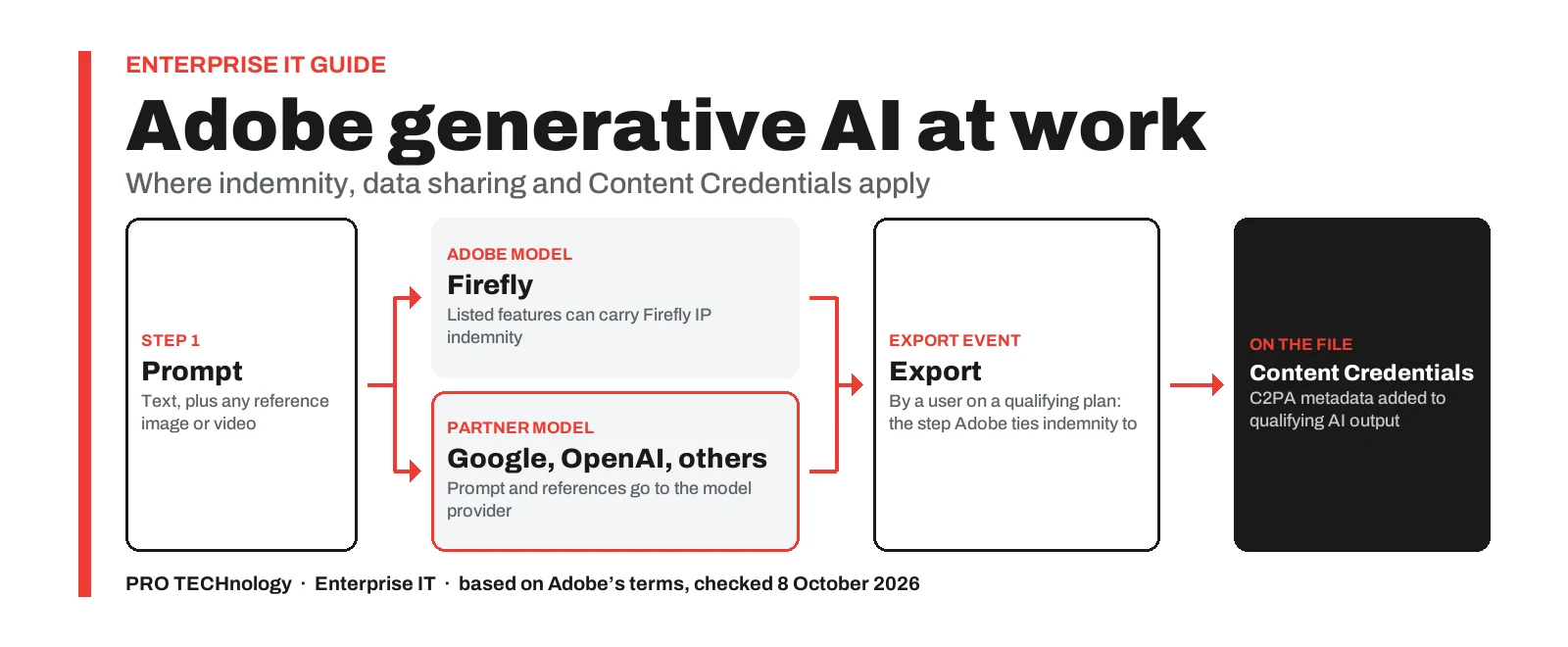
You can approve Adobe’s AI features at work once you know three limits: Adobe’s Firefly IP indemnity covers only listed Firefly features exported under a qualifying agreement, partner-model output falls outside Adobe’s IP cover except Google and OpenAI image and video output on qualifying terms, and Acrobat AI Assistant offers regional data pinning, which keeps AI processing in one region, only to enterprise customers in the EU and US. Adobe documents controls over AI model access for Creative Cloud for enterprise Edition 4, 4+ and 5; we found no equivalent documented for teams plans (checked 8 October 2026). In the UAE, the National Media Authority advised on 29 September 2026 that AI images of national symbols or public figures need prior official approval.
- Firefly indemnity
- Listed features, on export, under a qualifying agreement
- Partner-model cover
- Google and OpenAI image and video models only, on qualifying agreements
- AI Assistant data
- Deleted after 12 hours, except chat history and reported content; EU and US enterprise pinning only
- Model access controls
- Enterprise Edition 4 and 4+; partner models on Edition 5 too
Key takeaways
- Adobe’s Firefly IP indemnity covers only the features and apps Adobe lists, applies to output exported by a user on a qualifying plan, needs an agreement that links to Adobe’s Firefly product description, and excludes beta, trial and non-Adobe-model features (Adobe page published 27 August 2026).
- Partner models such as Google’s Gemini and OpenAI’s GPT Image now run inside Adobe apps including Firefly, Photoshop and Illustrator; Adobe leaves the choice of model to the user, and only Google and OpenAI image and video models can gain Adobe’s Supplemental Coverage, on qualifying licences (terms effective 8 May 2026).
- Adobe documents role-based Firefly and partner-model controls for Creative Cloud for enterprise Edition 4 and 4+, and partner-model access controls for Edition 5 as well; we found no equivalent organisation-wide switch documented for teams plans (checked 8 October 2026).
- Content Credentials, Adobe’s C2PA metadata, are attached automatically to qualifying generative AI output and cannot be turned off; on enterprise plans an Admin Console setting decides whether staff can add their personal identity, and Adobe says Firefly credentials carry no personal identity by default.
- Acrobat AI Assistant currently runs on Microsoft Azure OpenAI Service, deletes session files, prompts and responses from Adobe’s cloud after 12 hours, except retained chat history and reported content, and offers regional pinning only to enterprise customers in the EU and US (Adobe for Business blog, 12 May 2026; Adobe Trust Center, 2 October 2026).
- The UAE National Media Authority advised on 29 September 2026, as Gulf News and Emirates 24|7 reported, that AI images or videos of national symbols or public figures need prior official approval; Adobe documents no check for this approval, so your own approval process must cover it (a summary, not legal advice).
What to decide before staff use Adobe’s AI features
Most Adobe business plans now include some generative AI: Firefly features in Photoshop and Illustrator, models from other AI companies on plans with premium generative features, and AI Assistant in Acrobat Studio or as an add-on, several of them on by default. Approving them means four separate decisions: who carries the risk for outputs, what data leaves the organisation and for how long, how AI use is disclosed, and which local rules apply.
This guide covers commercial plans. Schools and universities license Adobe on separate education terms, covered in our post on Adobe licensing for UAE schools and universities; education AI settings are outside this guide. Plan choice and Adobe Admin Console basics are in our licensing guide, and governance for AI agents and automated workflows beyond Adobe’s apps is the subject of our i-GENTIC AI partnership announcement.
- Export Event
- Adobe’s term for the download or export, by a user on a qualifying plan (for the Firefly APIs, by the customer), that its Firefly indemnity applies to.
- Content Credentials
- Metadata built on the open C2PA (Coalition for Content Provenance and Authenticity) standard that records how a file was made, including whether generative AI was used.
- Edition 4, 4+ and 5
- Adobe’s names for Creative Cloud for enterprise plan editions. Adobe’s pages use both ‘Edition 4+’ and ‘Edition 4 with Premium Stock’; your Adobe agreement or quotation shows which edition you hold.
Which AI switches your Adobe admins actually have
Adobe added per-model and per-group AI controls for enterprise in March 2026, as its business blog of 24 March 2026 describes; the sections below explain what each control protects. Check your own console before relying on a cell.
| AI control | Where it is set | Plans Adobe documents it for | Default | Adobe source, checked 8 Oct 2026 |
|---|---|---|---|---|
| Access to Adobe’s Firefly models | Users > Roles: Firefly user role, or the Member role’s Firefly permission | Enterprise Edition 4 and 4+; not documented for teams | On: the Member role, given to everyone, includes Firefly | Predefined roles, 3 Sep 2026; roles announcement, 11 Mar 2026 |
| Access to partner models | Users > Roles: Partner model user role, or the Member role’s partner-model permission | Enterprise Edition 4, 4 with Premium Stock and 5; not documented for teams | On through the Member role, per Adobe’s roles page; an earlier Adobe community answer differed, so check your console; needs Firefly access | Partner models FAQ, 10 Sep 2026; Predefined roles, 3 Sep 2026 |
| Access to named partner models only | Users > Roles > Create a role (up to 100 permissions) | Enterprise, as above | None until you create one | Manage custom roles, 3 Aug 2026 |
| AI Assistant in Acrobat | Product profile services; in Acrobat Studio, revoke it by turning off both AI Assistant and Adobe Express | Acrobat Studio, Acrobat Premium and Reader Premium for enterprise | Set per product profile | Administer Acrobat Studio, 7 Jun 2026 |
| AI Assistant cloud chat history | Product profile service: AI Assistant Chat History on Cloud | Acrobat Studio, Acrobat Premium and Reader Premium for enterprise | Not stated; admins can turn it off | Administer Acrobat Studio, 7 Jun 2026 |
| AI Assistant seats on teams | Users request access in Acrobat; an admin approves or denies | Teams, with the AI Assistant add-on | No seat until an admin assigns or approves one; a request can stay pending up to 60 days | Teams user requests and teams admin page, both 23 Sep 2025 |
| Content Credentials and staff identity | Settings > Asset Settings > Content Credentials | Enterprise admin guide only | Identity not included | Content Credentials for enterprise, 3 Aug 2026 |
| Automatic AI disclosure (C2PA) | No setting | Not tied to a plan in Adobe’s FAQ; applies when qualifying generative AI tools are used | Applied automatically when required; cannot be turned off | Labelling FAQ, 25 Aug 2026 |
| Generative AI in Acrobat on one computer | Acrobat: Preferences > Generative AI, set by each user | Acrobat desktop | On | Turn off generative AI, 28 Apr 2026 |
For teams plans, we found no documented organisation-wide switch for Firefly or partner models, and Adobe’s Firefly FAQ, in an answer addressed to individual users, says an included Firefly entitlement cannot be turned off, only left unused. The controls there are licence assignment, such as who gets an AI Assistant seat, and written policy. Adobe’s lockable-settings reference for Acrobat on Windows lists no generative AI setting either, so we do not recommend unofficial registry changes from forums.
Adobe combines permissions across a user’s roles, so restricting partner models takes two steps, as Adobe’s guide to managing predefined roles (updated 3 August 2026) describes. First, turn the partner-model permission off in the Member role, which everyone has. Then give the Partner model user role, or a custom role naming specific models, to approved user groups; Adobe’s custom roles guide recommends groups, not individuals. Adobe’s roles guide and user roles FAQ say role changes apply at once and are recorded in the audit log, and users are not emailed, so tell staff yourself.
How far Adobe’s Firefly IP indemnity reaches
Adobe’s Firefly IP indemnity has defined limits. Adobe’s Firefly product description, published 27 August 2026, lists the features, apps and Export Events it applies to; read together, its terms set four conditions.
- Your agreement must point to it. The lists apply only if your agreement with Adobe links to the Firefly product description.
- The feature must be on Adobe’s list, shown in the table below.
- The app must be an eligible surface. Adobe lists the Firefly website and mobile app, the Adobe Stock website, Adobe Express, Photoshop, Illustrator, InDesign, Lightroom, Premiere and the Firefly APIs.
- A qualifying user must export it. Adobe ties the indemnity to an Export Event: a download or export by a user on a qualifying plan (for the Firefly APIs, the customer downloading the output); placing an image on a canvas is not an export.
| Eligible Firefly feature | On Adobe’s list since |
|---|---|
| Text to Image | 16 August 2023 |
| Generative Fill, Generative Expand and Expand Image, Text Effects | 13 September 2023 |
| Text to Vector Graphic | 14 October 2024 |
| Translate Audio, Translate Video, and Translate and Lip Sync | 19 February 2025 |
| Generative Extend | 31 March 2025 |
| Text to Video and Image to Video | 24 April 2025 |
| Text to Avatar | 26 June 2025 |
| Text to Sound Effects and Voice to Sound Effects | 30 September 2025 |
| Generate Speech and Generate Music | 13 July 2026 |
Two exclusions matter most. Anything labelled beta or trial is out, although Adobe’s Firefly FAQ allows commercial use of beta output unless the product says otherwise: commercial use and indemnity are separate questions. Anything the app shows as powered by a non-Adobe model is also out; see the next section for partner-model cover.
Adobe’s own example. If one user generates a Firefly output in an Adobe Express project and a second user exports it, Adobe treats the second user as the one who performed the Export Event.
Hypothetical example. If an agency designer on a qualifying plan builds a client post and the client’s marketing officer, on a personal plan, exports it, the export is not made by a user on the agency’s qualifying plan, so the agency’s cover may not apply. An agency that relies on Adobe’s cover may prefer to export final files itself and check its own agreement.
The same page warns that generative output may not be unique, so another customer can produce a very similar image. On copyright in outputs, Adobe’s Firefly FAQ refers users to a local legal adviser.
Adobe’s statements on commercial use and training data, and which Creative Cloud plans include Firefly indemnity, are in our licensing guide. Your agreement sets the limits of any cover; this is a summary, not legal advice.
Partner models in Firefly, Photoshop and Illustrator: who carries the risk
Adobe now offers other companies’ generative models, which it calls partner models, non-Adobe models or Creative Partner Models, alongside its own. Its partner models page, updated 10 September 2026, lists them across Firefly, Photoshop, Illustrator, Lightroom and Adobe Express. Availability varies by region, and each user must accept Adobe’s partner-model confirmation before they can use a partner model.
The same page states that Adobe does not develop these models, and puts the choice on the user: “You are responsible for determining whether a model is appropriate for your project.”
Which partner models can carry Adobe cover
Partner-model output is excluded from the Firefly indemnity. Adobe’s separate Creative Partner Models product description, effective 8 May 2026, adds Supplemental Coverage only for Google and OpenAI image and video generation models. It applies where your agreement with Adobe links to that page, or for current Creative Cloud Edition 4 with Premium Stock customers. Adobe’s partner-model terms list these qualifying licences; your agreement decides. Beta, trial and preview models are excluded, and Adobe does not guarantee access to the listed models.
| Partner models | Examples Adobe lists | Can Supplemental Coverage apply? |
|---|---|---|
| Google image and video models | Gemini 3 (with Nano Banana Pro) and Gemini 3.1 (with Nano Banana 2) in Firefly and Photoshop Generative Fill; Veo in Firefly and Lightroom | Yes, on a qualifying agreement, if not beta or preview |
| OpenAI image models | GPT Image in Firefly, Illustrator and Adobe Express | Yes, on a qualifying agreement, if not beta or preview |
| Google and OpenAI language models | Behind Firefly Graph and Illustrator’s Rewrite | No: cover is for image and video only |
| Other partner models | For example FLUX, Runway, Luma and Topaz models | No |
| Kling and Seedance video models | Firefly video tools | No: Adobe lists these models for individual users only, not business plans |
Line-ups change quickly: Adobe’s page says Google is deprecating Gemini 2.5 (with Nano Banana) from 2 October 2026.
What partner models receive
Adobe says it shares the text prompt and any reference image or video the user uploads, which it describes as the minimum needed to generate the output. It states that customer content is never used to train partner or Adobe models, and that it offers a partner model only where the developer or host agrees to this in contract.
For Seedance 2.0, Kling 3.0 and Kling 3.0 Omni, Adobe discloses that prompts and reference files go to the Chinese companies that developed them. For enterprise customers, Adobe says partner-model use paid with Adobe generative credits falls under the enterprise agreement with Adobe, with no separate agreement with the model provider.
Content Credentials: what Adobe records on AI output, and who decides
Adobe’s Firefly product description says Adobe applies C2PA metadata automatically, to comply with generative AI transparency laws, when content containing a Firefly-generated asset is downloaded or exported.
Its labelling FAQ, updated 25 August 2026, adds four points.
- It cannot be switched off for qualifying generative AI content, according to Adobe.
- It may record the app, the AI model, whether the content was wholly generated or modified, the date and time, and a content identifier.
- Adobe adds no visible label. The metadata does not change how the file looks, and anyone can read it with Adobe’s Inspect tool; social media and other platforms decide whether to show their own AI label based on it, Adobe notes.
- It covers generative AI only, not what Adobe calls traditional AI-powered features.
The two settings an organisation controls
Adobe’s enterprise admin guide (updated 3 August 2026) describes two settings under Settings > Asset Settings > Content Credentials. The first decides whether users can apply and manage Content Credentials in Adobe apps at all; the second, which needs the first, decides whether they can add personal identity information from their Connected Identities profile. Firefly credentials carry no personal identity by default.
Adobe adds that the organisation owns, and is responsible for, its users’ content, including any identity in its credentials. We found no teams equivalent of these settings (checked 8 October 2026).
A workable policy for client and campaign files
- Do not ask staff to strip the metadata from deliverables; Adobe says it applies it to comply with generative AI transparency laws, so any exception is for your legal team to decide.
- Keep staff identity off unless you want named attribution. Once a file is published, the identity travels with it.
- Decide whether client work also needs a visible AI label. Adobe’s watermarks FAQ (updated 18 August 2026) says that, depending on jurisdiction, use case and distribution channel, additional disclosures may be appropriate.
- Keep business work out of the public Firefly community gallery, as Adobe’s Firefly FAQ asks.
Acrobat AI Assistant: where staff documents go and how long they stay
Acrobat AI Assistant summarises, and answers questions about, the documents a user opens in Acrobat. Adobe describes its data handling in an enterprise security post of 12 May 2026 and its Trust Center hosting page.
| Question | What Adobe says |
|---|---|
| Which model reads the text, and is it trained on our data? | Currently Microsoft Azure OpenAI Service. Adobe says it does not use customer data to train or fine-tune large language models, and that Microsoft is contractually barred from manually reviewing or training on Adobe customer data. |
| What does it read? | By default, only the documents a user opens or selects; it does not crawl company systems or the web. Answers from general knowledge carry a disclaimer. |
| How long is data kept? | Uploaded documents, prompts and responses are deleted from Adobe’s cloud after 12 hours, except retained chat history and any content a user reports. |
| Where is chat history kept? | On the device for desktop and mobile Acrobat, and in Adobe’s cloud for Acrobat on the web. Enterprise admins can turn off cloud chat history. |
| Who at Adobe can see it? | A small number of trained Adobe employees review reported content and feedback. |
| Where is it processed? | Acrobat is hosted on AWS in locations including North America, Europe and Japan; the language-model step runs on Microsoft Azure OpenAI, whose location Adobe names only for pinned EU customers (Sweden). Regional pinning, which keeps processing and the up-to-12-hour cache in the region, is offered only to enterprise customers in the EU and US. |
Adobe lists no UAE or Middle East processing option, and its Trust Center says the Admin Console itself is hosted in an AWS data centre in Virginia. Because reported content outlives the 12 hours and can be read by Adobe staff, your policy should say whether employees may report or send feedback on confidential documents.
The UAE’s personal data law, Federal Decree-Law No. 45 of 2021, sets requirements for processing personal data and for transferring it outside the country, according to the UAE government portal (checked 8 October 2026); financial free zones such as the DIFC (DIFC Law No. 5 of 2020) have their own data protection laws. Whether the law applies to your organisation, and whether an upload meets it, is for your data protection officer or lawyer; this is a summary, not legal advice.
AI images of national symbols and public figures in the UAE
On 25 September 2025 the UAE Media Council said that using AI or other modern tools to depict national symbols or public figures without prior official approval is a clear legal violation of media content standards; misusing AI to spread misinformation, incite hatred or defame people is a media offence under the Media Violations Regulation, with fines and administrative penalties, as WAM reported.
A Federal Decree-Law issued on 18 December 2025 set up the National Media Authority, which replaces the UAE Media Council, the National Media Office and WAM in their functions, sets media content standards in coordination with other authorities, and monitors media content across the UAE, including in free zones. On 29 September 2026 the Authority repeated the point on its social media channels: generating images or videos of national symbols or public figures with AI requires prior official approval under the Media Content Standards, as Gulf News and Emirates 24|7 reported. The reports name no new penalty.
Adobe documents no check for this UAE approval, and Content Credentials record how a file was made, not whether any approval was obtained. The approval step belongs in your own process, for example for National Day campaigns, government-client work and any content showing leaders or officials.
A summary, not legal advice. Ask the National Media Authority or a UAE lawyer which approval a particular project needs.
A one-page approval checklist for Adobe AI
- List who has which Adobe plans and AI features, from an inventory of the software on company devices and your Admin Console.
- Decide the approved models: Firefly only, or named partner models too, set as roles for user groups on enterprise plans.
- Check that your agreement links to Adobe’s Firefly and Creative Partner Models product descriptions.
- Keep beta, trial and preview features out of client deliverables that need indemnity cover.
- Set the Content Credentials policy: staff identity on or off, and a rule on visible AI labels.
- Write AI Assistant rules for confidential and personal data, including cloud chat history and reporting content, with your data protection officer.
- Add a prior-approval step for any AI depiction of national symbols or public figures.
- Record who exported which AI output, so the Export Event can be shown later.
- Name one owner for AI settings in the Admin Console.
- Review the policy quarterly: Adobe updated most of the pages behind this guide between April and October 2026.
Getting these AI settings in place
PRO TECHnology is an authorised Adobe reseller in the UAE: we supply Adobe licences and help with onboarding and Admin Console setup, while your organisation stays the primary administrator. We do not give legal advice or obtain media approvals.
Sources
Adobe’s product descriptions, help pages, blog posts and Trust Center page were read on 8 October 2026, when this guide was last reviewed; label dates are Adobe’s own, Adobe changes these pages often, and further Adobe help pages are linked in the text where it relies on them. UAE points come from WAM, the UAE government portal and, for the National Media Authority’s advisory of 29 September 2026, reports by Gulf News and Emirates 24|7; legal points are a summary, not legal advice.
- Adobe: Firefly product description, IP indemnification (published 27 August 2026)
- Adobe: Creative Partner Models product description (effective 8 May 2026)
- Adobe Help Center: partner models in Adobe products (updated 10 September 2026)
- Adobe Help Center: predefined user roles (updated 3 September 2026)
- Adobe Help Center: assign and manage predefined roles (updated 3 August 2026)
- Adobe Help Center: Content Credentials for enterprise content (updated 3 August 2026)
- Adobe Help Center: generative AI content labelling FAQ (updated 25 August 2026)
- Adobe Help Center: Adobe Firefly FAQ (updated 13 May 2026)
- Adobe Help Center: administer Acrobat Studio for enterprise (updated 7 June 2026)
- Adobe for Business: Acrobat AI Assistant for enterprise, security commitments (12 May 2026)
- Adobe Trust Center: Document Cloud hosting locations (updated 2 October 2026)
- UAE government portal: data protection laws (checked 8 October 2026)
- WAM: UAE Media Council on AI depictions of national symbols (25 September 2025)
- WAM: Federal Decree-Law establishing the National Media Authority (18 December 2025)
- Gulf News: UAE warns against AI-generated images of national symbols, public figures (29 September 2026)
- Emirates 24|7: National Media Authority on AI images of national symbols or public figures (30 September 2026)
Frequently asked questions
Can our Adobe admin block non-Adobe (partner) AI models?
On Creative Cloud for enterprise, yes. Adobe says Edition 4, Edition 4 with Premium Stock and Edition 5 customers can manage partner-model access in the Admin Console, and its roles announcement names Edition 4 and Edition 4+. Switch off partner-model access in the default Member role, then give the Partner model user role, or a custom role naming specific models, to approved user groups. Partner models also need Firefly access. For teams plans, we found no Adobe documentation of an organisation-wide switch (checked 8 October 2026), so licence assignment and written policy are the controls there.
Are images made with Google or OpenAI models in Adobe apps covered by Adobe’s indemnity?
Not by the Firefly IP indemnity, which excludes features the app shows as powered by non-Adobe models. Adobe’s Creative Partner Models terms, effective 8 May 2026, add Supplemental Coverage for Google and OpenAI image and video generation models only, where your agreement links to those terms, or for current Creative Cloud Edition 4 with Premium Stock customers. Beta and preview models are excluded. Check your own agreement; this is a summary, not legal advice.
Does a Firefly feature labelled beta qualify for Adobe’s IP indemnity?
No. Adobe’s Firefly product description excludes any feature designated beta or trial, and any feature used within a surface labelled beta or trial. That differs from commercial use: Adobe’s Firefly FAQ says beta output can be used commercially unless the product says otherwise. So a beta result may be usable in a campaign but carries no Firefly indemnity. Keep beta features out of deliverables where a client expects that cover.
Do partner models or Acrobat AI Assistant train on our prompts and files?
Adobe says no for both. Its partner models page states that customer content is never used to train partner or Adobe models, and that Adobe offers a partner model only where the developer or hosting platform agrees to this in contract. For Acrobat AI Assistant, Adobe says it does not use customer data to train or fine-tune large language models, and that Microsoft Azure OpenAI Service is contractually barred from training on or manually reviewing Adobe customer data. Firefly’s own training data is covered in our Adobe licensing guide.
Can staff on a business plan use Kling or Seedance video models in Firefly?
No, according to Adobe’s partner models page updated 10 September 2026. Adobe lists Dreamina Seedance 2.0, Seedance 2.0 Fast, Kling 2.5 Turbo, Kling 3.0 and Kling 3.0 Omni as available only to individual users while it carries out further reviews for business use. If staff are using these models, they are working on a personal plan, outside the controls your organisation sets in the Admin Console.
Can we keep employee names out of Content Credentials on exported files?
On Creative Cloud for enterprise, yes. Adobe’s enterprise admin guide describes a setting under Settings, Asset Settings, Content Credentials that controls whether users can add personal identity information from their Connected Identities profile. With it off, credentials still record how the content was made, including generative AI use, but carry no personal identity. Firefly credentials include no identity by default. The AI disclosure itself cannot be turned off for qualifying generative AI content, according to Adobe. We found no equivalent setting documented for teams plans (checked 8 October 2026).
Is there a UAE data-residency option for Acrobat AI Assistant?
Not as of 8 October 2026. Adobe’s Trust Center, last updated 2 October 2026, offers Regional Data Center Pinning for AI Assistant only to enterprise customers in the European Union, where LLM processing currently takes place in Sweden, and in the United States. Adobe hosts Acrobat on AWS in locations including North America, Europe and Japan, and the language-model step runs on Microsoft Azure OpenAI, whose location Adobe names only for pinned EU customers. Ask your data protection officer whether those locations suit the documents staff will upload.
How long does Adobe keep files and prompts sent to Acrobat AI Assistant?
Adobe says uploaded documents, prompts and generated responses from a session are deleted from its cloud automatically after 12 hours. Two things are kept longer: chat history, which sits on the device for desktop and mobile Acrobat and in Adobe’s cloud for the web version, and any content a user reports. Adobe says chat history stays under the user’s control for deletion, and enterprise admins can turn off cloud chat history in the product profile.
Do we need approval to create AI images of UAE national symbols or public figures?
According to the UAE National Media Authority, yes. On 29 September 2026 the Authority advised, as Gulf News and Emirates 24|7 reported, that using AI to generate images or videos of national symbols or public figures requires prior official approval under the Media Content Standards, repeating a UAE Media Council statement of 25 September 2025. Adobe documents no check for this approval, so build the approval step into your own review process. This is a summary, not legal advice.
التحكم في ميزات الذكاء الاصطناعي من أدوبي داخل المؤسسة: التعويض والبيانات وصلاحيات المسؤولين
تتضمن معظم خطط أدوبي للشركات اليوم بعض ميزات الذكاء الاصطناعي التوليدي، منها Adobe Firefly، ونماذج من شركات ذكاء اصطناعي أخرى تسميها أدوبي نماذج الشركاء، مثل Google وOpenAI، في الخطط التي تشمل الميزات التوليدية المتقدمة، والمساعد Acrobat AI Assistant ضمن Acrobat Studio أو كإضافة مدفوعة. ولا يشمل تعويض أدوبي عن الملكية الفكرية لمخرجات Firefly إلا الميزات والتطبيقات المدرجة في وصف المنتج، ويسري عند تصدير المخرجات من مستخدم مرخّص بخطة مؤهلة وبموجب اتفاقية تشير إلى ذلك الوصف، ويستثني الميزات التجريبية (beta) والميزات القائمة على نماذج من خارج أدوبي. أما نماذج الشركاء فتترك أدوبي مسؤولية اختيارها للمستخدم، ولا تمتد التغطية الإضافية إلا إلى نماذج الصور والفيديو من Google وOpenAI في اتفاقيات وتراخيص مؤهلة.
توثّق أدوبي أدواراً في Admin Console للتحكم في الوصول إلى نماذج Firefly ونماذج الشركاء لخطط Creative Cloud للمؤسسات Edition 4 و4+، كما تتيح لخطط Edition 5 إدارة الوصول إلى نماذج الشركاء، ولم نجد توثيقاً لمفتاح مماثل على مستوى المؤسسة لخطط الفرق حتى 8 أكتوبر 2026. وتُرفق بيانات Content Credentials تلقائياً بالمحتوى المؤهل المُنشأ بالذكاء الاصطناعي التوليدي ولا يمكن تعطيلها، بينما يحدد إعداد في Admin Console لخطط المؤسسات ما إذا كان يجوز للموظفين إضافة هوياتهم إليها. ويعمل Acrobat AI Assistant حالياً عبر خدمة Microsoft Azure OpenAI، وتُحذف الملفات والمطالبات النصية والردود من سحابة أدوبي بعد 12 ساعة، باستثناء سجل المحادثات المحفوظ وأي محتوى يبلّغ عنه المستخدم، ولا يتوفر تثبيت إقليمي لمعالجة البيانات إلا لعملاء المؤسسات في الاتحاد الأوروبي والولايات المتحدة، من دون خيار معلن داخل الإمارات.
وفي الإمارات، ذكرت الهيئة الوطنية للإعلام في 29 سبتمبر 2026، بحسب ما نقلته الصحف المحلية، أن استخدام الذكاء الاصطناعي لإنشاء صور أو مقاطع فيديو للرموز الوطنية أو الشخصيات العامة يتطلب موافقة رسمية مسبقة وفق معايير المحتوى الإعلامي، ولا توثّق أدوبي أي تحقق من هذه الموافقة، لذا يجب أن تتضمن إجراءات المؤسسة خطوة الموافقة. هذا ملخص وليس استشارة قانونية. وشركة PRO TECHnology بائع معتمد لمنتجات أدوبي في الإمارات، توفّر التراخيص وتساعد في الإعداد الأولي وتهيئة Admin Console، ولا تقدّم استشارات قانونية ولا تستخرج موافقات إعلامية.
Match your Adobe licences to the AI controls you need
Tell us which Adobe plans you have, who uses the AI features and which controls your policy calls for. We will tell you which Adobe licences include those controls, quote those available through Adobe’s VIP programme in the UAE, and help with onboarding and Admin Console setup.